
• This forum is the machine-generated translation of www.cad3d.it/forum1 - the Italian design community. Several terms are not translated correctly.

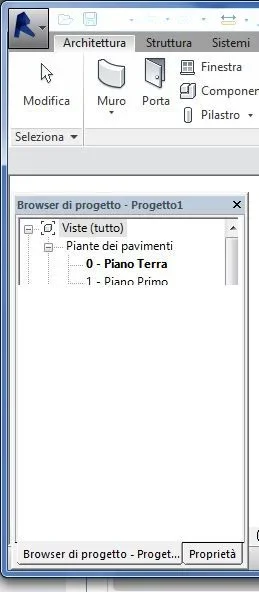
project browser/property drop-down menu

  • Thread starter Thread starter valentna
  • Start date Start date

valentna

Guest
revit.webphi, I don't understand why the revit drop-down menu (the one related to the project/property browser) doesn't see any more correctly, the lower part is not seen and if I translate the menu itself forms a sort of "scia". I can't use it in these conditions and I just can't figure out what it's like! Give me a hand! Thank you very much.
 
if you close it and reopen it? . .
question, what video card do you see on that pc?
I tried hundreds of times to close the program, turn off the pc and restart everything, but nothing to do! my video card is nvidia geforce gt540m (up to 4095 mb turbocache), should have 2gb of dedicated memory (of 8 gb total). I just can't get to it! I thought it might be a problem of incompatibility with the latest windows7 updates...but I don't know where to put hands!
 
I tried hundreds of times to close the program, turn off the pc and restart everything, but nothing to do! my video card is nvidia geforce gt540m (up to 4095 mb turbocache), should have 2gb of dedicated memory (of 8 gb total). I just can't get to it! I thought it might be a problem of incompatibility with the latest windows7 updates...but I don't know where to put hands!
already done. Nothing to do, the problem persists. by going on "options" of revit and then on "graphics" tells me that the program does not recognize the driver of the video card and puts up a yellow triangle. What I don't understand is why until June (I made a project with this program) worked very well (other than the effort in launching the renders). the version of revit in the pc is that "student" with three-year license; according to you if you uninstall it and try to reinstall the student version you would create additional problems, of the type that autodesk does not allow me to download it again or remain uninstalled components correctly in the pc etc.? I have to find a solution as soon as possible because I am carrying out the graduation thesis and it doesn't seem appropriate to pull up a 3d urban level entirely on autocad! or solve the problem as soon as possible or I will have to look for another program... and I have never used any more!
 
Do you know what version of revit you have? have you mounted the latest service pack available?
 
But if you used infrawork rather than revit? should also be more suitable for urban modeling. Will it be very difficult to use?
 

Forum statistics

Threads
44,997
Messages
339,767
Members
4
Latest member
ibt

Members online

No members online now.
Back
Top