• This forum is the machine-generated translation of www.cad3d.it/forum1 - the Italian design community. Several terms are not translated correctly.

creo parametric tolerances tree hole

  • Thread starter Thread starter DottorMouse
  • Start date Start date

DottorMouse

Guest
Good morning, I'm moving the first steps with creo 2, and since gray hair I already have this I'm making them phosphorescent. .:smile:
I have no tree/oven tolerances in the table quotation. By reading around here, I think I understand that I have to upload tables to get them in the quota menu. but unfortunately I did not understand how and from where I have to load these tables.
Can you give me suggestions? Thank you.
 
for a matter of practicality I would proceed like this:
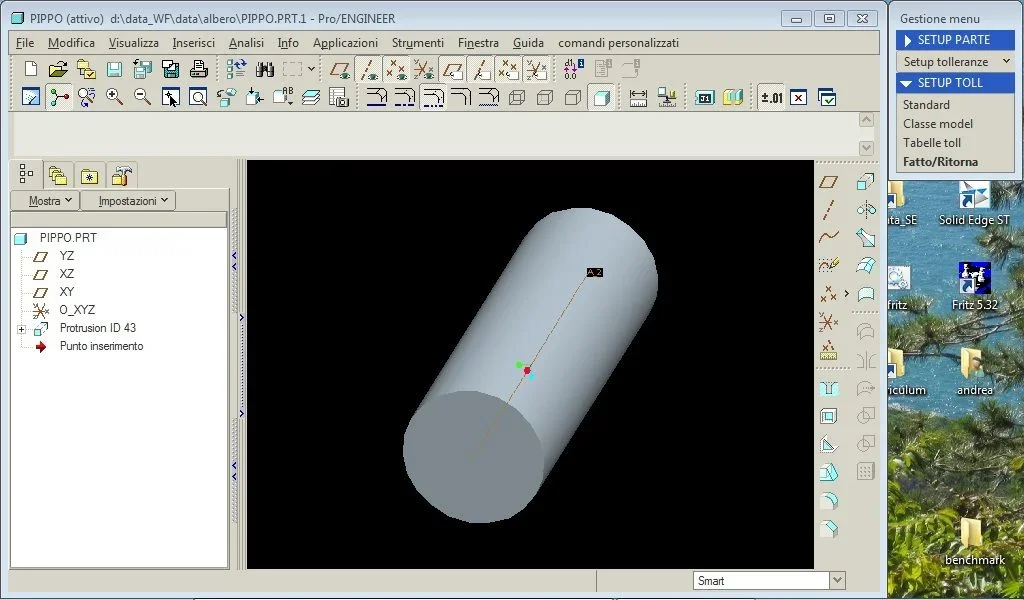
open the "start part" you have in your configuration, in the "file" menu select "prepara" then "model property", in "features and geometry" select in "tolerance" the "change" item, in the drop-down menu select "standard", iso/din,tabelle toll, select "recover".
I recommend that you select all of them and click on "open", regenerates, end returns,close "property model",save the "start part" and exit.
every time you create a part you will have available all tolerances, which I impose directly in the model, and then display them
in the table.

Hi.
jambo
 
Many thanks jambo, it works!
Now I imagine that to view also the tolerance values you will have to set some variable in some configuration files. Where can I look?
... and to think that until now I have had the courage to complain about too many solidworks settings, but I think that with creo the party has just begun;-)
 
no ok solved, it is not enough to choose only the class in the tolerance table, you must also set the "tolerance mode" on more/less.
I take advantage of this in order to ask a further question: can it not be added to the table axes/axes that are not only those of the holes recovered from the 3d with exhibition notes?
 
no ok solved, it is not enough to choose only the class in the tolerance table, you must also set the "tolerance mode" on more/less.
I take advantage of this in order to ask a further question: can it not be added to the table axes/axes that are not only those of the holes recovered from the 3d with exhibition notes?
I recommend you always use the axes belonging to the features of the model, but in case of need, you can create in the drw an axis with
the command "reference 2d" by selecting "reference axle 2d".

Hi.
jambo
 
Thanks jambo, what's making me suffer is that I can't do what I want on the harvests. modeling and assemblies seem more friendly to me. .
 
you seem more friendly because more like concepts you already use in modeling with other 3d programs.
when you have familiarized with the concepts of putting into the table and learned what I call "automatisms" will seem to you
to have used it forever.

Hi.
jambo
 
Hello jambo

I'm using creo 2.0 recently. I can't do quite simple operations, how to set the odds in a permanent way (Can you set the arrow type the color and position of the odds?). Moreover I can not see in the drw the tolerances, not only of the construction quotas but also regarding the trees and holes. I have seen that doctormause has succeeded but turning long and wide between tutorials and config.pro I have not come to head (e.g., when you impose h7 you automatically give tolerances). n.b. I am using the free version for 30gg made available by the ptc. You can help me. Thank you. he's doing it.
 
Hello jambo

I'm using creo 2.0 recently. I can't do quite simple operations, how to set the odds in a permanent way (Can you set the arrow type the color and position of the odds?). Moreover I can not see in the drw the tolerances, not only of the construction quotas but also regarding the trees and holes. I have seen that doctormause has succeeded but turning long and wide between tutorials and config.pro I have not come to head (e.g., when you impose h7 you automatically give tolerances). n.b. I am using the free version for 30gg made available by the ptc. You can help me. Thank you. he's doing it.
in the detail options you can set everything you need.
if you change the style of a quota in a drawing you will have a change only for that drawing and not on the program quotation standard, as it is right that it is.
 
Hello jambo

I'm using creo 2.0 recently. I can't do quite simple operations, how to set the odds in a permanent way (Can you set the arrow type the color and position of the odds?). Moreover I can not see in the drw the tolerances, not only of the construction quotas but also regarding the trees and holes. I have seen that doctormause has succeeded but turning long and wide between tutorials and config.pro I have not come to head (e.g., when you impose h7 you automatically give tolerances). n.b. I am using the free version for 30gg made available by the ptc. You can help me. Thank you. he's doing it.
ahi, right now I'm with netbook, so you'll have to settle for the explanation with wildfire figures.
I hope they can help you anyway.

1) from the model: menu change "set"
01.webptake you on "setup tolerances", "tabelle tolerances"
02.webppoi su "recover"
03.webpproe brings you to the tree/hole tables, choose the one that interests you and "open"
04.webpthen move to the table where you have already placed the quota
05.webpselect it, right-click, the share becomes red (or other on creo) comes drop-down menu and select "ownership"

you find yourself in this situation
06.webpon tables tolerances select tree (I know, in the rush I put hole), on way tolerance +-

tip: make a template where you load all tolerances. It's pale, but once it's done, it's forever.

I can't understand why ptc doesn't put standard templates already with all uploaded tables.

how to configure it: armed with holy patience.

ptc products are extraordinarily flexible, but you pay with a configuration that at first seems never to end.

the advantage is that they are as shavers you use them the more you know them, the more they become sharp for your tasks.

if you want I can pass config, dtl and template drawings with carts and borders. at first it will still be hard.

Say hi, go.
 
Hello jambo

I'm using creo 2.0 recently. I can't do quite simple operations, how to set the odds in a permanent way (Can you set the arrow type the color and position of the odds?). Moreover I can not see in the drw the tolerances, not only of the construction quotas but also regarding the trees and holes. I have seen that doctormause has succeeded but turning long and wide between tutorials and config.pro I have not come to head (e.g., when you impose h7 you automatically give tolerances). n.b. I am using the free version for 30gg made available by the ptc. You can help me. Thank you. he's doing it.
I add that in order to configure the drawing I always find excellent an old online page of the en. john noon located on:
http://www.proengineer.altervista.org/file_html/dtl.htmthere is not everything, but the indispensable to get a good configuration yes! (config.dtl).

then the video
http://www.youtube.com/watch?v=6pevwfuovkcfor when he has more experience.

indeed, the videos of the ecognition of leo greem I recommend them all, are made in a wonderful way.
 
Hello jambo

I'm using creo 2.0 recently. I can't do quite simple operations, how to set the odds in a permanent way (Can you set the arrow type the color and position of the odds?). Moreover I can not see in the drw the tolerances, not only of the construction quotas but also regarding the trees and holes. I have seen that doctormause has succeeded but turning long and wide between tutorials and config.pro I have not come to head (e.g., when you impose h7 you automatically give tolerances). n.b. I am using the free version for 30gg made available by the ptc. You can help me. Thank you. he's doing it.
hello luigi, regarding the drawing environment there are well over a hundred settings
that control the appearance and functionality of a design.
although some of these are contained in the "config.pro". most are included in a setup file.
when a design is created for the first time, it contains the settings of this file.
in this file are specified about 130 settings that also include those you require.
in the attached_creo folder I created the file that is called "luigi_drawing.drw", copy it to your
working directory , add to the config the voice <template_drawing> indicating in the heading "value" the path
of such file.
to change the values of that file in creo 2.0 open the file then from the file menu>prepara>property design>options detail>change.
other important file is the iso.dtl file,in this file are contained settings such as projection orientation,section selection,
the orientation of the texts etc.
I have attached a file of this type, to use it copy it in your working directory and add to your config.pro
following entries:
<drawing_setup_file> in the value item the path.
<format_setup_file> in the value item the path.
the procedure for tolerances is what I listed at the beginning of this discussion, as you failed I attached a start part
which is called "luigi_start.prt", copy it in the working directory, add to the config.pro <template_solidpart> in the value item the path.
already contains the tolerances you want to see.

Hi.
jambo</template_solidpart></format_setup_file></drawing_setup_file></template_drawing>
 

Attachments

Hello jambo
You've gone beyond my brightest expectation.
I am also interested in the management of assemblies, cinematisms, fems, and surfaces.
I have said little, I have used them for a few years with pro/e w5.
while surface and fem never seen.
Since I can't afford courses at the mother's house you'd know how to tell me
are you available?
Thank you.
he's doing it.
 
Hello jambo
You've gone beyond my brightest expectation.
I am also interested in the management of assemblies, cinematisms, fems, and surfaces.
I have said little, I have used them for a few years with pro/e w5.
while surface and fem never seen.
Since I can't afford courses at the mother's house you'd know how to tell me
are you available?
Thank you.
he's doing it.
unfortunately hegi are of the province of reggio emilia, and the distance is not
in our favor.
you don't have to despair though,personally I never did any course,but I had
and I have a very strong motivation to learn.
sift the network daily and youtube where you can learn the
more complex techniques in a free way.
I bought several books on pro-e and creo 1.0 and 2.0 (unfortunately all in English),
and I feel like advisor 2 on all:

advanced tutorial for creo parametric releases 1.0 & 2.0 by roger toogood,ph.,p.eng.
creo parametric 2.0 for designers of sham tickoo

Of course, the most direct way to solve problems that are difficult
you will find the solution on books is to turn to this forum and to
many specialists who attend him.

Good job

jambo
 
thanks continue to reiterate that your information is very valuable

I wanted to bring 2 questions
; one relates to how the carts are set and how the custom tables are created
The other is related to the information you gave me is my problem of little familiarity.
the start path creo 2 is c:\users\public\documents where I find the config.pro and where I inserted your
precious luigi_start. but there is not in the directory_install_proe\text\iso.dtl path. and so for me
c:\users\public\documents. should you add the path c:\users\public\documents\text by hand?
and then insert the iso.dtl you sent me?
The last thing the books are on the Internet I presume!
thanks and good week
 
thanks continue to reiterate that your information is very valuable
Let's see if I understand
the application of my ptc creo parametric is "launched" from the path c:\users\public\documents.
then under the document folder I will copy / "luigi_start" / "luigi_drawing.drw" / "iso.dtl".
in the config.pro I have to change the paths:
<template_drowing> value c:\users\public\documents
<drawing_setup_file> value c:\users\public\documents
<format_setup_file> value c:\users\public\documents
to change the values of the template_drowing file I have to follow the procedure you have indicated
menu file>prepara>property design> detail options>change.
If I don't understand anything, pull my ears and tell me where I'm wrong.

other question; can you give me directions to create custom paper and tables?
where are the auto compilation parameters (is there a table of such parameters? )

and finally I should also have the start_asm to be able then to make the harvests that if
not erro are different (tables for parts and boards for assemblies drowing.part / drowing.asm).

Thank you very much
bidding330</format_setup_file></drawing_setup_file></template_drowing>
 
I proceeded to insert your configurations but:
when I create a table, it defaults on the American views already listed. I have to delete them and set views as I wish
I don't get the sheet
But I solved the problem of tree tolerances and holes and I thank you enormously.
hi bisanzio330
 
thanks continue to reiterate that your information is very valuable
Let's see if I understand
the application of my ptc creo parametric is "launched" from the path c:\users\public\documents.
then under the document folder I will copy / "luigi_start" / "luigi_drawing.drw" / "iso.dtl".
in the config.pro I have to change the paths:
<template_drowing> value c:\users\public\documents
<drawing_setup_file> value c:\users\public\documents
<format_setup_file> value c:\users\public\documents
to change the values of the template_drowing file I have to follow the procedure you have indicated
menu file>prepara>property design> detail options>change.
If I don't understand anything, pull my ears and tell me where I'm wrong.

other question; can you give me directions to create custom paper and tables?
where are the auto compilation parameters (is there a table of such parameters? )

and finally I should also have the start_asm to be able then to make the harvests that if
not erro are different (tables for parts and boards for assemblies drowing.part / drowing.asm).

Thank you very much
bidding330</format_setup_file></drawing_setup_file></template_drowing>
luigi regarding the paths of the config.pro I recommend you create a
folder separated from the document folder, you will be easier to locate
the various files.
to direct creo to that folder placed on the creo icon you have
on the desktop, right-click, in the "link" tab you will find the string
"destination" with the path from which I create launches the executable (not modifying it),
in the string "from" change the path by indicating the new folder.
inside the new folder creates a subfolder that you can call "temp" and
add to config.pro <trail_dir> in the value item indicates the location of that folder.
this has the function of collecting in one place the "trail.txt" files that come
products from creo.
The "start_asm" you don't need to make the harvests at the table but the assemblies.
to create the correct table with its bom table you need the carts.
compilation from scratch of a cartiglio is really a complicated thing, for this
I would refer you to the publications I mentioned, where they are described in detail
the various operations to perform.
These books you can find them on the internet, personally I bought them on "amazon".
If you're not in a hurry, I can provide you with the "start_asm", logo-free cards, and 2 files that are called
"bolle.dtl" that serves to create the balls with the number of the part and the "boom.fmt" that serves
to fill out the tables.

Hi.
jambo</trail_dir>
 
Okay, thank you.
once you create the new "from" path (which I find under "ownership" by clicking with the right button on the creo icon) to create the under folder "temp" and having modified the <trail_dir> in the config.pro the value of the new path, then do I have to keep in "from" on new path or do I have to reset it? If I have understood correctly the new folder is "only" to collect the "trail.tex" this involves having the "swimming" in a separate folder. while "iso.dtl", "luigi_drowing" and "luigi_start" remain under "documents", right?
when I go create a new design remove the check from "use default mask" - "use mask" - "sfoglia" - "luigi_drowing" - I choose the format. At this point I have a drowing with American views already set with relative quotas and notes that I create in part 3d. It also tells me that quotas are normalized according to din standards while I use iso, and do not appear squares. If I use the empty mask and select the format these problems do not occur to me. how do I proceed? Can you send me something in this case? and what is the procedure for inserting the squares with related cards?
As for the "start_asm", the logo-free cartilages and the 2 files that are called "bolle.dtl", "boom.fmt" I gladly accept, without haste (which I think will be put under "documents"? ).
still thanks bisanzio330</trail_dir>
 

Forum statistics

Threads
44,997
Messages
339,767
Members
4
Latest member
ibt

Members online

No members online now.
ciao
Back
Top