
• This forum is the machine-generated translation of www.cad3d.it/forum1 - the Italian design community. Several terms are not translated correctly.

management of states

  • Thread starter Thread starter Davimont
  • Start date Start date

Davimont

Guest
Good morning to all:finger:
I tried to do a search but I didn't find an answer to my question!

I refer to this tab in the properties of a fileGestione stati.webpall my archive is on "available", I was wondering whether it was useful to deepen the knowledge of these tags and whether you make use of them or not.
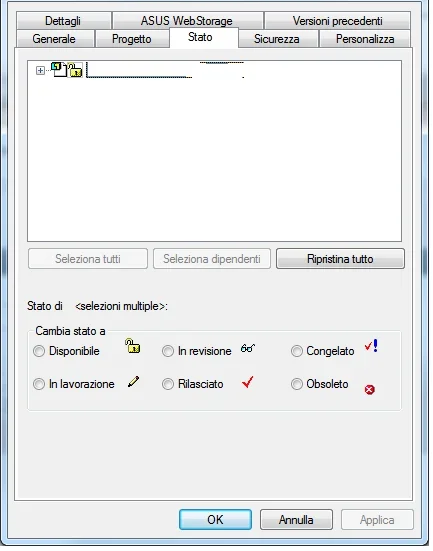
if someone explained to me in a few words how they can come back useful I would be happy:smile:
 
Good morning to all:finger:
I tried to do a search but I didn't find an answer to my question!

I refer to this tab in the properties of a fileView attachment 40324all my archive is on "available", I was wondering whether it was useful to deepen the knowledge of these tags and whether you make use of them or not.
if someone explained to me in a few words how they can come back useful I would be happy:smile:
Hi.

these states are automatically managed by some management.
otherwise they are to be used by hand.

I only use "available" states, "released", "in revision" and "obsolete"

for new files to complete use the "available" status; is editable and still to be released.
for the completed files and in production use the "released" status; is not editable.
for files previously released in modification still not completed use the status "in revision"; the file is editable and still to be released
for the files I want to keep an old copy I use the "obsolete" status; the file is not editable.

Obviously using these states creates an order in things, but this order implies management.
I have developed a series of automated procedures to minimize human intervention.

Hi.
 
thanks for the clarification.
for automated procedures what do you mean? Did you create macros?
I am interested in managing these states also to minimize errors like accidental modification and rescue.
If you want, can you explain how you automate this?
 
I made macros (which are then full programs).

the main ones are:

save code: the user enters the code previously created on the management and saves the press. the program saves the file with the right name in the right folder, compiles the code properties, description (which is recovered from the management), author (which is recovered by the user windows), the tolerance class (determined by the code), set the material and sheet thickness (only for the sheets and determined according to the code). if used on draft connects the views to the previously saved 3d models, sets a semi-transparent writing on the design background as "to be released"

design release: the "to be released" writing is automatically deleted, the pdf of the draft is saved in the appropriate folder with the appropriate name, the states of the files are changed in "released", if present a distinct on the drawing is compared on a sheet excel with that present in the management. depending on the code are then made a whole series of input\control data in the management (weight, size, total area). if it is a revision the old pdf is first filed and the revision index in management is increased.

creates revision: the user inserts the description of the revision, index and date are determined automatically. the state of the files passes to "in revision", the writing is changed in the background of the draft, compile the author properties revision, index review, description revision.

These are just part of the things that are done automatically.


I add that on the pathfinder you can view the status of each component (right click on pathfinder, status, display status).
 
be_on_edge you're letting me die reading things!
I am passionate about programming as a self-taught and I have vb 2010 at home but I should get back to studying!
for now I am pleased to learn how to use well solid edge and manage drawings, then with time you will see!
Meanwhile thank you for the clarifications and availability!
 
we use a pdm (product data management) that uses its management, we use the concepts of release, in revision, etc. but it does not seem to me that interact with this solidedge card, that is, the pdm puts the files in read-only and reconnects during revisions links to the right files. a ribbed pdm.
a user had made a do-it-yourself pdm, find the referees here: http://www.cad3d.it/forum1/threads/36168-pdm-in-access-per-file-solid-edge-e-allegati

ciao vespa[emoji2] I saw that post, but the author never showed up again.
Do you know if anyone tried?
 
be_on_edge you're letting me die reading things!
I am passionate about programming as a self-taught and I have vb 2010 at home but I should get back to studying!
for now I am pleased to learn how to use well solid edge and manage drawings, then with time you will see!
Meanwhile thank you for the clarifications and availability!
I left with the open dft and over time I arrived at all this, and in continuous development.

if you want and time I suggest you start with something simple, just at a time you will grow it and adapt to the needs that you come to create.

I guarantee that satisfaction will be great.

if you have little time to devote to this but money to invest you could be oriented to a commercial management.

Hi.
 
I'm testing states.
I put a carter in "released", then I opened it and I noticed on the top right the icon that warns me of the read-only state of the file.
I now give a change and try to save. rightly save and turn off while saving by name is available.
if I click on the x to close the file, if you don't ask me what I want to do! If my change lasted 30min I lost the job done.
similar thing if I modify in conjunction with the command "modifies on the spot" same warning on the top right.
I'll change the part and get out of the change. here I have available both the save that saves by name and saves everything. except for everything and video sambra everything ok. I close and reopen the assieme and the changes are lost. When saved, shouldn't I be warned that a file is read-only and ask me what I want to do?
 
I'm testing states.
I put a carter in "released", then I opened it and I noticed on the top right the icon that warns me of the read-only state of the file.
I now give a change and try to save. rightly save and turn off while saving by name is available.
if I click on the x to close the file, if you don't ask me what I want to do! If my change lasted 30min I lost the job done.
similar thing if I modify in conjunction with the command "modifies on the spot" same warning on the top right.
I'll change the part and get out of the change. here I have available both the save that saves by name and saves everything. except for everything and video sambra everything ok. I close and reopen the assieme and the changes are lost. When saved, shouldn't I be warned that a file is read-only and ask me what I want to do?
to me in these situations there appears a mask that tells me that there are unsaved changes that would be lost by closing the file.

I am at st7 but I remember this message also on previous versions.

Hi.
 
I'm doing evidence with other files and some of them warn me, others don't.
with new files always warns me. a lot of stuff was made with st5 and moved and copied brutally several times. I think that's the problem.

I wanted to ask, but once I released a detail, how do I get it back available?
I have done this task to explore resources, I am doubtful that it was done from within itself.
I can't change files anymore!
 
I'm doing evidence with other files and some of them warn me, others don't.
with new files always warns me. a lot of stuff was made with st5 and moved and copied brutally several times. I think that's the problem.

I wanted to ask, but once I released a detail, how do I get it back available?
I have done this task to explore resources, I am doubtful that it was done from within itself.
I can't change files anymore!
It seems to me that in the powertoys of jason newell there is a utility to unlock the "released" state.

but these features of states can be used even if "release", or do you need to use insight+sharepoint?
 
Hello hunter
I don't even know what you're talking about :rolleyes:
I licensed classic and without a course I still have millions of things to discover.
but possible that if I put a file in release I have to go for external tools to change that state?
Once released, do I have to do a rescue by name? :confused:
Let's see if anyone knows more.
I thought it was more used to manage the states, if it is not the case I leave this road.
 
Hello hunter
I don't even know what you're talking about :rolleyes:
I licensed classic and without a course I still have millions of things to discover.
but possible that if I put a file in release I have to go for external tools to change that state?
Once released, do I have to do a rescue by name? :confused:
Let's see if anyone knows more.
I thought it was more used to manage the states, if it is not the case I leave this road.
When an object is released, it is released. Do you think it's normal that any designer in the fall takes a project of a code released and modifies it?

by the guide says you can only do it if you are administrator.
 
Let's see if maybe I didn't grasp the concept of release:biggrin:

I send in production a particular.
I create draft and pdf for the workshop.
I put the file status on release.

After a year, I'll take that file for changes. the system warns me that it is alone reading because released.
aware of wanting to review it, put it in release or revision or other.
modify the file and bring the rev to 1.
I make the draft and rev1 pdf.
I remove the file in released to avoid accidental changes.

so I have my 3d always updated and the historian of the revs in pdf.
a single 3d file.
What do I do every time? save by name and then throw the previous one? I saw files with 50 revisions, I don't care about 50 3d files released.
If I mistake reasoning and drawings manage differently I willingly accept advice:finger:
 
Let's see if maybe I didn't grasp the concept of release:biggrin:

I send in production a particular.
I create draft and pdf for the workshop.
I put the file status on release.

After a year, I'll take that file for changes. the system warns me that it is alone reading because released.
aware of wanting to review it, put it in release or revision or other.
modify the file and bring the rev to 1.
I make the draft and rev1 pdf.
I remove the file in released to avoid accidental changes.

so I have my 3d always updated and the historian of the revs in pdf.
a single 3d file.
What do I do every time? save by name and then throw the previous one? I saw files with 50 revisions, I don't care about 50 3d files released.
If I mistake reasoning and drawings manage differently I willingly accept advice:finger:
to be able to edit a file released you have to do a revision, and then the file will pass from the "released" state to the "reviewed" state.
to pass to the state "in revision" you use revision manager or save by name.

As I told you earlier, using states, implies management.

If you want to unlock a file without switching from revision managers you can edit this registry key, and from the panel that warns you that the file is locked you will find a "unlock" button.

hkey_current_user\software\unigraphics solutions\solid edge\version 106\debug\docmgmt_overridestatuscheckforfileaccess

value = 1

Hi.
 
to be able to edit a file released you have to do a revision, and then the file will pass from the "released" state to the "reviewed" state.
to pass to the state "in revision" you use revision manager or save by name.
always implies a copy of the file. Then what do I do? I keep them all.

As I told you earlier, using states, implies management. .
You're right, I'm trying to study a method, too. Now that I know this thing, I can get better organized.
If you want to unlock a file without switching from revision managers you can edit this registry key, and from the panel that warns you that the file is locked you will find a "unlock" button.

hkey_current_user\software\unigraphics solutions\solid edge\version 106\debug\docmgmt_overridestatuscheckforfileaccess

value = 1

Hi.
This is really a bean. Now I make a copy of the key and try to change it.
 
always implies a copy of the file. Then what do I do? I keep them all.

You're right, I'm trying to study a method, too. Now that I know this thing, I can get better organized.

This is really a bean. Now I make a copy of the key and try to change it.
I personally do not keep the old revisions and I wrote a macro that among other things change the state from "released" to "revision" without the need to use revision managers.

Hi.
 
I changed the registry key and now I can change the file while remaining with the released state.

but with your macro comes the check on available? I can't do it manually.
 

Forum statistics

Threads
44,997
Messages
339,767
Members
4
Latest member
ibt

Members online

No members online now.
Back
Top