• This forum is the machine-generated translation of www.cad3d.it/forum1 - the Italian design community. Several terms are not translated correctly.

macro in company config.pro

Ghirarduzzi.G

Guest
I'm currently working for a company where they use a business config.pro.
but for several years I have been used to work with different macros that I had created for my needs.
how can I do to load my macros in the company config.pro without going to change all other parameters?
Sorry if I accidentally duplicated an old discussion but I don't think I found anything like that.
Thank you in advance.
 
I add another detail.
There are also visualization parameters that are loaded by the config.pro (antialias, etc.) that I would like to avoid loading every morning.
therefore not only macro but also other parameters more than other related to display.
because then everything about start-part, etc. obviously fits me well and I have to use the business settings.
but I have to be able to see how I like it, find the commands where I have always been used to find them and especially use the macros that have always simplified me and facilitated my work.
 
.....but I have to be able to see how I like it, find the commands where I have always been used to find them and especially use the macros that have always simplified me and facilitated my work.
Bye!
I agree with what you write, and I add that the utility and force at the same time to have a customizable configuration file is exactly what you talk about.
Obviously there are settings that could decide "the company", for a whole series of reasons.
I don't know what version you use. from a few years we went to creo 2 (from wf3, a nice jump): here are a config.sup and the classic config.pro. the first command on the second (even in case of redundant variables). the company decision (suggested by consultants) was to set in the config.sup some variables that should not be changed, and the file is "blind". all the others, the ones you were talking about, are in the config.pro, and there each user has maximum freedom.

in any case, if the file is not protected from writing you can select the macros with a text editor (notepad for example) and paste them into the business config.pro (after the last text line): restart the program and you should find all the macros. for other customizations you should not have problems (if we talk about viewing). when the company reopens the files with its config will see everything according to their configurations, which do not necessarily have to be yours.

I hope I haven't confused your ideas...:rolleyes:
 
we also use creo 2 (m100 in our case).
I've never heard of config.sup and I don't think they use it here.
I can't go to change the company's config.pro because if everyone did so would be along a km.
I tried to copy the company's config.pro locally and add there what interested me but there was the same something that didn't work properly.
He thinks that I noticed because I made holes threaded with the hole command and, despite showing me correctly the preview, then he didn't make me the feature. and it depended on the fact that he was looking for the features on the net and obviously I didn't have the correct pointing.
 
Anyway, step by step I'm trying to get to the solution that interests me.
the absurd thing is that practically when I change something in my view he automatically creates in the network folder my visualization customization file and, despite in the config.pro there is not the line pointing to that file, I have to run to delete it because otherwise my colleagues when they upload are found the same my custom view.
In practice now I understand that I have to do this.
keep the business config.pro locally, get first to the office, load creo, apply all my personalizations, once loaded keeps them and then return to the company directory to delete everything.
comfortable mooolto!! !

ps if someone can tell me a better method. . .
 
I knew you were working for a company as an outsider, so they had passed their config. :confused:

Since you use I create 2, I would point on the config.sup. Maybe all paths to network files and other settings throw them in there, and the rest you change it to your liking.
try talking to someone who has to do it and see that he answers. .
This is obviously the solution we have adopted, but it is not said to be the only one: we hope they make other suggestions from the people of the forum.... here the good ozzy could give you a hand, who knows where it passes!! :biggrin:
 
That would be nice! but being the last one I can't go in giving a kick to the door and beginning to break the c...o.
much more than the guy who deals with the company cad is not a dedicated figure but is a designer adapted to take care of the cad. but his job is to design and is also good at this.
while on the configuration moves, as I would do myself, with the feet of lead and consequently each variation costs fatigue. also because rightly the theory is: "Is it working today? Yes, so if you're okay, it's like that, otherwise you attack. "
But it's right! the problem is that companies, as it happened in other companies where I worked, must understand that cad is a heavy, delicate software and that needs to be continuously managed, as much as the erp, the website and other business software.
and instead it is thought that the cad once installed is done and finished as if it was any office. completely wrong!
However now I stop myself otherwise more than a forum seems a chat.
if someone has good ideas to customize my creo without going to break the assholes to colleagues in the company otherwise I proceed in that barbaric way to get, load and then restore everything as if nothing were.
 
That would be nice! but being the last one I can't go in giving a kick to the door and beginning to break the c...o.
much more than the guy who deals with the company cad is not a dedicated figure but is a designer adapted to take care of the cad. but his job is to design and is also good at this.
while on the configuration moves, as I would do myself, with the feet of lead and consequently each variation costs fatigue. also because rightly the theory is: "Is it working today? Yes, so if you're okay, it's like that, otherwise you attack. "
But it's right! the problem is that companies, as it happened in other companies where I worked, must understand that cad is a heavy, delicate software and that needs to be continuously managed, as much as the erp, the website and other business software.
and instead it is thought that the cad once installed is done and finished as if it was any office. completely wrong!
....
quoto!
I hope for you that the good designer is so awake to understand how much you wrote here, and that maybe over time you find a better solution than the current one!
here the situation is managed by those who do not understand anything, but not only of cad: we live of income from those who managed before. company you're going, you filthy find!
Good job!
 
Sorry guys if I ask for help again on this topic.
I don't know for what reason but this happens: we have a company config.pro loaded on the net.
I to be able to use my config.pro move provisionally on the net my config.pro that I hold ready in local, launch I create and, once finished the loading, I delete the config.pro from the network and I return the company.
Everything works except the command of the threaded holes. I create the feature, place it correctly with all the parameters, the preview displays it correctly but at the end when I decide to close it doesn't create it and doesn't even show it to me in the model tree.
if I use the company config.pro this does not happen.
Can you explain?
Thank you so much!
 
Sorry guys if I ask for help again on this topic.
I don't know for what reason but this happens: we have a company config.pro loaded on the net.
I to be able to use my config.pro move provisionally on the net my config.pro that I hold ready in local, launch I create and, once finished the loading, I delete the config.pro from the network and I return the company.
Everything works except the command of the threaded holes. I create the feature, place it correctly with all the parameters, the preview displays it correctly but at the end when I decide to close it doesn't create it and doesn't even show it to me in the model tree.
if I use the company config.pro this does not happen.
Can you explain?
Thank you so much!
then, check in the config the voice:

allow_udf_style_cosm_threads

maybe your config was created for a previous installation that didn't point to files

<directory installazione="">\intudfs\threads but a custom hole definition file

you do in case you want to extend the hole library, typically to add gas holes.

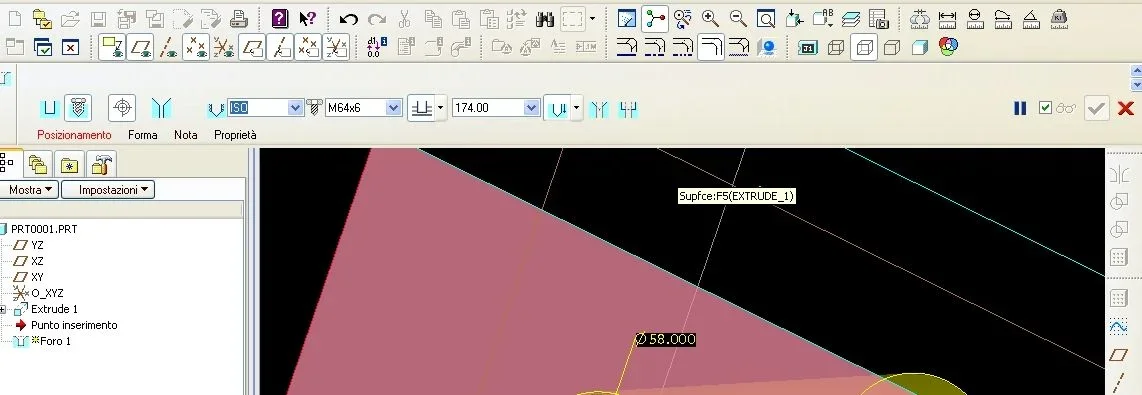
In fact if I do it on my old wildfire I find myself like this:
</directory>Immagine.webpthe preview appears, but not the green tick to give the free way to the creation of the hole

If I'm not

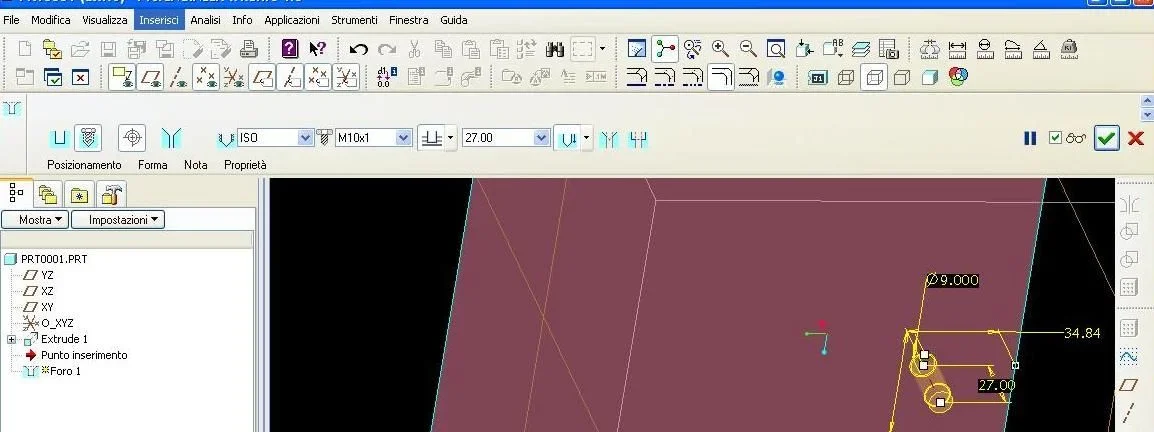
allow_udf_style_cosm_threads no
Immagine_02.webpthe green tick returns.

if instead it is the company config set on yes you have to understand where fishing the new definitions of holes

Let me know, say hi.
 
... keep the business config.pro locally, get first to the office, load creo, apply all my personalizations, once loaded keeps them and then return to the company directory to delete everything.
comfortable mooolto!! !
ps if someone can tell me a better method. . .
the best method has already indicated you tartufon80: use config.sup

But I'm sorry: I wouldn't do all these things.

If you break the business config or overwrite it by mistake and you're also the last one, it's not the best way to make yourself nice.
there are 160 pages of parameters only for the config, remaking it is not a health walk.

let me know for a couple of months, show you're good: at that point explains why it is better to use the config.sup and you will see that they will listen to you.
 
then, check in the config the voice:

allow_udf_style_cosm_threads

maybe your config was created for a previous installation that didn't point to files

<directory installazione="">\intudfs\threads but a custom hole definition file

you do in case you want to extend the hole library, typically to add gas holes.

In fact if I do it on my old wildfire I find myself like this:
</directory>View attachment 41040the preview appears, but not the green tick to give the free way to the creation of the hole

If I'm not

allow_udf_style_cosm_threads no
View attachment 41042the green tick returns.

if instead it is the company config set on yes you have to understand where fishing the new definitions of holes

Let me know, say hi.
I forgot to tell you to check this voice as well:

hole_parameter_file_path
 

Forum statistics

Threads
44,997
Messages
339,767
Members
4
Latest member
ibt

Members online

No members online now.
Back
Top