
You are using an out of date browser. It may not display this or other websites correctly.
You should upgrade or use an alternative browser.
You should upgrade or use an alternative browser.

Catafratto
Guest
because it moves the comma I don't know, but if you split up for 1mm it's fine. the formulas of inventor take into account the units of measurement, on is "without units" and then you have to eliminate it (337.999 mm / 1 mm = 337.999 on). so as it is among other things you should have wqe in red when you edit the row of the x parameter
perhaps moves the comma because the unit of measurement that inventor uses internally is the cm.
perhaps moves the comma because the unit of measurement that inventor uses internally is the cm.
MARCOC
Guest
thank you so much catafract, I ask you something, how can I export a table value without the measuring unit? ? ?
I would like to have in the table value 377,69mm only as text 377,69
Can you do that? ? ?
I would like to have in the table value 377,69mm only as text 377,69
Can you do that? ? ?
Catafratto
Guest
I'm afraid I didn't understand the question well. .
by "export" the value you mean on xml (in which case I don't know) or simply choose a model parameter and put it on the table?
in the second case: from 1) choose the origin of the parameter, 2) if it is model or user, 3) the name and 4) insert it. to me does not put the measuring unit, I do not remember if I set up so or whether it is the standard behavior: test.
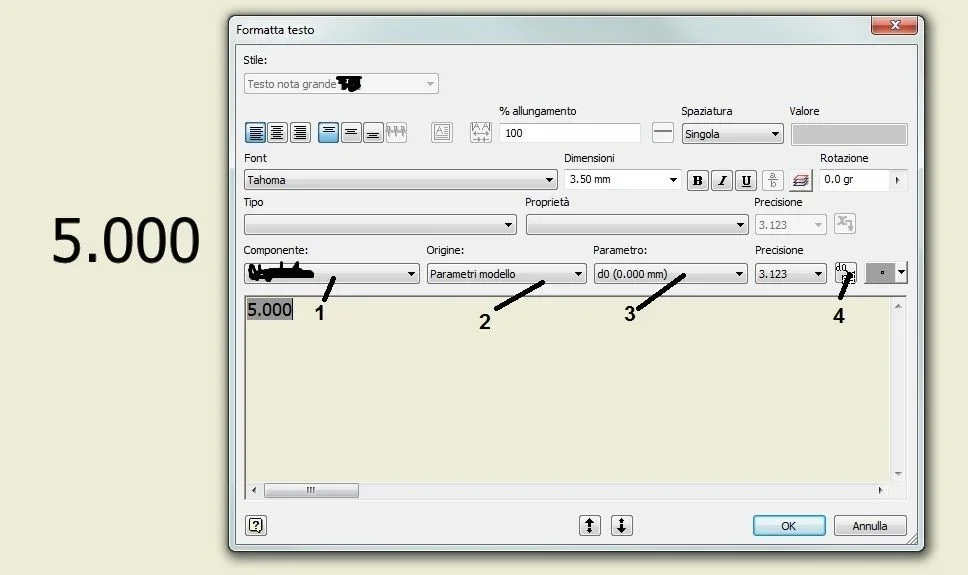
by "export" the value you mean on xml (in which case I don't know) or simply choose a model parameter and put it on the table?
in the second case: from 1) choose the origin of the parameter, 2) if it is model or user, 3) the name and 4) insert it. to me does not put the measuring unit, I do not remember if I set up so or whether it is the standard behavior: test.
MARCOC
Guest
Sorry I was too generic, in the table parameters I have the parameter wqe I carry it in custom iproperties, putting it on the table in a table, but I would only like the value without the unit of wetness
Catafratto
Guest
I don't think you can do this, but I can totally go wrong anyway. . .
Ilario
Guest
you're in the parameters window, pick up the "export parameter" column that I imagine you've already done. at this point go to the value to the column "Nominal value" of the parameter itself, dx key and "Formed custom property". from there impose various settings of how you want the value to be exported.
Catafratto
Guest
Here, I was wrong:redface:you're in the parameters window, pick up the "export parameter" column that I imagine you've already done. at this point go to the value to the column "Nominal value" of the parameter itself, dx key and "Formed custom property". from there impose various settings of how you want the value to be exported.
I would also like to thank the Commissioner for his information.
Ilario
Guest
e' un piacere! 
MARCOC
Guest
Yes that I know, the problem and that I can't enter into the same row more values, that works on the single parameter, I must have a set of numbers divided by one / and all without unit of measurement.
and if you try to set what you say a column where 2 variables are wrong to you.
and if you try to set what you say a column where 2 variables are wrong to you.
MARCOC
Guest
Yes that I know, the problem and that I can't enter into the same row more values, that works on the single parameter, I must have a set of numbers divided by one / and all without unit of measurement.
and if you try to set what you say a column where 2 variables are wrong to you.
Is there nothing to do with ilogic?? any expert on this matter? ? ?
and if you try to set what you say a column where 2 variables are wrong to you.
Is there nothing to do with ilogic?? any expert on this matter? ? ?
Catafratto
Guest
I didn't understand the column thing with two varietals. And the number series I imagine you need in iproperties, right?Yes that I know, the problem and that I can't enter into the same row more values, that works on the single parameter, I must have a set of numbers divided by one / and all without unit of measurement.
and if you try to set what you say a column where 2 variables are wrong to you.
Is there nothing to do with ilogic?? any expert on this matter? ? ?
Ilario
Guest
I don't understand, too, but if you need more parameters in a customised line of iprop, you can do it by doing a custom hoc iprop.
If you explain better and my solution works, I'll tell you how...
If you explain better and my solution works, I'll tell you how...
Ilario
Guest
I'll put it to you.
1) set the export parameters as I said before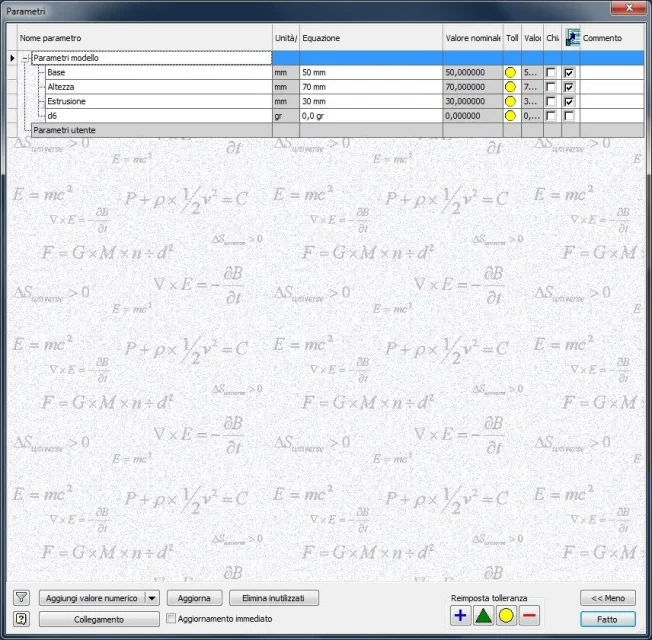 2) create the iprop to duty by handing the string initiating with "=" and in parentheses "<>" the parameters exported: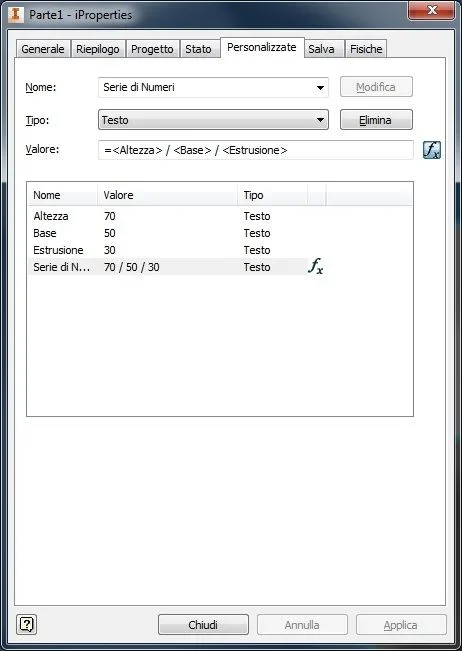
1) set the export parameters as I said before
2) create the iprop to duty by handing the string initiating with "=" and in parentheses "<>" the parameters exported:MARCOC
Guest
and what I have to do, and what I have done, the problem and that to me the unit of measurement appears
How did you remove it?
to make you understand if I use your example I'm blackmailing 70mm/50mm/30mm
How did you remove it?
to make you understand if I use your example I'm blackmailing 70mm/50mm/30mm
MARCOC
Guest
And you didn't erase the "mm"?? because in that case if you change the parameter, the mm return
Let me understand!!! ! !
Thank you very much
Let me understand!!! ! !
Thank you very much
Ilario
Guest
I told you first how to remove the measuring units... Have you read the post before?
you're in the parameters window, pick up the "export parameter" column that I imagine you've already done. at this point go to the value to the column "Nominal value" of the parameter itself, dx key and "Formed custom property". from there impose various settings of how you want the value to be exported.
MARCOC
Guest
I am sorry, I did what I said in the table table (idw), do not ask why, I have not read carefully
so perfect, I solved the great
Thank you very much!!! ! ! ! ! ! ! ! ! ! !
so perfect, I solved the great
Thank you very much!!! ! ! ! ! ! ! ! ! ! !
Ilario
Guest
great:smile::finger: