
• This forum is the machine-generated translation of www.cad3d.it/forum1 - the Italian design community. Several terms are not translated correctly.

change the order of drop down menus

  • Thread starter Thread starter mirco354
  • Start date Start date

mirco354

Guest
Good morning to all,
I ask you an information, can you change the order of autocad drop down menus 2013?
starting from left I have files, edits, displays, inserts etc., it is possible to put first "change" of "files"?
also it is possible to "hide" a drop-down menu, so that I do not see it?
in the old 2005 autocad was very simple, but here I do not find the function,
Thank you very much
 
tools>personality> interface
selections of the work area
in the right window expand the menu item and manage them as you want
be careful not if once you remove a voice you can put it backView attachment 41348
 
tools>personality> interface
selections of the work area
in the right window expand the menu item and manage them as you want
be careful not if once you remove a voice you can put it backView attachment 41348
Bye to all,
with this 2016 autocad I have several problems with the menus:
1) I go to place all the toolbars at my liking, the locks, but when I go to "personality user interface" and make a change, even simply to the normal menu, just save and close, the toolbars move me all and place themselves scattered as when you just insert, you know how to help me?
2) multifunction menus do not use them, I close them by going over with the right button and then "close", but every time I open autocad again, how can I close them permanently? I tried to delete them from the menu "personality user interface" but nothing changes.
3) the menu bar does not appear by default, the active type "menubar" and then 1, idem with this, every time I open autocad disappears and I have to reactivate it every time, there is a procedure to let it active?
4) once "personalized" the menu, at my pleasure, complete with lisp, menu and toolbars, can you save it and upload it to another machine without having to miss the hours to reset everything?
5) When I move or copy a block comes out a yellow dash from the initial point to the pointer, is it possible to remove it?

Thank you very much
 
I can advise you to make a copy of the acad.cuix file otherwise you risk, after various customizations, losing important tools no longer recoverable.
other advice: make a copy of a work area and customize it according to your needs.
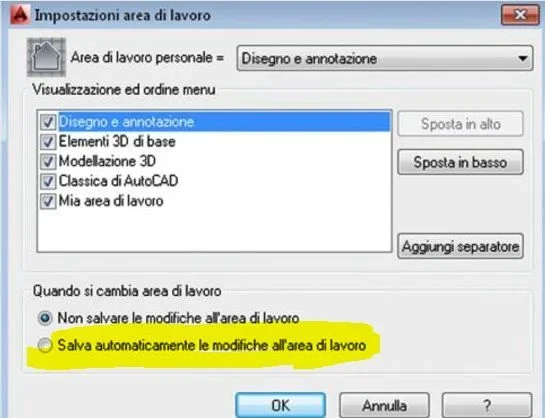
regarding bars that do not remain in their place have you verified on setting work area to have the check on automatically save changes on work area?
 
I can advise you to make a copy of the acad.cuix file otherwise you risk, after various customizations, losing important tools no longer recoverable.
other advice: make a copy of a work area and customize it according to your needs.
regarding bars that do not remain in their place have you verified on setting work area to have the check on automatically save changes on work area?
Hello, thank you for the clarification, only that I can't find where to put the check on "automatically save the changes on the work area", where can I find it?
 

Forum statistics

Threads
44,997
Messages
339,767
Members
4
Latest member
ibt

Members online

No members online now.
Back
Top