
• This forum is the machine-generated translation of www.cad3d.it/forum1 - the Italian design community. Several terms are not translated correctly.

print designs without license inventor

  • Thread starter Thread starter TECNOMODEL
  • Start date Start date

TECNOMODEL

Guest
hi to all, in the company we need to print the drawings (tables 2d) also from some pcs on which the cad is not installed.
We use the basic vault, so you cannot use one of the classic autodesk viewers.

we bought a third party application but it doesn't work well, what alternatives are there?
 
hi to all, in the company we need to print the drawings (tables 2d) also from some pcs on which the cad is not installed.
We use the basic vault, so you cannot use one of the classic autodesk viewers.

we bought a third party application but it doesn't work well, what alternatives are there?
could you instruct the pdm to create the pdf when saving the 2d tables?
 
could you instruct the pdm to create the pdf when saving the 2d tables?
Do you want to do it at the vault when it's stored?
I don't know if the basic does, however the problem of the entire previous archive remains.
the use of the vault I introduced it since I arrived in the company a year ago, first everything was saved on a server and used the autodesk viewer.
Now with the vault it seems no longer possible to do it, but I would not like to return to the old system.
too many error risks, data loss etc.
without considering the convenience of some vault functions.
 
1) steps to professional vault (pagging) and you can install as many viewers as you want.
2) in the vault basic under the vault > display settings, there is the definition of attachments and you can check the last item and define a folder on a server where each time you store, do a dwf and place it them (structured as in the vault or only folder), then install the design review and everyone can view them. only neo is that if the file stored is still in the design phase, in the dwf you do not notice...
 
1) steps to professional vault (pagging) and you can install as many viewers as you want.
2) in the vault basic under the vault > display settings, there is the definition of attachments and you can check the last item and define a folder on a server where each time you store, do a dwf and place it them (structured as in the vault or only folder), then install the design review and everyone can view them. only neo is that if the file stored is still in the design phase, in the dwf you do not notice...
seems like a good solution, thank you.

Is there also the way to create the dwfs of the old archive? without extracting them and storing them one by one...
 
back on this post, I finally had time to make some evidence.

I set the vault as from attached imageCartella.webpI drew a drawing, archived it again but does not publish the dwf.


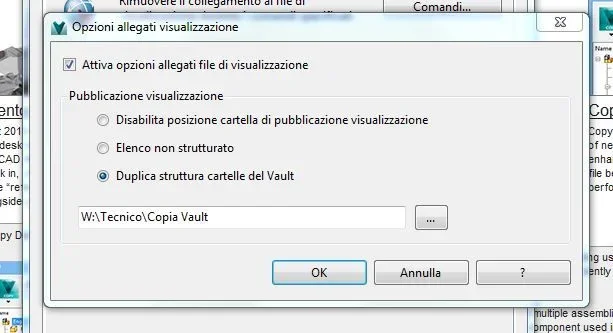
Perhaps the problem could arise from the option of which I attach imageOpzioni.webpI modified the same by choosing inventor 2016 2d, the problem is that ,both give the ok you click on reset, when I open the options I always find inventor 2014 2d.

Am I wrong?
 
use vault professional for some years and on the publication and printing of dwf makes several errors, type change of characters, overlap of quotas and texts, omission quotas etc. there have been updates about it, also asked autodesk dealer, but the situation has not improved.
I don't trust the dwfs anymore, I mold everything manually, I don't know if in the new version they solved the problems.
 
back on this post, I finally had time to make some evidence.

I set the vault as from attached imageView attachment 42816I drew a drawing, archived it again but does not publish the dwf.


Perhaps the problem could arise from the option of which I attach imageView attachment 42817I modified the same by choosing inventor 2016 2d, the problem is that ,both give the ok you click on reset, when I open the options I always find inventor 2014 2d.

Am I wrong?
to me have set up on "display attachment options"-"disable location folder display" and on "publishing options"- application: 2d inventor 2010, everything else is equal.
 
setting the "disabled" then where do you publish them?

I did a test also with the "programming operations", no problem to extract and archive, the "public dwf" however does not work.

or better, the operation does it however do not find the files in the folder.
 
setting the "disabled" then where do you publish them?

I did a test also with the "programming operations", no problem to extract and archive, the "public dwf" however does not work.

or better, the operation does it however do not find the files in the folder.
do not find them, you can only use them via vault, the pcs that do not have it can access intranet through any browser but you have to create users with its permissions.
 
I see only now that he published them in the vault.
then what do you need that duplicate vault structure option where you can choose the destination folder?

so now if from a pc where only the autodesk viewer create a user can access the vault to consult the dwf?
and can I print them and do other operations?
 
There is a web address with which to access, I do not have it as I have installed all the full suite, never my enabled colleagues can access it, each with their own login and view and print the drawings (dwf). of course each user can make it belong to a group and each group has its permissions. here we have 2 groups: technical (full access through application), and commercial that can only display and print through webclient. here I also set the life cycles of the drawings (in working, released, obsolete...) and the commercial group only sees the "releases".
to publish the dwfs have ache set a pc with "job server" which in breaks does a search in the vault of designs released without dwf and goes to create them automatically.
 
thank you very much for the info, I try to summarize:

vault basic installed on cad stations
viewer installed on other locations.
create dwf files of drawings
create users with read permission only (I create them in the vault? )
the user without cad, through the viewer, access via webclient and view,print etc dwf.

Right?

but is webclient to create and configure?
Is it a copy of the vault archive located elsewhere or is it a vault access?
 
Yes, users create themselves from the vault as administrator, the webclient points directly to the server where the vault archive is, in fact, you have to put the right network ip, I don't know how the vault server is configured because I made it a autodesk technician, (I saw that on the network it is easy to configure vault , in English. . ).
Then, I don't know if the basic vault allows webclient, you should inform yourself.
 
I'm still here to ask.

the viewer to open dwf what would it be?
with true viewer does not see them.
 

Forum statistics

Threads
44,997
Messages
339,767
Members
4
Latest member
ibt

Members online

No members online now.
Back
Top