• This forum is the machine-generated translation of www.cad3d.it/forum1 - the Italian design community. Several terms are not translated correctly.

copy and move

  • Thread starter Thread starter Joshua662
  • Start date Start date

Joshua662

Guest
Good morning

Does a camonado like solidworks move and copy the bodies? I have other roads to realize the piece I need, my question is pure curiosity. Thank you.
 
I don't know solidworks, so if you explain to me more or less what the command does or (what you have to do) and I try to help you.

Hi.
 
I don't know solidworks, so if you explain to me more or less what the command does or (what you have to do) and I try to help you.

Obviously catia moves/wheel/muove 1 body, but if you want to move more body at once, just assemble them with a boolean.

Let me know.

Hi.
 
I don't know solidworks, so if you explain to me more or less what the command does or (what you have to do) and I try to help you.

Obviously catia moves/wheel/muove 1 body, but if you want to move more body at once, just assemble them with a boolean.

Let me know.

Hi.
Good morning

then the command of solidworks, copies and moves an object and makes it completely independent from the father. example I build a cube with a hole in the center and with the caccordi on the edges, I want a copy of this object with all these operations at a distance of 120mm, clikko on the command copy all I need and translo it according to a xyz direction of 120mm and the piece is completely independent from the first.

to get the same thing there are two ways:

1) I build cube, hole, and fittings, I create a second body cup once at a time operations in the new body and use the special glue command so as to eliminate the parental from the main body to the secondary body however "this procedure is done only on the operations function and not for example mirrors or others". I do the same for every time I need the finished cube.

2) I build cube, hole and fittings, except the part. I go into the assembly environment I insert my parts what I need the wheels to my liking according to xyz axis and the translocation according to the distance I need, with the command generates catpart from catproduct and getting the finished but not editable piece, so to change it I have to keep aside both the primary part and the axieme.

These are the roads I know, but there would be a third way i.e. the powercopy I have never used and I don't know if it can do such a thing, if you have any other info about it I would be able, I would like to learn this modeling method. now I ask a command like solidworks that copies and makes the copy completely independent exists or not? I forgot in solidworks the command as well as translating also rotates the object. thank you for any answer.
 
1) I build cube, hole, and fittings, I create a second body cup once at a time operations in the new body and use the special glue command so as to eliminate the parental from the main body to the secondary body attention though "this procedure is done only on the operations function and not for example mirrors or others". I do the same for every time I need the finished cube.
much depends on the sorting of features and how you projects: Hybrid/non hybrid etc., however I try some answers:

1) built the "cube, hole fittings etc." I cover all body and neck "as spec" thus obtaining an identical body including mirror functions etc. but completely editable. of course all construction geometries must be inside the body: if you have a sketch in another geometric group, this remains the "father" for all body (as it is right that it is)
copying individual operations in a new body makes sense only in particular cases.
rotation and translation should be done separately and are features of the body (in fact better maintain the story fathers/sons of modeling)
2) I build cube, hole and fittings, except the part. I go into the assembly environment I insert my parts what I need the wheels to my liking according to xyz axis and the translocation according to the distance I need, with the command generates catpart from catproduct and getting the finished but not editable piece, so to change it I have to keep aside both the primary part and the axieme.
2) generally in the industry, a particular is planned, a unique name/number is assigned to it and this appears in the assembly with the amount it serves. if one of these must change it, another name/number/revision is assigned (better to avoid catpart from catproduct that serves for other purposes). if it is the same and unique part, but work in multibody the speech is different, perhaps better to use a rectangular matrix, circular or point, or a glue with connection.
These are the roads I know, but there would be a third way i.e. the powercopy I have never used and I don't know if it can do such a thing, if you have any other info about it I would be able, I would like to learn this modeling method.
3) summarizing: an equal command is not there, but if you send some image/file or concrete example, you can find the way to help you or set a power copy.

Let me know.

Hi.
 
much depends on the sorting of features and how you projects: Hybrid/non hybrid etc., however I try some answers:

1) built the "cube, hole fittings etc." I cover all body and neck "as spec" thus obtaining an identical body including mirror functions etc. but completely editable. of course all construction geometries must be inside the body: if you have a sketch in another geometric group, this remains the "father" for all body (as it is right that it is)
copying individual operations in a new body makes sense only in particular cases.
rotation and translation should be done separately and are features of the body (in fact better maintain the story fathers/sons of modeling)


2) generally in the industry, a particular is planned, a unique name/number is assigned to it and this appears in the assembly with the amount it serves. if one of these must change it, another name/number/revision is assigned (better to avoid catpart from catproduct that serves for other purposes). if it is the same and unique part, but work in multibody the speech is different, perhaps better to use a rectangular matrix, circular or point, or a glue with connection.


3) summarizing: an equal command is not there, but if you send some image/file or concrete example, you can find the way to help you or set a power copy.

Let me know.

Hi.
Good morning
My procedure is only descriptive, I know very well that the parts are attributed a partnumber, I avoided mensation only for a fact of post length. what you tell me copy paste as spec does not copy operations like mirror and wheel. with regard to the multibody is a thing that I already indicated and that I did on the modeling of this component, I asked if it is between the thousands of commands catia a conando similar to that of solidworks, my question was only for curiosity, I always worked in multibody in these cases, but the difficulties in this way of modeling is to remember to define the object of lavory and if you forget it is a casino. instead with such a command it is all easier and simpler. That's all.
 
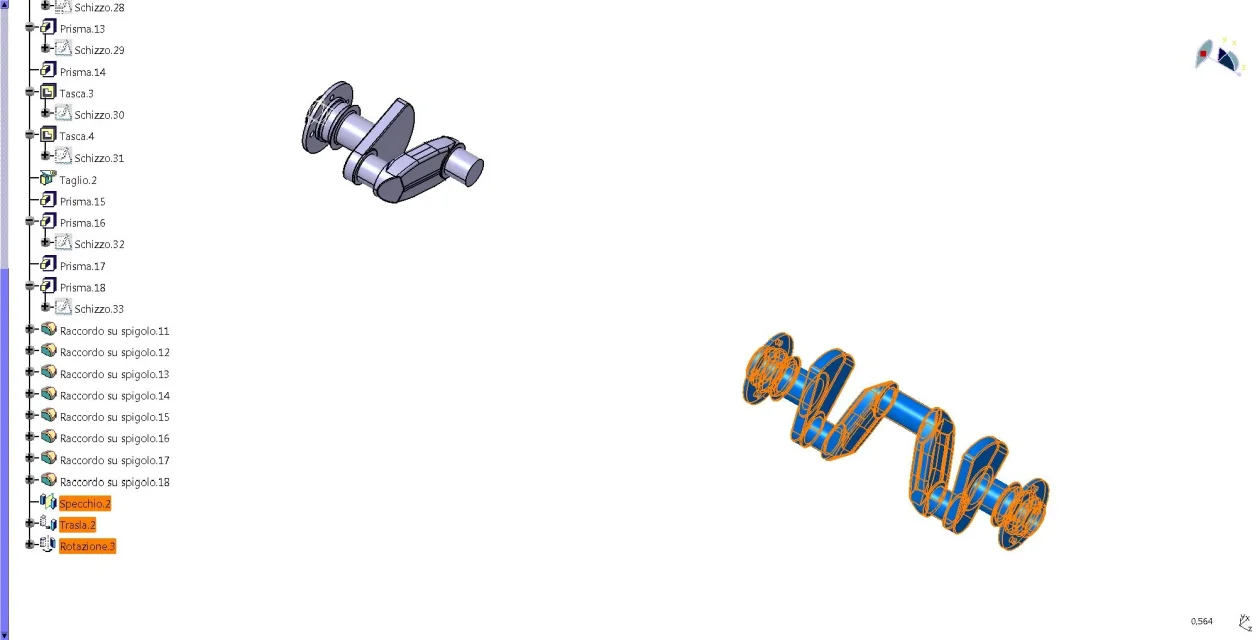
an example can be a model motor shaft the first couple of elbows so I call it made this echo the oil passage and finished this with a command of the genus I make copies quati are the cylinders and rolled them according to the phases of the engine, with solidworks model copio and rough egg and assemblo with the boolean, caia instead is much longer as process and much more dispersed.
 
what you tell me copy paste as spec does not copy operations like mirror and wheel.
the images that attach, refer to a body (basic model) that contains features of mirror rotation and translation and body (basic model copy as spec). as you can see in the first I disabled them and in the copy I activated them.. .
as I told you cover all the body and not the individual features
 

Attachments

  • Capture_017.webp
    Capture_017.webp
    50.5 KB · Views: 3
  • Capture_018.webp
    Capture_018.webp
    87.5 KB · Views: 3
  • Capture_019.webp
    Capture_019.webp
    90.7 KB · Views: 4
an example can be a model motor shaft the first couple of elbows so I call it made this echo the oil passage and finished this with a command like that I make copies here are the cylinders and rolled them according to the phases of the engine, with solidworks model copio e muovo ruoto e assemblo con il booleano
as we have seen in the previous post it is possible to make an identical but completely editable copy (father-father).

otherwise you can use the as result copy with connection that allows you to have a model equal to the first (father-son) where changing the father changes the son, but changing the son (with shift and wheel, mirror etc.) does not change the father.

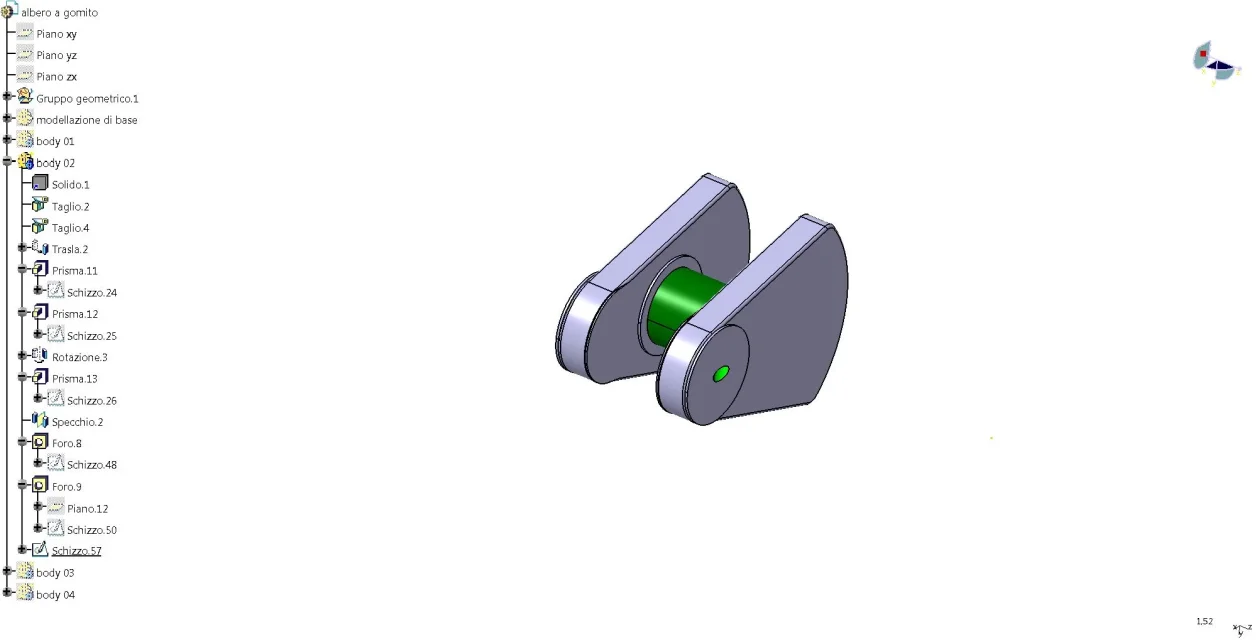
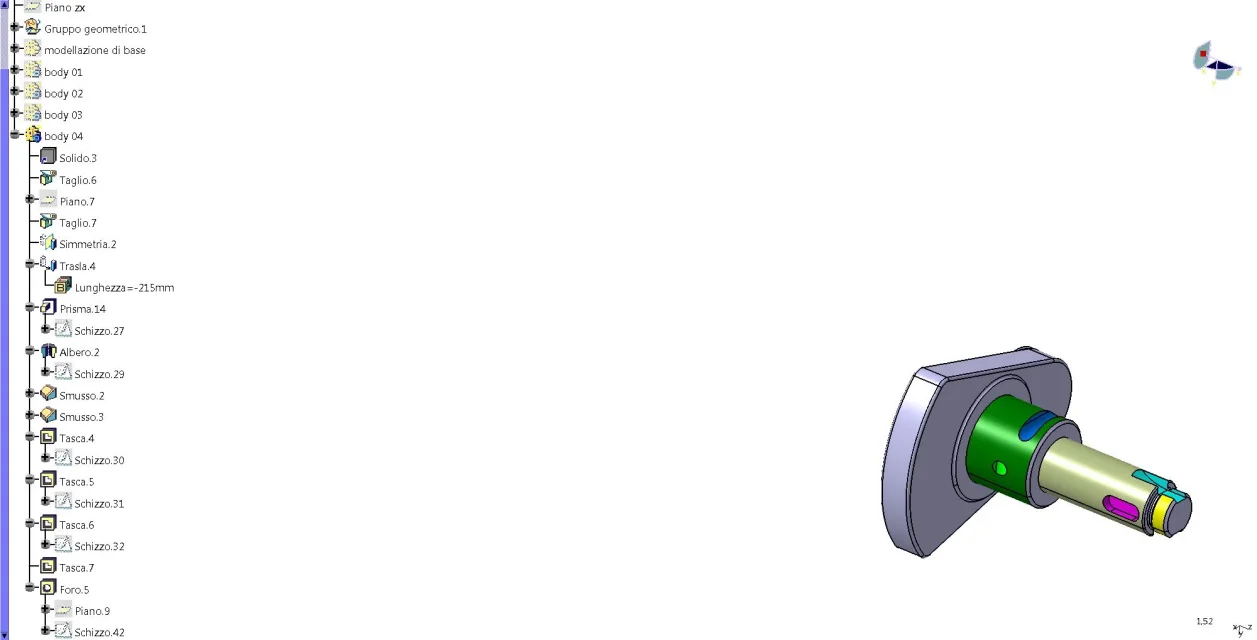
attached an example of multibody modeling with different body obtained by copy with later modified link:

basic body modeling (the father of all body)
body 01 (the son with drilling)
02 body (other son cut,specchiato,forato)
body 03 (other son cut,specchiato,forato)
body 04 (other son cut,specchiato,forato)
final result of all body together (with the hidden father).

if you do repetitive models that may vary in some parameters (diameters, lengths, position etc.) then we can see with the powecopy.

Let me know.

Hi.
 

Attachments

  • Capture_009.webp
    Capture_009.webp
    78.2 KB · Views: 2
  • Capture_010.webp
    Capture_010.webp
    63 KB · Views: 1
  • Capture_011.webp
    Capture_011.webp
    59 KB · Views: 1
  • Capture_012.webp
    Capture_012.webp
    49.3 KB · Views: 1
  • Capture_013.webp
    Capture_013.webp
    64.1 KB · Views: 1
  • Capture_014.webp
    Capture_014.webp
    103.8 KB · Views: 1
It seems to have succeeded with your explanation. I made two mistakes one is the hybrid modeling I did not select it, here at work is set by standar to not hybrid, the other error is that I copied the individual features one at a time instead copy whole body paste as spec is so I can model every part and rotate it to my liking. thanks gianni, if you go because no we also see the power copy but since they say it is a bit complicated as procedure. Thanks again... .
 
Good.

some further clarification:

1) Hybrid or non-hybrid mode is determined first of all by customer requests (or design office directives) and it is better to keep all the same, so do not change it if unauthorized.

2) the as spec copy works both in hybrid and non-hybrid mode.

3) in the non-hybrid mode if you work only with sketches, just create them in the body and not in the geometric group and each body copied as spec will preserve them independent inside.

4) Hybrid mode use it if you also use surfaces and want to keep them inside the solid or in a geometric group (I patch the surfaces better to keep them separate, but sometimes you cannot)

5) try using the copy with connection, in your case it may be useful.

6) for powercopy, you should at least give me an example where you happen to remake the part almost equal except for some variants.

Hi.
 

Forum statistics

Threads
44,997
Messages
339,767
Members
4
Latest member
ibt

Members online

No members online now.
Back
Top