
• This forum is the machine-generated translation of www.cad3d.it/forum1 - the Italian design community. Several terms are not translated correctly.

error closing the program

  • Thread starter Thread starter davideingSp
  • Start date Start date

davideingSp

Guest
hello to everyone, I write you why I'm trying to solve a problem, for the university I'm doing a small project and I'm working with creo parametric 2.0

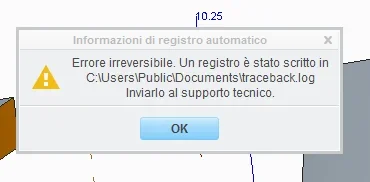
the point is that every now and then an error message comes out and suddenly it closes all without giving me the chance to save the job, the mistake is this:errore.webpDo you have any idea how I can solve this? :confused:
 
It's the only way I create crashes. Fortunately once I find the reason the crashes fall drastically. you go from one every 4 days to who hasn't crashed for months. depends on the release you have. Usually the high releases type m120 are much more stable than the low type m020. However if you show up that crash the first thing to do and the most important thing is to check if you have a supported or certified hardware configuration. especially important is the graphics card. I attach the document you need to check. from pdf click on the hardware manufacturer of your workstation and get an idea of supported graphics cards and so.
 

Attachments

I thank you for your help:)
My version is m010.
Looking at the requirements it seems to me that my pc has plenty, I don't know exactly how to fix it, it's a very annoying thing:frown:
 
the video card is an ati radeon hd6950 2gb
the ram is 4gb
the processor is an i5 2500k

Are you okay?
 
among other things I think I have done a big harm, thinking about solving I have tried to uninstall and reinstall creo, the problem is that after entering the license it does not allow me to choose which programs to install, the entries remain grige and not selectable!
and as if not enough soon I have to deliver the project for the university!:36_1_25:
 
as not mentioned, I was wrong to insert the installation path, menomal!

to understand why of that problem:confused:
 
Bye!
without reading the file posted by mad76, I think the radeons are not deerified.
confirming what was written by mad76, the m010 is one of the first releases, which presented many instability.

Finally, maybe check if you were doing some operation at the limit, which was crashing it.
Sometimes it happened to me, and it depended on me!
 
Sometimes it happens when I show the plans and the boards, or maybe when I work a little fast with quite complex assemblies.
I don't know exactly, the speech is that it does it with the laptop that has a nvidia gt540m

I don't think that's a compatibility speech.
Anyway, I reinstalled everything, maybe now it works so...
 
if the cards are not certified try to insert in your config.pro (config.pro guide) option
graphics win32_gdiyou could find creo slower and snappy but maybe it will not close more unexpectedly.

if the crash still happens, try to attach the traceback.log; not that it is very clear, but in the meantime it is something
 
Let's say that already so is not that it is lightning, often and willingly gets impunta and then resumes, I do not know if it is the case to change that parameter. .
where can I find it? in the event that the problem is resumed so that it can be attached
 
neither the nvidia series gts are certified. even if I know they go a lot but much better than the fingers for I create.
I think you still have too many crashes. It is true that it takes a second to verify the integrity of the job at reboot but it is very annoying.
 
Trust me, try it.
the path of traceback.log is in the screenshot of your first message. .
 
Trust me, try it.
the path of traceback.log is in the screenshot of your first message. .
ok then in the morning as soon as I get to work I try to insert that string into the config.pro
In the meantime, I'll train you the traceback.log

Do you understand anything?
 

Attachments

However for now everything seems to work well, at least as far as the laptop is concerned, we hope that with the new installation the problems are gone.. I would still have a question for you:

I have a project in a folder, this contains all parts, assemblies, components, boards etcc, I would like to create a secondary folder inside which to put all the components like screws, elastic thorns etcc so that the main folder is more neat, the problem is that if I open the general axieme I create it does not find the components that I put in the under folder and says " missing component".

Do you know how I can solve this?

I don't know how to work on it, I never even opened it:frown:
 
I have succeeded, I have crushed a plentiful hour for a cabbage:finger:

the problem is that now the program starts with black background rather than white but I have not touched any setting regarding colors, you know how can I solve?
 
Bye!
I suggest you study well how the config.pro works (and the config.sup).
according to me is the key element of pro/e - creo. there is a lot of information about it here on the forum.
Doing what you're doing is a little good, but you're not going far away by trying.
at a first glance it seems that you are working with the basic config, which objectively does not help much.

Good job!
 

Forum statistics

Threads
44,997
Messages
339,767
Members
4
Latest member
ibt

Members online

No members online now.
ciao
Back
Top