
• This forum is the machine-generated translation of www.cad3d.it/forum1 - the Italian design community. Several terms are not translated correctly.

problem with quotatura

  • Thread starter Thread starter tatyb295
  • Start date Start date

tatyb295

Guest
Good evening, everyone!
I have a problem with the quotation of the drawings.when in the design space in meters and then I go to quote I get out of the values of quota not exact.
if for example one side measures 3 meters the altitude comes out of 00.
I have changed all settings, but obviously I can't figure out what the right setting allows me to get the right value of the quota.
 
you have already been explained draws in meters, millimeters or yards, but in units.
said this without pictures or files it is really difficult to understand why of the quotation behavior. that then 00 in autocad does not exist, you can have 0.00 or 0 or, and perhaps it is your case ,00 that means that the entity you are listing is lower than one unit, that you have suppressed the initial zero and that you have visible only 2 decimals so instead of reading 0.003 laws ,00
I hope at least you're listing in model space. . .
 
Last edited:
You have to quaint the scale factor.
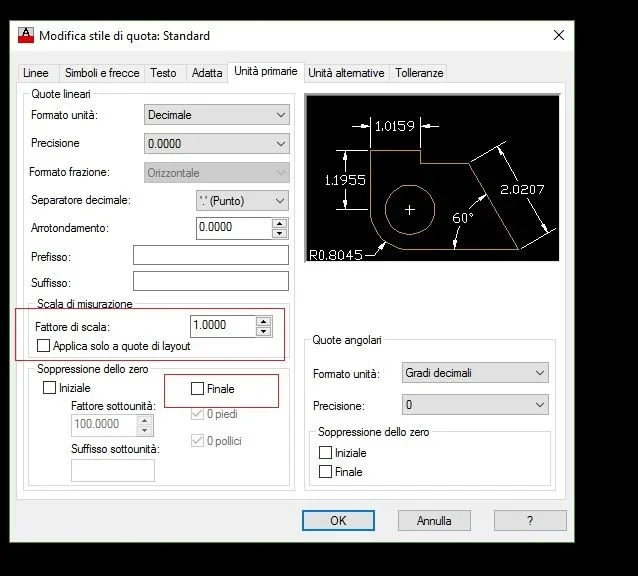
_dimstyle, tab primay units, value of scale factor.
if you have the entity that is 3 long and you want to quota 300, put a scale factor of 100 and decimal to 0
if you want to quote 3,00 put a scale factor of 1 and decimal at 2
 
You have to quaint the scale factor.
_dimstyle, tab primay units, value of scale factor.
if you have the entity that is 3 long and you want to quota 300, put a scale factor of 100 and decimal to 0
if you want to quote 3,00 put a scale factor of 1 and decimal at 2
thank you so much!I tried to put a scale 1 and decimal to 2, only that does not leave me 3,00 but 30!I will have wrong some other setting?
 
you have already been explained draws in meters, millimeters or yards, but in units.
said this without pictures or files it is really difficult to understand why of the quotation behavior. that then 00 in autocad does not exist, you can have 0.00 or 0 or, and perhaps it is your case ,00 that means that the entity you are listing is lower than one unit, that you have suppressed the initial zero and that you have visible only 2 decimals so instead of reading 0.003 laws ,00
I hope at least you're listing in model space. . .
I'm listing in model space. I'm referring to the meters only for my convenience, but I know that in autocad it is only spoken of unit.thanks thousand cmq
 
if you leave 30 instead of 3 you will have to put a report of 01 I would say
while for decimals you have to remove the tick to final zero suppression.
I recommend never to put pictures (of the change window style quote in this case) otherwise it is too easy to help
Immagine.webp
 
I hope at least you're listing in model space. . .
think that to me, at a self-desk course, they said that it is quoted in paper space and not in the model.
I clearly have never taken into account, if not to become skeptical and critical about certain teachers at courses.
 
when you work for external customers arrive and you must send dwg to all imaginable and even unimaginable sauces.

more than before my doubt was that made the drawing in scale 1:1 in the model space tatyb295 had made a 1:100 scale window in the layout and listing it had that value.

in fact I do not understand the underlying issues: if drawing 1:1 does not need to change the ratio of the quota, this is done only if there are several units of measurement as a general design in meters and details in centimeters
to remain in concrete if I want to have a long line 0.3 long design 0.3 and 1:1 ratio share will give 0.3.
seems that those who teach autocad at school, if they teach it, do it superficially just to give a motivation to the existence of the course
 
seems that those who teach autocad at school, if they teach it, do it superficially just to give a motivation to the existence of the course
My course was a paid course, from a certified autodesk center, to have, in my turn, the certification that I was skillful and capable :mad::mad::mad:
 
think that to me, at a self-desk course, they said that it is quoted in paper space and not in the model.
but I think both solutions are right.
there are cases where it is better to quote in model space and cases where it is better to quote in paper space.
then obviously tastes and fashions appear among the cases.
I prefer to quote in the model space using annotative but strictly non-associative quotas.
but if you have to quote a 3d view then quote in the paper space, with associative quotas, it is the best way to proceed (obviously according to me).
 

Forum statistics

Threads
44,997
Messages
339,767
Members
4
Latest member
ibt

Members online

No members online now.
Back
Top