• This forum is the machine-generated translation of www.cad3d.it/forum1 - the Italian design community. Several terms are not translated correctly.

solid with "only" surface to be able to wrap completely (for bnd)

  • Thread starter Thread starter reggio
  • Start date Start date

reggio

Guest
hi guys... time ago you helped me solve a problemone...
Now I don't remember how it was done...

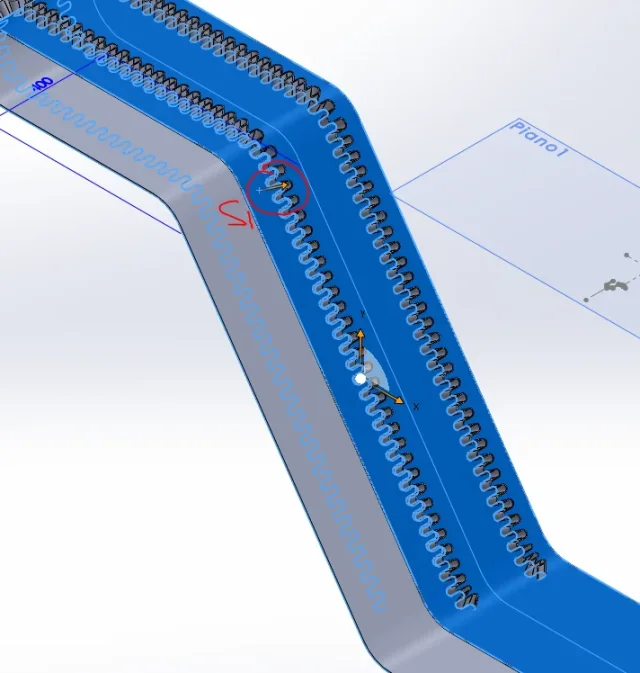
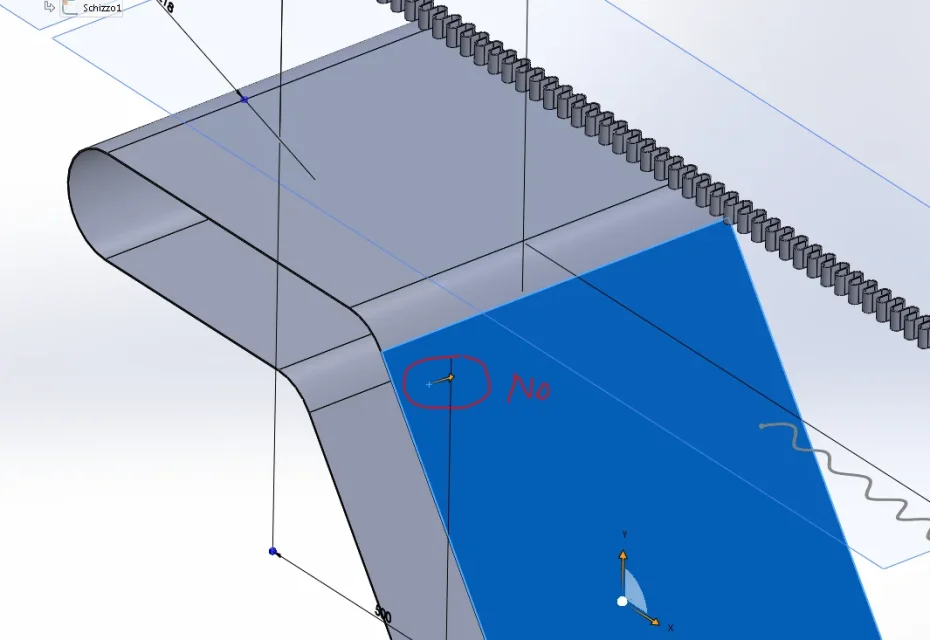
I attach the file, in practice I need to be able to remember how to make to get a solid that, when touched on his face of "external perimeter" this is completely selected...
I have the model, published the features, but I don't understand how to do it, to me is only a solid "composed" ... :frown:

How do I get the solid with the "united surface"? I can't do it again from scratch... how do you do it?
 

Attachments

  • solido-superficie-unita.zip
    solido-superficie-unita.zip
    5.8 MB · Views: 5
  • sup-unica-no.webp
    sup-unica-no.webp
    40.6 KB · Views: 2
  • sup-unica-SIIII.webp
    sup-unica-SIIII.webp
    50.7 KB · Views: 2
on a right-clicked face?

fix the version in the profile that with 2014 I do not open your files
 
...pork... what a speed they pay to make me look like this:
fix the version in the profile that with 2014 I do not open your files
What do you mean, "running"? I don't understand, how do I switch from 2016 to 2014? I don't understand.
on a right-clicked face?
no does not work, too easy, wraps wants a "roba" continues, if you can open the file you will notice that with
"on a right-clicked face" the wind command selects only the parallel faces :frown: and this causes the whole to collapse...

If you can open the file you would notice that by simply touching (without dx key or other) an external surface, you would select all the external perimeter ...

how do I get you the model without distorting it with iges or step? :rolleyes:
 
What do you mean, "running"? I don't understand, how do I switch from 2016 to 2014? I don't understand.
in the sense that in your profile there is written swx12 sp4 w7 x64+ready2w2012 and not swx2016. so I like a pyrla I think I open your files and instead wet.

after dinner I try to see better 'this thing of selection
 
and insert >superficie> union? then select the surface from the feature manager or model by activating the surface selection filter
 
no ...
and insert >superficie> union? then select the surface from the feature manager or model by activating the surface selection filter
found! from the initial sketch it is necessary to get spline only after, with a simple extrusion you get a continuous surface that winds can use perfectly :redface:thanks for the usual and patient support :)

ps: Do you know what I would need now? explode a spline: how do you do it? Can you?
... I cleaned too much the solid by eliminating the initial sketch that seemed useless and instead drove the spline (the spline alone can not be quoted and to me instead it serves to give her the desired size - I would therefore expulde it, quote it and recreate the spline)
 
no ...

found! from the initial sketch it is necessary to get spline only after, with a simple extrusion you get a continuous surface that winds can use perfectly :redface:thanks for the usual and patient support :)

ps: Do you know what I would need now? explode a spline: how do you do it? Can you?
... I cleaned too much the solid by eliminating the initial sketch that seemed useless and instead drove the spline (the spline alone can not be quoted and to me instead it serves to give her the desired size - I would therefore expulde it, quote it and recreate the spline)
quotating at spline controlshttp://help.solidworks.com/2016/italian/solidworks/sldworks/t_dimensioning_to_spline_handles.htm
 

Forum statistics

Threads
44,997
Messages
339,767
Members
4
Latest member
ibt

Members online

No members online now.
Back
Top