• This forum is the machine-generated translation of www.cad3d.it/forum1 - the Italian design community. Several terms are not translated correctly.

mirroring and repeating parts

  • Thread starter Thread starter tanticapelli
  • Start date Start date

tanticapelli

Guest
Hello everyone

I hope I don't make you angry today.

I would like to know if there is the possibility to ensure that the parts created following mirrors or repetitions inherit all the properties compiled in the "matrix" parts of the mirror/return.

I also realized that in the folder where I'm saving this job physically created a part file for each mirrored component.

I want to point out that I also mirrored local repetitions.

thanks to all

so many hairs
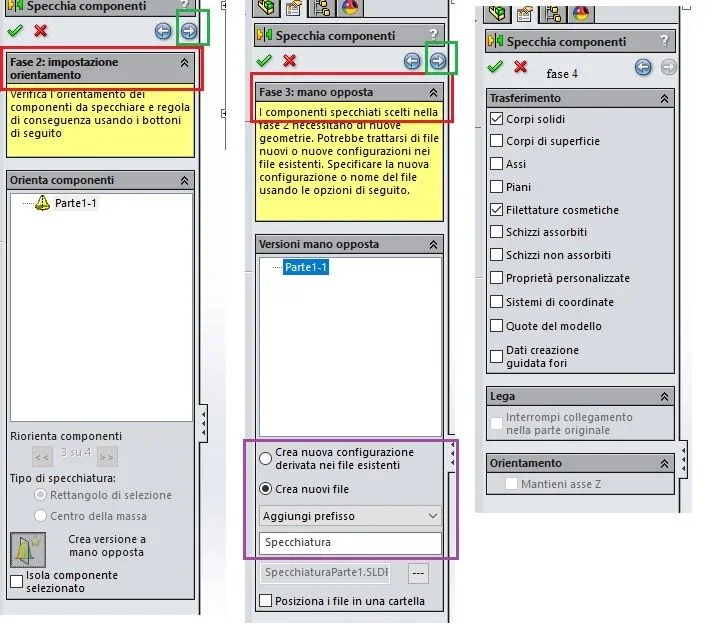
 
the creation of parts only makes it if the option creates opposite hand version is used. in this mode there is the possibility to create a new look or configuration in the existing part. in the last tab of the mirror function there are the data that can be transferred to the mirrored part (always and only in the opposite hand mode).

the phrase
linear repetition of mirrors of parts made by the axieme
non l'ho capita.
 
the creation of parts only makes it if the option creates opposite hand version is used. in this mode there is the possibility to create a new look or configuration in the existing part. in the last tab of the mirror function there are the data that can be transferred to the mirrored part (always and only in the opposite hand mode).

I don't get the sentence.
together, I made the linear repetition of mirroring functions.
 
the question is:
When did he make you unnecessary parts? to the creation of mirroring or that of repetition? What are the superfluous parts?

that I know the only way to get your problem is to make the mirror with opposite hand; If you do a part you will create a single file, if or if you make a set you will create many files how many are inside it.
 
the question is:
When did he make you unnecessary parts? to the creation of mirroring or that of repetition? What are the superfluous parts?

that I know the only way to get your problem is to make the mirror with opposite hand; If you do a part you will create a single file, if or if you make a set you will create many files how many are inside it.
I had to make mirrors in the opposite hand because for some reason unknown to me with the mirror by default it gave me the mirrored pieces anomally rotated. then is the "Opposite Hand" option that generates new undesired side files? because in separate pieces creates a discreet slaughter. and then the parts that magically appear in the project folder are automatically named always with the prefix "specking".

But the thing worries me because I asked the opposite hand (I was in the environment together as already written) because the mirror "natural" (through plan generated by me) that I would have expected was not given so first hand.. .

I can't understand why you have the most exhaustive answers in the official assistance center.
 
as never from the most exhaustive answers you of the official assistance center.
because I work there daily and almost always for external customers who have their needs and therefore I have faced many of the problems that are placed in the forum.
instead I wonder how you read the posts, because the speech of the opposite hand I had put it on the #4 post and you gave it confirmation only now I have come back to point out that only, I repeat only, with that method you can have file replicas.
if you had read the guidehttp://help.solidworks.com/2014/italian/solidworks/sldworks/hiddd_dve_dve_dve_mirror_subassembly_third_page.htm and carefully observed the mirror function you would have seen that in the case of opposite hand there are additional cards, reachable with the arrow on the upper right of the property manger of the function, that allow to manage the part )
the mirroring together, not the opposite hand, does not make a geometrically speculative copy of the part, but makes only one specular positioning of the same part therefore it is as if I once again insert the same part giving them specular pairs; the opposite hand version instead creates a geometrically specular part. see guide http://help.solidworks.com/2014/italian/solidworks/sldworks/c_mirror_components.htm
Immagine.webp
 
I know massive,

I apologize for the misconception, but if they were all experts in the use of software and had read all the guidance from the beginning to the end (and had fully understood it) this forum would no longer serve much.

Thank you.

so many hairs

n.b.: would it be possible to have a direct contact with you?
 
one thing is not to be experienced, another is not to deepen the function you are using. If you didn't have files with the mirroring name, it means that the function you used it on the lower head without observing it and without pressing the fatidic f1, otherwise that third tab would have seen it.

would it be possible to have a direct contact with you?
no, I reply on the forum and it is right that doubts, needs, insights are treated in the forum where everyone can intervene and bring home a solution or knowledge
 
one thing is not to be experienced, another is not to deepen the function you are using. If you didn't have files with the mirroring name, it means that the function you used it on the lower head without observing it and without pressing the fatidic f1, otherwise that third tab would have seen it.


no, I reply on the forum and it is right that doubts, needs, insights are treated in the forum where everyone can intervene and bring home a solution or knowledge
one thing is not to be experienced, another is not to deepen the function you are using. If you didn't have files with the mirroring name, it means that the function you used it on the lower head without observing it and without pressing the fatidic f1, otherwise that third tab would have seen it.


no, I reply on the forum and it is right that doubts, needs, insights are treated in the forum where everyone can intervene and bring home a solution or knowledge
Since you're so pungent, I can't help noticing that if you do mirror opposite hand, you can finish the function with confirmation without switching to stage 4.

In fact, I at phase 4 did not pass with the right brake and simply did not see it.

I also realized new-sided files when I generated the material table, and by now the axieme was already finished and I did not want to put in crisis the relationships built on the mirrors opposite hand that I had generated the day before.

then I would also have to ask some questions about how to better manage the $prpsheets in the designs so as to better organize the designs and make them as automated as possible, but I don't know if I do well.

thanks to all for patience

so many hairs
 
I did not say that the function must pass all the steps to be confirmed, I said that the function, as all, is useful to deepen it, read the guide online and try the various options, although at the moment they do not need.
apart from that if your part in the axieme is geometrically speculating those parts must exist or as file or as configuration, this is unreliable, if instead your file mirrored in the axieme should not be geometrically speculating then the opposite hand is wrong because it created you and insert into the axieme a file that is not how it should be.

you can ask all the questions you want, as it is right to be; if my interventions bother you I have no trouble abstaining, you tell me and users as before without astio and no rancori whatsoever
 
if your part in the axieme is geometrically speculating those parts have to exist or as file or as configuration, this is unreliable, if instead your file mirrored in the axieme should not be geometrically speculate then the opposite hand is wrong because it created you and insert into the axieme a file that is not how it should be.
porcoboia you are right, I should have acted on reorienting component so I would have avoided the opposite hand speech and consequently the new unwanted parts.

so doing with reorient 2 on 4 I get the mirrored part identical to that matrix but simply rotated 180°.

The rush is always the one that cares.

so many hairs
 
I'm going to go to ot.

Once this happens, it is assumed that in separate materials the right amount of parts actually used in the assemblies appears.

question:
when I create a drawing of a part that appears we pretend 3 times in the axieme, which strings I have to write to make sure that in a certain field of drawing cartilage automatically appears the amount of distinct materials?

Thank you

so many hairs
 
is something already dealt with in the forum (I put you two discussions I saved) try to do a research.
but the juice is that it is not possible without pdm or macro. https://www.cad3d.it/forum1/threads/45074-quantità-pezzi-da-assieme-di-referencehttp://www.cad3d.it/forum1/threads/...-laser-con-quantit%c3%a1?highlight=quantit%e0But maybe I found a system to do it and I'll send you to read this discussion where a user asked something slightly different but the method I recommended should come back good for you and who has your needs http://www.cad3d.it/forum1/threads/...-laser-con-quantit%c3%a1?highlight=quantit%e0in practice you go to fill out a property of the file that is connected to the cell of the amounts of the assieme
 
is something already dealt with in the forum (I put you two discussions I saved) try to do a research.
but the juice is that it is not possible without pdm or macro. https://www.cad3d.it/forum1/threads/45074-quantità-pezzi-da-assieme-di-referencehttp://www.cad3d.it/forum1/threads/...-laser-con-quantit%c3%a1?highlight=quantit%e0But maybe I found a system to do it and I'll send you to read this discussion where a user asked something slightly different but the method I recommended should come back good for you and who has your needs http://www.cad3d.it/forum1/threads/...-laser-con-quantit%c3%a1?highlight=quantit%e0in practice you go to fill out a property of the file that is connected to the cell of the amounts of the assieme
Okay, thank you, but it's too complex for me.

When I expose the table of materials in excel I imagine that the generated file doesn't automatically update to the changing of components within the axieme, does it?
 
Okay, thank you, but it's too complex for me.

When I expose the table of materials in excel I imagine that the generated file doesn't automatically update to the changing of components within the axieme, does it?
separate materials - save as excel files


applicable to separate materials in excel.

to save a distinct material like excel files:
1.click the separate materials on the drawing sheet.
2.select file > save by name.
3.type a file name and click save.

it is possible to use the distinct materials in excel or as an ole object in other applications. the saved file is not connected to the separate materials in the design and therefore changes to one will not affect the other.
 
In the meantime I apologize because the third link is not the right one (the copy/paste made of cilecca).
the right one is this https://www.cad3d.it/forum1/threads/51379-estrazione-dati-cella-distinta-in-assiemethen I made a test it is necessary to make a small escamotage to bring back the quantities because the cell of the quantities of the distinct is an automatism not tied the parts but to the assieme.
However, you can bypass the obstacle by creating a special column in which you create the equation that reads the value of the quantities and therefore this column is transferable to the properties of the part.
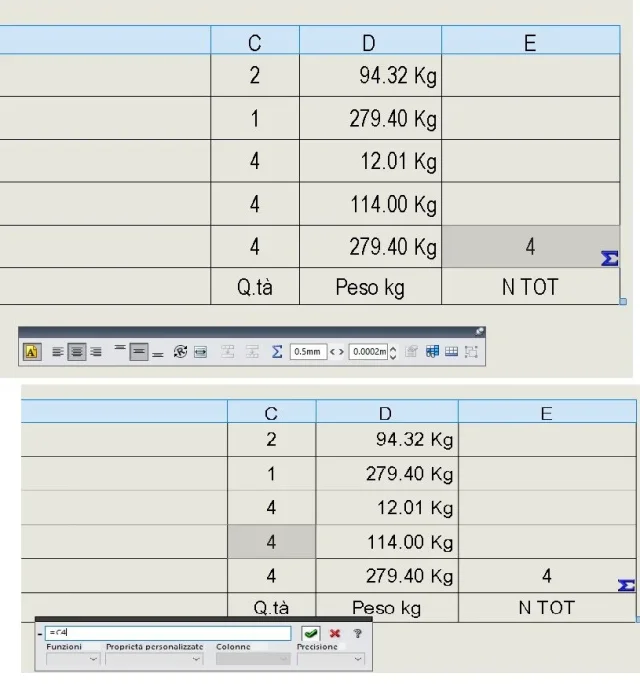
look at the post #3 video of the link, but as what I explained above is a bit confusing I make you the mirror of the operations:
1 in the part create a property for the quantities (we call it banally n tot) and from a fictitious value so much to have a given
2 create the design of the axieme and insert the distinct tidal*
3 in the distinct materials create a column that reads the property n tot (if the fictitious vault inserted in the part is ok)
4 select a column cell (one click I recommend) and you will see the text editing bar
5 in the bar you find the equation symbol, selection and in the cell you can insert the simple equation =cell showing the quantities (then once written the same selections the column cell where the quantities are written)
6 if instead of the fictitious value you appear the value of the quantities the process is ok
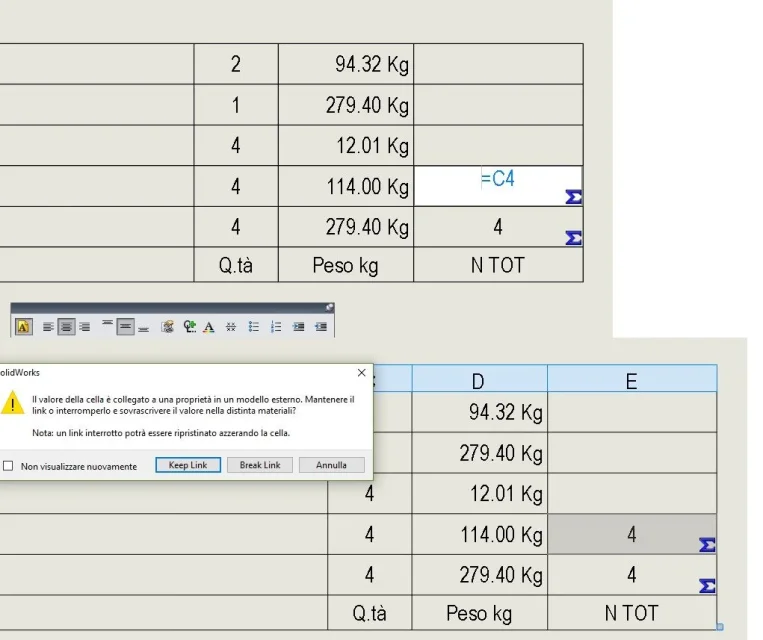
7 Now if you double click on column n tot cell of the message must appear the cell value is connected to a property with the buttons you want to keep it or you want to interrupt it, you select to keep it and in this way the value guided by the equation is transferred to the properties of the part

* separate materials can also be inserted inside the axieme

a couple of picturesImmagine1.webpImmagine2.webp
 

Forum statistics

Threads
44,997
Messages
339,767
Members
4
Latest member
ibt

Members online

No members online now.
Back
Top