ale1190
Guest
Bye to all,
I happen every now and then, at the table of totals, to fail to export in dwg or dxf.
At first I attributed the fault to downloaded commercial components, which were "defective". actually other times, deleting or reloading these components, the thing was resolved.
but not this time. I came to clear all the components to see to find what gave the problem, but nothing. :36_1_4:
This is the table, very simplified, which I have left: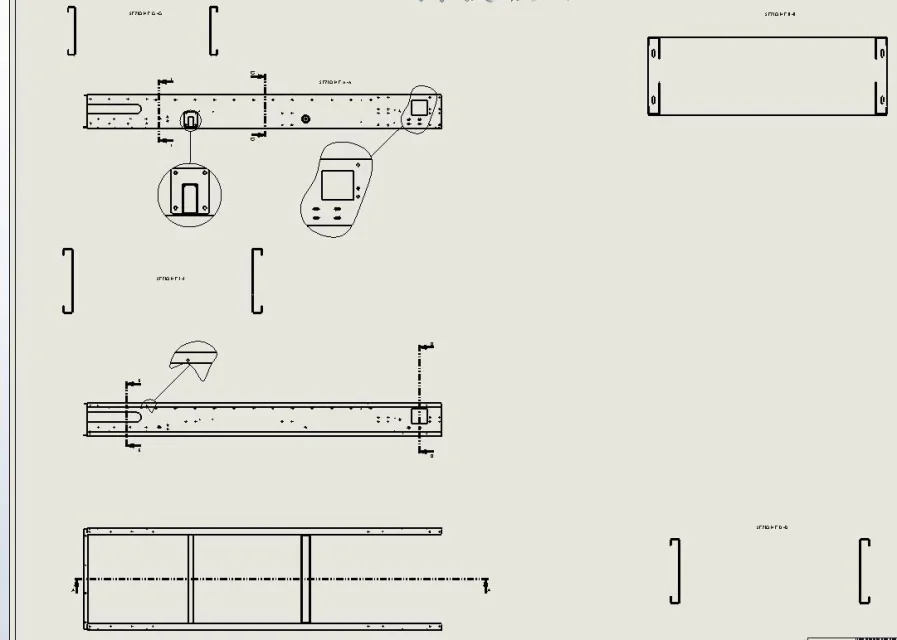 apparently no problem. sin that when I go export to dwg or dxf, the result is this:
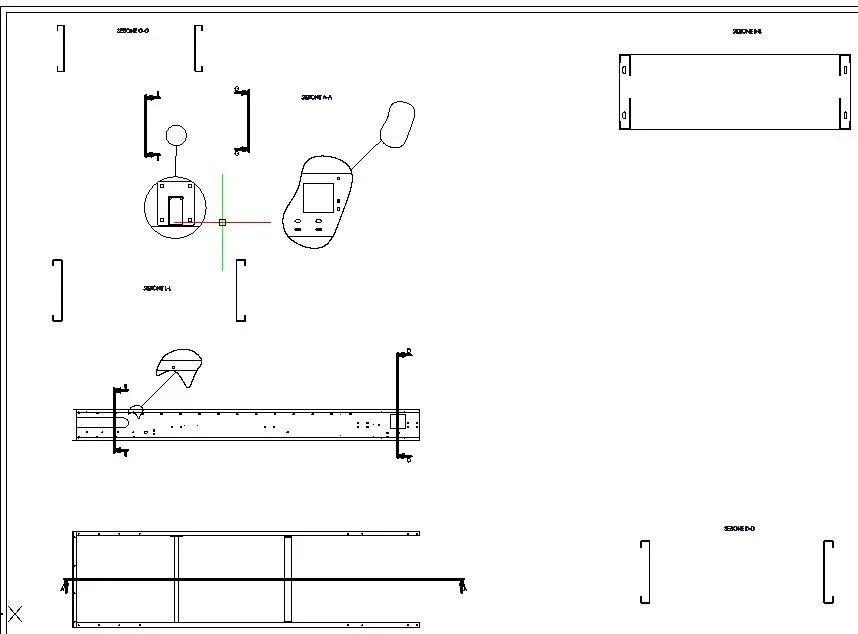 the a-a section has disappeared, but its details are seen.. :36_1_25:
attached a zip with inside the files we say "corrotti".View attachment NON ESPORTA TUTTE LE VISTE.7zHas anyone ever happened anything like that? Can you help me?
I happen every now and then, at the table of totals, to fail to export in dwg or dxf.
At first I attributed the fault to downloaded commercial components, which were "defective". actually other times, deleting or reloading these components, the thing was resolved.
but not this time. I came to clear all the components to see to find what gave the problem, but nothing. :36_1_4:
This is the table, very simplified, which I have left:
apparently no problem. sin that when I go export to dwg or dxf, the result is this:the a-a section has disappeared, but its details are seen.. :36_1_25:attached a zip with inside the files we say "corrotti".View attachment NON ESPORTA TUTTE LE VISTE.7zHas anyone ever happened anything like that? Can you help me?