• This forum is the machine-generated translation of www.cad3d.it/forum1 - the Italian design community. Several terms are not translated correctly.

verification element in surface machining roughing and pocket problem

  • Thread starter Thread starter RiccDS
  • Start date Start date

RiccDS

Guest
Hi I have a couple of questions:

1-in surface machining, when the surfaces of a roughening operation are assigned, a type is called verification (a verification element). I don't understand what it takes. ideas?

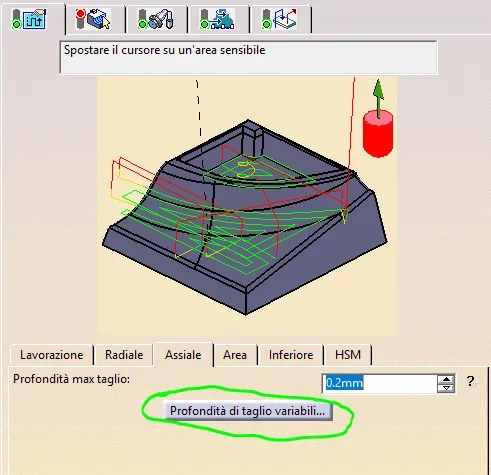
2-always in surface machining I'm trying to slit a pocket with a limiting contour. the pocket has beveled edges with a fittings. I would like it to be dug in more past, that is first with depth 0.2mm then to 0.4 etc. I don't understand why in the tutorials I've seen online this thing already does it automatically while in my case it always does and only at a height equal to "maximum depth of cutting" of the axial card. Any indication? I'm trying to get some pictures.

 
the verification..... is a surface that you want it not to be touched and you can also put what it has to stay away .

For the second case, I have to see in the office... but I don't understand the usefulness, you tell him you want to rough up and overmmetal, then you decide the past max, I usually put 0.5 mm.... then think of the cam.
 
It seems to me that there is a button where you give the cutting prof that allows you to do the past as you want..... so to increase............... .
 
the verification..... is a surface that you want it not to be touched and you can also put what it has to stay away .
I'm not so sure I understand: Actually, when I step on that portion of the surface I've been looking for on the left, he says, "click to select an area to ignore in the definition of part", which seems to me to be what you're telling me.Cattura.webp
For the second case, I have to see in the office... but I don't understand the usefulness, you tell him you want to rough up and overmmetal, then you decide the past max, I usually put 0.5 mm.... then think of the cam.
The fact is that in my case the cam is not thinking about it. i.e. if I put it 0.2mm maximum for the single pass that does not make further past and stops at the first step, when maybe 4 passes would be necessary to get to the lower surface, i.e. leaves me with an incomplete processing.
You mean this button? Cattura1.webpHowever it is the first time I try to set up a casket processing, so among other things I did not understand where the supermetal :rolleyes is set:
 
ok I realized that the overmetal is set by clicking on "offset aside" and I understood "offset by verification" is what indicated me mcbramby.
 
. . . . . . . . the verification that I said is that to the right that to the left I never used it seems that it does not show you a superfice and the cam fresi ................ .
 

Forum statistics

Threads
44,997
Messages
339,767
Members
4
Latest member
ibt

Members online

No members online now.
Back
Top