
• This forum is the machine-generated translation of www.cad3d.it/forum1 - the Italian design community. Several terms are not translated correctly.

rototranslation

  • Thread starter Thread starter hoytdefiant
  • Start date Start date

hoytdefiant

Guest
Good morning to all, I wanted to know if solidworks has introduced some new strategy to achieve cuts with rototrasla function.
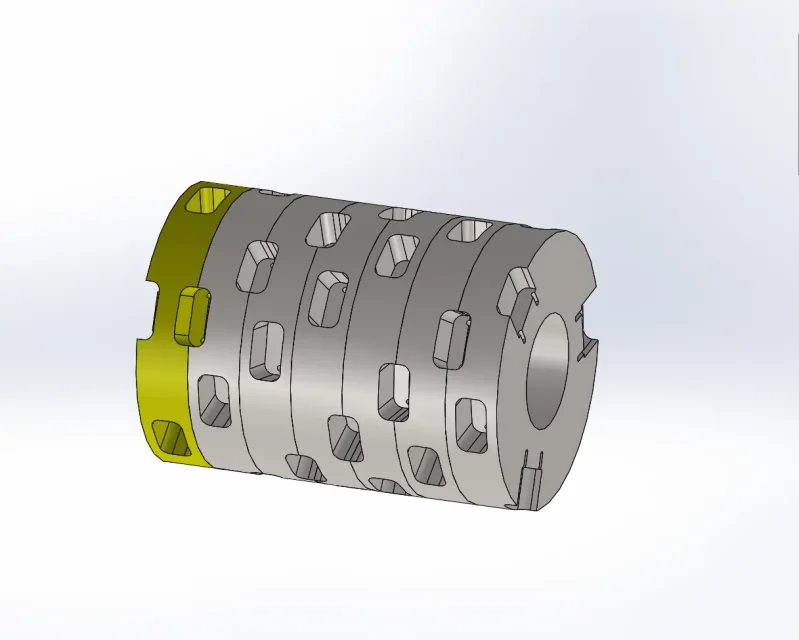
I basically need to create a series of equal backgrounds (with more functions - cutting, radius and creation of holes) around a cylinder, making a move both axial and rotary. you will tell me to draw a coil on the diameter of the cylinder and then make a repeat guided by the sketch but I have left this type of practice for a long time since it is inhuman to find the right step to get a correct rotation. .currently the solution I found faster is to create sectors and then
mating them in a set but this also takes care of me a lot of work because I have to create tilted plans and every time to recreate the various functions. If you have any advice, I'd be grateful.
I attach an example of the sector.

Thank you.
 

Attachments

no that is just a sector, then I have to pair various sectors together so that half pockets become whole pockets. I attach a pdf of a work I did similar.
 

Attachments

ot: changes version of the software written in the profile, because it does not open the file with 2016 (says that it is a future version)
 
therefore it is a problem of assembly together and not of functions of the part
 
No, no, now I'm building the part like a set. I do so many wide sectors as the double of the step I have to make, I create my pockets stalking them by tilting the work plans and after amount various sectors in a set and I go to mate them. the piece in reality though it is only one, it is not formed by sectors, but if I had to draw a hundred pockets, positioned at edge, it takes me a couple of days.
 
the image you entered in post #5 should be done as a single part?
Can't you use the curved repeat? That's what I need.
 
the image you entered in post #5 should be done as a single part?
Can't you use the curved repeat? That's what I need.
you should be a single part.
as I wrote you in post #1, I've already tried it on circumference but it's not easy at all (I've never succeeded) to find the right axial step to have a correct rotation. the function for if it works, but if I have to move axially for example of 100 mm and rotate 15°, how do I with the coil? Do I have to go on trial? in the axial step I have to have absolute precision, I cannot settle for an approximate positioning.
 
the best of 2018 should only concern repeats together seems to me; not having 2018 I have to rely on what I remember the update course. This is the manual manual manual in which the news of 2018.
that of repetition on the curve is however an argument already treated in the forum; I don't know if, however, the speech of angular precision was addressed. ripetizione curva
 
Have you tried with the table-guided repetition?
in excel you get the x and y values according to the angle, carry in txt format and load it in the repetition function
 
Good morning to all, I wanted to know if solidworks has introduced some new strategy to achieve cuts with rototrasla function.
I basically need to create a series of equal backgrounds (with more functions - cutting, radius and creation of holes) around a cylinder, making a move both axial and rotary. you will tell me to draw a coil on the diameter of the cylinder and then make a repeat guided by the sketch but I have left this type of practice for a long time since it is inhuman to find the right step to get a correct rotation. .currently the solution I found faster is to create sectors and then
mating them in a set but this also takes care of me a lot of work because I have to create tilted plans and every time to recreate the various functions. If you have any advice, I'd be grateful.
I attach an example of the sector.

Thank you.
I don't happen often, but when I happen I do just with the spire and the repetition guided along the curve. There's some approximation and I don't know if you can tolerate it, but I don't find it inhuman.
 
I don't happen often, but when I happen I do just with the spire and the repetition guided along the curve. There's some approximation and I don't know if you can tolerate it, but I don't find it inhuman.
I have a few tenths of light between rotating blades and fixed blades and I cannot afford to accumulate errors, otherwise after a few steps I already begin to go into interference.
 
Have you tried with the table-guided repetition?
in excel you get the x and y values according to the angle, carry in txt format and load it in the repetition function
I don't know if it does my case and how many variables you can give, but I don't have a move on a 2d lattice, I have to move in x along the rotor axis, in y I stay still because I roote the tree. if I can make a table with shifts and rotation and check a cutting function the game is done.
 
looks so much like a shredder drum do waste... .
However the only way in the part is to do the propeller and to do the repetition along the sketch. However, you can also manually define the 3d sketch of the points in the middle of the pockets and then do the function-driven series. Another alternative you make the skeleton with 3d sketch, do your pocket and then cover and paste the function or make it a tool to insert n times on the skeleton done.
 
looks so much like a shredder drum do waste... .
However the only way in the part is to do the propeller and to do the repetition along the sketch. However, you can also manually define the 3d sketch of the points in the middle of the pockets and then do the function-driven series. Another alternative you make the skeleton with 3d sketch, do your pocket and then cover and paste the function or make it a tool to insert n times on the skeleton done.
Thank you very much, as soon as I have a moment with this system.
 

Forum statistics

Threads
44,997
Messages
339,767
Members
4
Latest member
ibt

Members online

No members online now.
Back
Top