
• This forum is the machine-generated translation of www.cad3d.it/forum1 - the Italian design community. Several terms are not translated correctly.

added file name in view label

  • Thread starter Thread starter bibi9000
  • Start date Start date

bibi9000

Guest
Hello everyone
as from title I ask how to do for:
add file name in the label view to every new creation view

thanks to everyone hello
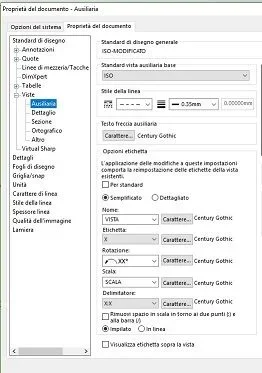
 
I noticed that I can add label automatically to the creation of the view...and if I change scale compared to that of the sheet automatically shows me the scale... there is no method to add the file name into the label a little more automated. . .
Thank you.
 
I have noticed that I can add label automatically to the creation of the view...and if I change scale compared to that of the sheet automatically shows me the scale. .
How do you do that?
 
if the file contained in the view contains a property with the file name you can recall it with a note. the note you can insert it with a simple copy-paste.

example: you do a property in the templates you call file and how value the cheques $prp:"sw-file name" (you can do it in the part template and together so you always find it without doing anything)

then create a note that recalls this property for the view in which the note is inserted. Then cover the note and the crowns in the various views.
 
I saw that with the bubble I can choose to insert the file name instead of the article number...but aesthetically I liked it as an inventor in the note of the view scale...thanks for the advice after I try
How do you do that?
imposed by the property of the document. tonight if I ever tell you where...
 
If you refer to these you can't put the file name. you can try with variables that read properties, but I doubt stronglyImmagine.webp
 

Forum statistics

Threads
44,997
Messages
339,767
Members
4
Latest member
ibt

Members online

No members online now.
Back
Top