
• This forum is the machine-generated translation of www.cad3d.it/forum1 - the Italian design community. Several terms are not translated correctly.

angles modeling sheets

  • Thread starter Thread starter cccicccio
  • Start date Start date

cccicccio

Guest
Good evening
I recently changed business. for years I have used solid edge for the modeling of sheets and now I have passed to solidworks. tralascianado the interface that I find less intuitive (maybe it is still early to be able to judge) the biggest drawback I find is in the definition of the fold angle. while with solid edge I inserted the same angle that in bending the operator set in bending machine now is no longer so and I am to have to type the additional corner having then agree to go to change the value at the table in the flat repetition.
Is there any setting that allows me to operate as I have always done?
 
the angle is defined according to the type of function used:
- in the base flange sketch
- in the flange function of the edge
so much to say a couple
in the drawings the insertion of the folds is automatic and it does not need to change anything, but will correspond to those inserted in the model and do not foresee range of deformation due to the operations of the machines

Perhaps if you bring some example, if you circumstigate the situation you can give targeted advice
 
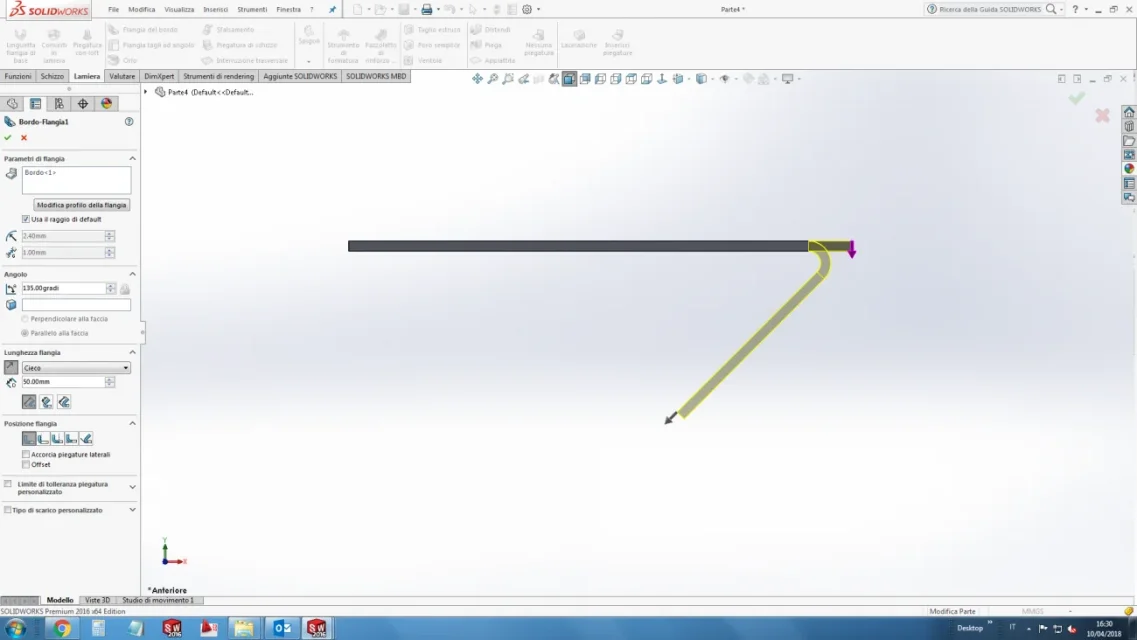
in the following example I created a base flange and then I want on one side there is a flange that makes a sharp angle of 45° with the previous one.
45° is the angle that I would set in solidedge in modeling and is the same angle that the operator will set in the machine for the realization of the fold.
in modeling phase with solidworks I have to set the angle to 135° to get what I want.
similarly to having a 160° angle I will have to set the value of 20°.
 

Attachments

  • ESEMPIO.webp
    ESEMPIO.webp
    38.2 KB · Views: 28
in the following example I created a base flange and then I want on one side there is a flange that makes a sharp angle of 45° with the previous one.
45° is the angle that I would set in solidedge in modeling and is the same angle that the operator will set in the machine for the realization of the fold.
in modeling phase with solidworks I have to set the angle to 135° to get what I want.
similarly to having a 160° angle I will have to set the value of 20°.
135° is the correct angle for that fold, 45 is wrong. in fact parts from a flat sheet and the right angle is what makes the sheet break during the fold.
 
135° is the correct angle for that fold, 45 is wrong. in fact parts from a flat sheet and the right angle is what makes the sheet break during the fold.
as a logical line is correct what you say but it is not functional when you have to interact with production. to have a fold as in the figure previously placed, to the technician I have to say to make a bend to 45° (value that will impose in the car) and not that I want the flap to make a corner of 135°.
I was just used differently with solidedge and I hoped you could change some setting to return to work as I always did.
 
in the table
for the single file you have to go to the flattened view property manager and change the bending notes
to do so by default you have to change the known file of the bending lines identifiable in option>position of file>file note of bending lines
 
in the table
for the single file you have to go to the flattened view property manager and change the bending notes
to do so by default you have to change the known file of the bending lines identifiable in option>position of file>file note of bending lines
Can you tell me what the file name is and how to change it?
 
135° is the correct angle for that fold, 45 is wrong. in fact parts from a flat sheet and the right angle is what makes the sheet break during the fold.
Can you document the claim that it is wrong? for me it is correct that that angle is 45 degrees and not 135. a flat sheet has no angle of or degrees but 180 in my opinion. if you look for in google "a corner at 135 degrees you get out an open and unclosed corner.
 
Can you document the claim that it is wrong? for me it is correct that that angle is 45 degrees and not 135. a flat sheet has no angle of or degrees but 180 in my opinion. if you look for in google "a corner at 135 degrees you get out an open and unclosed corner.
corners are written on the development that is flat. the note declares the direction (up or down) with its value. in that context it is right to give the angular shift value from the flat position, otherwise it is illogical. this note declares direction and value of a move from a plan. none of the workshops with which I have ever objected, my feedback with production confirms the correctness of the notes proposed by solidworks. When they tell me, make me a 45° fold, it means I bend 45°, not 135°. in my opinion and solidedge working backwards.
the similar situation we have with the cutting of the profiles. If I declare a cut at 0° I am actually cutting the profile at 90°.
 

Forum statistics

Threads
44,997
Messages
339,767
Members
4
Latest member
ibt

Members online

No members online now.
Back
Top