
• This forum is the machine-generated translation of www.cad3d.it/forum1 - the Italian design community. Several terms are not translated correctly.

vary quote from the window

  • Thread starter Thread starter stelio
  • Start date Start date

stelio

Guest
Hello everyone, boys
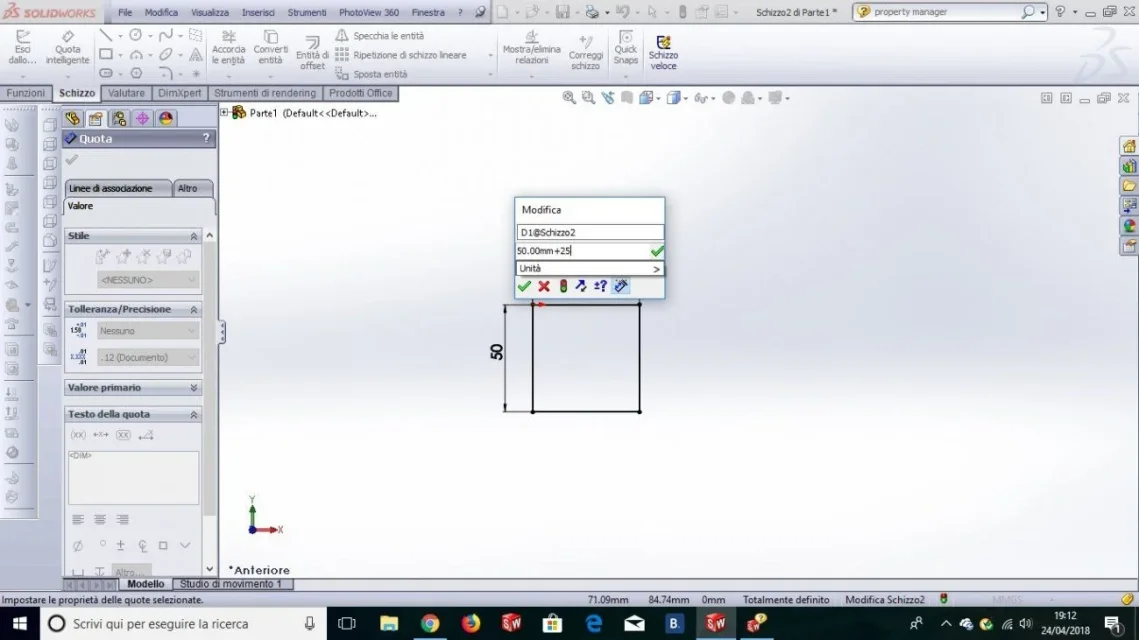
I installed premium solidworks 2013 on the new laptop and unfortunately match the following problem (on the previous computer did not do it!!!): Clicking on a quota opens the relative window in which we can make changes to the same quota by acting on the darts and the horizontal wheel. normally you can also manually insert a value we want to add or subtract to the original quota, etc. etc. (very convenient) and sending the original quota is modified accordingly with the addition of the new value. the problem lies in the fact that it allows me to insert the value I want, but then giving the ok the quota does not change.
Can anyone help me?

thanks in advance
 
So once you have entered the quota, can you no longer change it? Not even the property manager?
 
So once you have entered the quota, can you no longer change it? Not even the property manager?
hello and thanks for the prompt answer

I apologize, guys, but explaining things well is not part of my nature!!! !
I can change the quotas: For example, I have a 20 mm line. in case you want to change it, just click on it and enter the new value: the line changes accordingly and so far everything ok.
with the attached image it is easier to let you know what happens: I want to change the horizontal line that currently measures 50 mm by increasing 25mm. clearly it is an operation that we can do in mind without problems: We enter the value 75 and the line changes accordingly. in the case of more complex quotas it is very practical to insert the value we want to add or subtract (in this case 25) directly in the window next to the original quota and press Enter: the two values are added and the line changes accordingly.
Unfortunately it does not!

Thanks again
 

Attachments

  • Finestra quota.webp
    Finestra quota.webp
    65.9 KB · Views: 14
to create an equation; If you don't, as I suppose, it means that the installation has had some problems and you have to reinstall.
it had happened to me too, but I noticed it only by making equations and I do not remember if I had problems in operations through the editor of quotas
 
to create an equation; If you don't, as I suppose, it means that the installation has had some problems and you have to reinstall.
it had happened to me too, but I noticed it only by making equations and I do not remember if I had problems in operations through the editor of quotas
Thanks again, you are a great and always precious advice.
I'll try.
Hi.
 

Forum statistics

Threads
44,997
Messages
339,767
Members
4
Latest member
ibt

Members online

No members online now.
Back
Top