• This forum is the machine-generated translation of www.cad3d.it/forum1 - the Italian design community. Several terms are not translated correctly.

unique curve

  • Thread starter Thread starter fidippide
  • Start date Start date

fidippide

Guest
good morning, I built two closed curves to later make a solid multisection but one of them is made up of more curves (if you want to make an extrusion I would succeed). How can I make the sketch a single closed curve? Thank you very much!Image 2.webp
 
do you want to make a solid multi section using these two curves? in such case the two curves must be on different planes and therefore different sketches.
otherwise I have not understood the question well.
 
do you want to make a solid multi section using these two curves? in such case the two curves must be on different planes and therefore different sketches.
otherwise I have not understood the question well.
thank you for the answer pie81. this is the first "face", the second is not visible in the image. I want to make these curves two unique curves and not 16.
 
with the foreign command,
extract the outer curve and get the unique "external" curve
extract the inner curve and get the unique curve "inside"

use extracts (instead of sketching)

or
 
with the foreign command,
extract the outer curve and get the unique "external" curve
extract the inner curve and get the unique curve "inside"

use extracts (instead of sketching)

or
kind giann55, I don't find the command "extreme". Can you tell me where she is? Thank you very much.
 
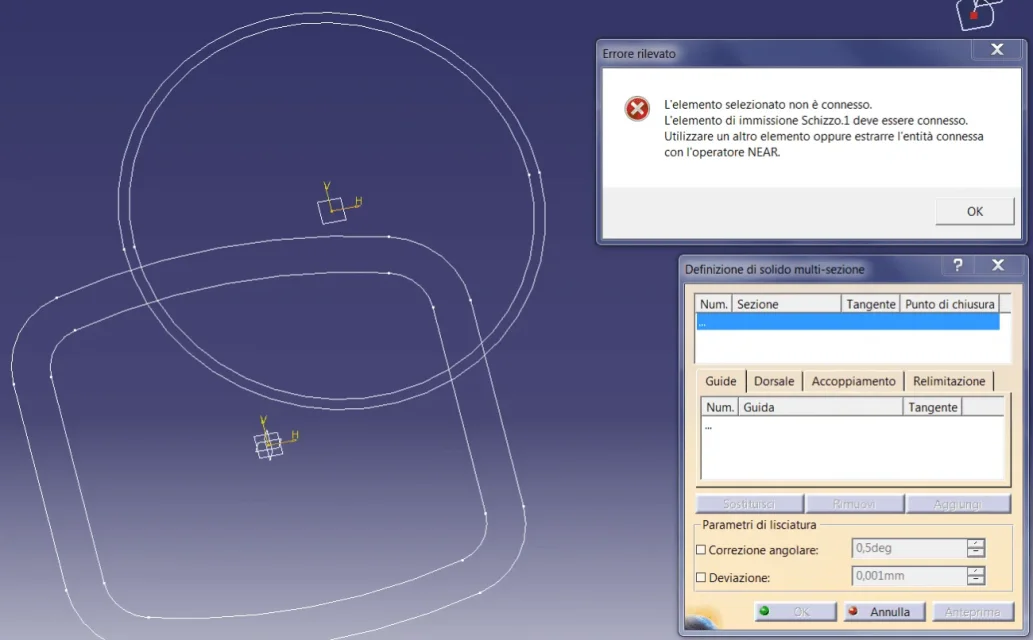
good morning motocad, if I select the sketch gives me the following warning.View attachment 50356
It gives you that mistake because it's not 4 sketches but two, nothing hits the curves,
every rounded rectangle must be a sketch and each circle a sketch
you did as you did with autocad, here you are not on autocad
 
It gives you that mistake because it's not 4 sketches but two, nothing hits the curves,
every rounded rectangle must be a sketch and each circle a sketch
you did as you did with autocad, here you are not on autocad
I understand. How do I then drill the piece? That must be a conduit. Thanks motocad!
 
the external command is in the generative design environment (menu/inser/operations/extreme)
I agree with motocad, the problem is that they are 2 sketches instead of 4, if you do not have the surface module, do 4 sketches instead of 2, first create the solid multisection and then to empty it use the solid multisection feature removed
 
So, thanks to your advice I managed to do something (see attached image) but I have to improve some aspects of the piece. I had to use the command "extreme" as suggested by gianni55. I then used the "solid multisection removed" feature to practice cavity. Thank you all!Image 4.webp
 
Well,
but the construction mode you applied is not optimal (hybrid mode with geometric groups ordered inside the body, more entity in a sketch and consequently extraction of profiles etc.)

better to work in non-hybrid mode, where in a simple geometric group (not ordered) insert the sketch 1 initial external profile
sketch 2 final external profile
sketch 3 internal profile
sketch 4 final internal profile
then activate the body
run solid multisection
Executing solid multisection removed
 
Well,
but the construction mode you applied is not optimal (hybrid mode with geometric groups ordered inside the body, more entity in a sketch and consequently extraction of profiles etc.)

better to work in non-hybrid mode, where in a simple geometric group (not ordered) insert the sketch 1 initial external profile
sketch 2 final external profile
sketch 3 internal profile
sketch 4 final internal profile
then activate the body
run solid multisection
Executing solid multisection removed
and how could I do it operationally? Thank you gianni55!
 
tools/options/infrastructure/part infrastructure/document part removes hybrid modeling check marks

make the piece as I told you
 
dear gianni55 I made the piece as you suggested. I just forgot to pop up at the beginning "create a geometric group". cmq now I will no longer use hybrid modeling as from your advice. Thank you!Image 3.webp
 
now that you have got a diameter in the terminal part, if you want you can close it in a perfect sphere:

from the sketch of the outer diameter, generate a prism (high as the diameter itself), then a fitting (equal to the diameter itself), then a shell (with the same thickness of the tube)
 
I'm sorry, but something unique happened. After making the prism, I realized I was wrong with the size of the bone and I modified it. However, the extrusion was not modified. I changed the catia settings as suggested by gianni55 (no hybrid modeling). it is then known by making holes, that the solid is not full. it is seen that the initial sketch does not coincide with the edge of the solid (first attached image). It's like the solid wasn't updated.Image 3.webp But what happened?Image 1.webpImage 2.webp
 
Last edited:
mm

something went wrong but without seeing the model it is difficult to answer. . .

controls the sketch.1 that lies in the geometric group, should be identical (possibly connected) to the sketch.1 of the body

Let me know.

I send you a private message

Hi.
 
mm

something went wrong but without seeing the model it is difficult to answer. . .

controls the sketch.1 that lies in the geometric group, should be identical (possibly connected) to the sketch.1 of the body

Let me know.

I send you a private message

Hi.
the problem that emerges from the holes is due to emptying (I do not know well to use the command for now). I still don't understand why prism is not extruded by that sketch. cmq I made the piece again.
 

Forum statistics

Threads
44,997
Messages
339,767
Members
4
Latest member
ibt

Members online

No members online now.
Back
Top