• This forum is the machine-generated translation of www.cad3d.it/forum1 - the Italian design community. Several terms are not translated correctly.

inventor not updated

  • Thread starter Thread starter Tarkus
  • Start date Start date

Tarkus

Guest
Hello everyone,
as from title, inventor is lazy to update:
if I have a part and a derivative, to modify (and save) the part, the derivative does not update, same thing for a portion put on the table.
if I change the part the drawing does not update, I almost always have to close and reopen the files to see the update icon activated.
Does anyone know how to solve this?
 
tab " tools " - " application options " - " together " - " postpone update off "?
 
if I have a part and a derivative, to modify (and save) the part, the derivative does not update,
to me when there are changes, the update button appears in the derivative.2019-02-22 08_49_07-Autodesk Inventor 2018 - [190222-b].webp
if I change the part the drawing does not update, I almost always have to close and reopen the files to see the update icon activated.
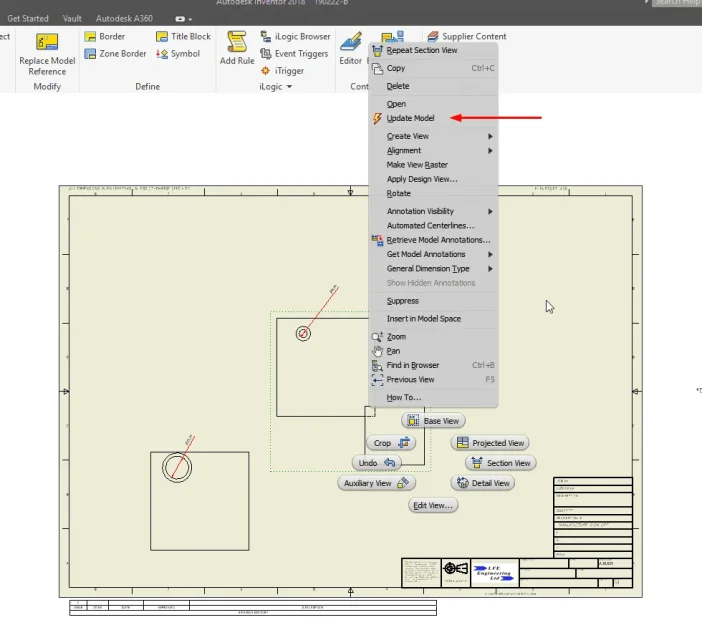
If you're talking about the view of the derived part: it's not a great deal, but with right click the update model option appears. inventor opens the part and adorns part and view.2019-02-22 09_00_29-Marking Menu.webp
 
to me in that position nothing appears, but I repeat, the problem is created both with the table and between the parent part and the derived part.
 
in the table, if you go to the document options there is postponed updates. I didn't see her. in the part in the management tab is recreates everything. Try them and let's go for exclusion.
Then sometimes even strange things happen to me and just wait the next day and it works again... Mah.
 
In fact, after the lunch break I return to the pc, and the icon updates it there, ready and waiting to click...mha
 

Forum statistics

Threads
44,997
Messages
339,767
Members
4
Latest member
ibt

Members online

No members online now.
Back
Top