• This forum is the machine-generated translation of www.cad3d.it/forum1 - the Italian design community. Several terms are not translated correctly.

selection of direct commands

  • Thread starter Thread starter deep70
  • Start date Start date

deep70

Guest
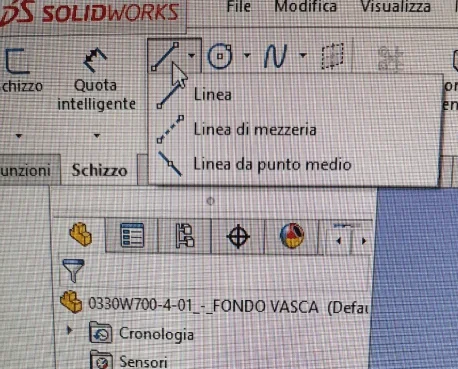
Hello everyone, I have a question that many may seem trivial, I don't know why from a few days I can't directly select any sw command, i.e. when I go to choose the command that I need, I open the menu of the various other options (commands) available, while first I select it directly and if anything, I should go to click in the appropriate side black braid of the pane.
This thing besides being quite uncomfortable, makes me waste time useless.
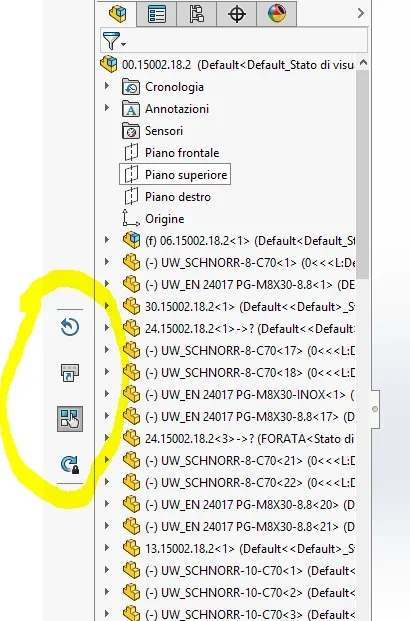
place an image to make the idea better, thanks to all for the possible answers given and good week to you.1552758141711.webp
 
another question, does anyone tell me what this bar is that I never called back and saw?
1552904726834.webp
 
for the first post; this morning I was no longer working the separate table materials put me all asterisks... .
I lost more than an hour... then I go to see in the windows start menu and the magic writing appears to me... .
reboot and update.... said done solved the problem....it is trying to give him a peek too maybe it is there the problem; also because in my everything works correctly(or almost)

Hi.
 
for the second post I have never seen that bar; You tried to see
Right click on command manager customize and see active bars... then go for exclusion.
Let us know that it is if you solve
Hi.
 
I tried to see anything, I reset and as last beach installed sw 18 again without solving anything. if instead start sw17 everything is ok and it works well.. I don't really understand..
 
I tried to see anything, I reset and as last beach installed sw 18 again without solving anything. if instead start sw17 everything is ok and it works well.. I don't really understand..
then I go to see in the windows start menu and the magic writing appears to me....revvia and updated.... said done solved the problem... .
given the teseo response I would tell you to try to see if there are pending updates, or, if you can see if you can do a recovery (always there is one before the issues you expose)
 
Yes but the strange fact is that in sw17 it does not trouble me.. what enough road therefore can depend on the system.operative. .
 
Yes but the strange fact is that in sw17 it does not trouble me.. what enough road therefore can depend on the system.operative. .
It seems strange to me that reinstalling has not solved the problem, yet it is so...
 
Hello everyone, sorry for the delay, you have me the solution was to perform a point of restore windows, so I presume it was lost from the operating system precisely, .. or something installed in recent times.
thank you all for the interest and good day to you.
 

Forum statistics

Threads
44,997
Messages
339,767
Members
4
Latest member
ibt

Members online

No members online now.
Back
Top