
You are using an out of date browser. It may not display this or other websites correctly.
You should upgrade or use an alternative browser.
You should upgrade or use an alternative browser.
Matteo Cappelli dis.CAD
Guest
for the problem that "zippa", you must for once export manually with the command:
file - export - export to dwg, select dwg for autocad, select options and turn off the pack&go option
file - export - export to dwg, select dwg for autocad, select options and turn off the pack&go option
Gian704
Guest
Thank you so much!! !for the problem that "zippa", you must for once export manually with the command:
file - export - export to dwg, select dwg for autocad, select options and turn off the pack&go optionView attachment 52896
andrea_botti
Guest
Unfortunately to me also removing the flag from this option remains the problemfor the problem that "zippa", you must for once export manually with the command:
file - export - export to dwg, select dwg for autocad, select options and turn off the pack&go optionView attachment 52896
andrea_botti
Guest
@catcher, please know your great availability. :
I would like to know, if it is not to ask too much, how to set a particular configuration for exporting dwg, see image
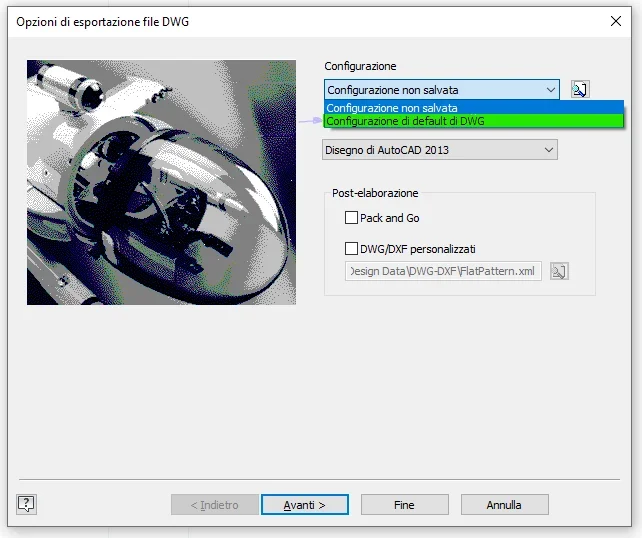 I'm currently working with this code (I don't need the storage number and the dwf so I commented them)
I would like to know, if it is not to ask too much, how to set a particular configuration for exporting dwg, see image
I'm currently working with this code (I don't need the storage number and the dwf so I commented them)
public sub pubblica()

    ' obtain reference to drawing
    dim odoc as document
    set odoc = thisapplication.activedocument


    ' destination folder
    ' ---------------------------------------------------
    dim sexportpath as string
    sexportpath = "c:\users\a.botticini\desktop\#esportati_dwg-pdf\"
    ' ---------------------------------------------------

    if odoc.documenttype <> kdrawingdocumentobject then
        msgbox ("deve essere aperta una tavola")
        exit sub
    end if

    ' get the filename with no path
    dim sfilename as string
    sfilename = sexportpath & isolanome(odoc.fullfilename, true)

    ' numero di revisione
    dim srev as string
    srev = inputbox("revisione tavola? ", "inserisci numero di revisione", "00")

    'legge le iproperties personalizzate:
    '-------------------------------------------------------------------------------------------------------
    dim opropsets as propertysets
    set opropsets = odoc.propertysets

    'custom
    '-------------------------------------------------------------------------------------------------------
    dim ocustompropset as propertyset
    set ocustompropset = opropsets.item("{d5cdd505-2e9c-101b-9397-08002b2cf9ae}")

    on error resume next
    dim scod as string

    ' sostituire "codice" con il nome che si usa per l'iproperty che interessa
    'scod = ocustompropset.item("codice").value

  '  if scod = "" then
   '     scod = inputbox("codice ricambio (inserimento manuale):? ", "inserimento manuale codice ricambio")
   ' end if

    sfilename = sfilename & "_rev" & srev
    '& " (" & scod & ")"

    ' get the dwg translator add-in.
    dim dwgaddin as translatoraddin
    set dwgaddin = thisapplication.applicationaddins.itembyid("{c24e3ac2-122e-11d5-8e91-0010b541cd80}")

    ' get the dxf translator add-in.
    dim dxfaddin as translatoraddin
    set dxfaddin = thisapplication.applicationaddins.itembyid("{c24e3ac4-122e-11d5-8e91-0010b541cd80}")

    ' get the pdf translator add-in.
    dim pdfaddin as translatoraddin
    set pdfaddin = thisapplication.applicationaddins.itembyid("{0ac6fd96-2f4d-42ce-8be0-8aea580399e4}")

    dim strinifile as string


    ' common init
    ' create a context object
    dim ocontext as translationcontext
    set ocontext = thisapplication.transientobjects.createtranslationcontext
    ocontext.type = kfilebrowseiomechanism

    ' create a namevaluemap object
    dim ooptions as namevaluemap
    set ooptions = thisapplication.transientobjects.createnamevaluemap

    ' create a datamedium object
    dim odatamedium as datamedium
    set odatamedium = thisapplication.transientobjects.createdatamedium

    ' ---------------------------------------------------------------------------
    ' dwg
    ' -------------------------------

    ' check whether the translator has 'savecopyas' options
    if dwgaddin.hassavecopyasoptions(odoc, ocontext, ooptions) then
        ' file with exportation options
        strinifile = "c:\tempdwgout.ini"
        ' create the name-value that specifies the ini file to use.
        ooptions.value("export_acad_inifile") = strinifile
    end if

    'set the destination file name
    odatamedium.filename = sfilename & ".dwg"


    'publish document.
    call dwgaddin.savecopyas(odoc, ocontext, ooptions, odatamedium)

    ' -------------------------------
    ' fine dwg
    ' ---------------------------------------------------------------------------


    ' ---------------------------------------------------------------------------
    ' dxf
    ' -------------------------------

    ' check whether the translator has 'savecopyas' options
'    if dxfaddin.hassavecopyasoptions(odoc, ocontext, ooptions) then
 '
  '      ' file with exportation options
   '     strinifile = "c:\tempdxfout.ini"
'
 '       ' create the name-value that specifies the ini file to use.
  '      ooptions.value("export_acad_inifile") = strinifile
   ' end if
'
 '   'set the destination file name
  '  odatamedium.filename = sfilename & ".dxf"
'
 '   'publish document.
  '  call dxfaddin.savecopyas(odoc, ocontext, ooptions, odatamedium)
    ' -------------------------------
    ' fine dxf
    ' ---------------------------------------------------------------------------


    ' ---------------------------------------------------------------------------
    ' pdf
    ' -------------------------------

    ' check whether the translator has 'savecopyas' options
    if pdfaddin.hassavecopyasoptions(odoc, ocontext, ooptions) then

        ' options for drawings...

        ooptions.value("all_color_as_black") = 1

        'ooptions.value("remove_line_weights") = 0
        'ooptions.value("vector_resolution") = 400
        'ooptions.value("sheet_range") = kprintallsheets
        'ooptions.value("custom_begin_sheet") = 2
        'ooptions.value("custom_end_sheet") = 4
    end if

    'set the destination file name
    odatamedium.filename = sfilename & ".pdf"


    'publish document.
    call pdfaddin.savecopyas(odoc, ocontext, ooptions, odatamedium)
    ' -------------------------------
    ' fine pdf
    ' ---------------------------------------------------------------------------
end sub

'funzione che restituisce il nome del file togliendo il path ed il suffisso
public function isolanome(byval nomefile as string, optional trunc as boolean) as string

    'toglie il .ipt
    if trunc = true then
        nomefile = strings.left(nomefile, len(nomefile) - 4)
    end if

    dim pos as integer
    'ciclo che rimuove il path: trova "\" e tiene tutto a dx
    do
        pos = instr(nomefile, "\")
        nomefile = strings.right(nomefile, len(nomefile) - pos)
    loop until pos = 0
    isolanome = nomefile
end function
andrea_botti
Guest
non so bene come ma ho risolto ahahahah :roflmao:
didinero
Guest
I personally did not know its existence; and anyway I thank you for the report because it seems very interesting to me for the company.But nobody uses this?drawing porter | inventor | autodesk app store
Styff
Guest
hi to everyone, I recommend taking a look at st-boosters, I'm finding myself well with this
windreef
Guest
to be able to choose the configuration you must save it first, in the next screen to that post there is the "Save Configuration" button obviously once you set everything as you want. in the drop-down menu, there is also your configuration and if you save with that set configuration you will remain default until you change.@catcher, please know your great availability. :
I would like to know, if it is not to ask too much, how to set a particular configuration for exporting dwg, see image
View attachment 65456I'm currently working with this code (I don't need the storage number and the dwf so I commented them)
public sub pubblica()

    ' obtain reference to drawing
    dim odoc as document
    set odoc = thisapplication.activedocument


    ' destination folder
    ' ---------------------------------------------------
    dim sexportpath as string
    sexportpath = "c:\users\a.botticini\desktop\#esportati_dwg-pdf\"
    ' ---------------------------------------------------

    if odoc.documenttype <> kdrawingdocumentobject then
        msgbox ("deve essere aperta una tavola")
        exit sub
    end if

    ' get the filename with no path
    dim sfilename as string
    sfilename = sexportpath & isolanome(odoc.fullfilename, true)

    ' numero di revisione
    dim srev as string
    srev = inputbox("revisione tavola? ", "inserisci numero di revisione", "00")

    'legge le iproperties personalizzate:
    '-------------------------------------------------------------------------------------------------------
    dim opropsets as propertysets
    set opropsets = odoc.propertysets

    'custom
    '-------------------------------------------------------------------------------------------------------
    dim ocustompropset as propertyset
    set ocustompropset = opropsets.item("{d5cdd505-2e9c-101b-9397-08002b2cf9ae}")

    on error resume next
    dim scod as string

    ' sostituire "codice" con il nome che si usa per l'iproperty che interessa
    'scod = ocustompropset.item("codice").value

  '  if scod = "" then
   '     scod = inputbox("codice ricambio (inserimento manuale):? ", "inserimento manuale codice ricambio")
   ' end if

    sfilename = sfilename & "_rev" & srev
    '& " (" & scod & ")"

    ' get the dwg translator add-in.
    dim dwgaddin as translatoraddin
    set dwgaddin = thisapplication.applicationaddins.itembyid("{c24e3ac2-122e-11d5-8e91-0010b541cd80}")

    ' get the dxf translator add-in.
    dim dxfaddin as translatoraddin
    set dxfaddin = thisapplication.applicationaddins.itembyid("{c24e3ac4-122e-11d5-8e91-0010b541cd80}")

    ' get the pdf translator add-in.
    dim pdfaddin as translatoraddin
    set pdfaddin = thisapplication.applicationaddins.itembyid("{0ac6fd96-2f4d-42ce-8be0-8aea580399e4}")

    dim strinifile as string


    ' common init
    ' create a context object
    dim ocontext as translationcontext
    set ocontext = thisapplication.transientobjects.createtranslationcontext
    ocontext.type = kfilebrowseiomechanism

    ' create a namevaluemap object
    dim ooptions as namevaluemap
    set ooptions = thisapplication.transientobjects.createnamevaluemap

    ' create a datamedium object
    dim odatamedium as datamedium
    set odatamedium = thisapplication.transientobjects.createdatamedium

    ' ---------------------------------------------------------------------------
    ' dwg
    ' -------------------------------

    ' check whether the translator has 'savecopyas' options
    if dwgaddin.hassavecopyasoptions(odoc, ocontext, ooptions) then
        ' file with exportation options
        strinifile = "c:\tempdwgout.ini"
        ' create the name-value that specifies the ini file to use.
        ooptions.value("export_acad_inifile") = strinifile
    end if

    'set the destination file name
    odatamedium.filename = sfilename & ".dwg"


    'publish document.
    call dwgaddin.savecopyas(odoc, ocontext, ooptions, odatamedium)

    ' -------------------------------
    ' fine dwg
    ' ---------------------------------------------------------------------------


    ' ---------------------------------------------------------------------------
    ' dxf
    ' -------------------------------

    ' check whether the translator has 'savecopyas' options
'    if dxfaddin.hassavecopyasoptions(odoc, ocontext, ooptions) then
 '
  '      ' file with exportation options
   '     strinifile = "c:\tempdxfout.ini"
'
 '       ' create the name-value that specifies the ini file to use.
  '      ooptions.value("export_acad_inifile") = strinifile
   ' end if
'
 '   'set the destination file name
  '  odatamedium.filename = sfilename & ".dxf"
'
 '   'publish document.
  '  call dxfaddin.savecopyas(odoc, ocontext, ooptions, odatamedium)
    ' -------------------------------
    ' fine dxf
    ' ---------------------------------------------------------------------------


    ' ---------------------------------------------------------------------------
    ' pdf
    ' -------------------------------

    ' check whether the translator has 'savecopyas' options
    if pdfaddin.hassavecopyasoptions(odoc, ocontext, ooptions) then

        ' options for drawings...

        ooptions.value("all_color_as_black") = 1

        'ooptions.value("remove_line_weights") = 0
        'ooptions.value("vector_resolution") = 400
        'ooptions.value("sheet_range") = kprintallsheets
        'ooptions.value("custom_begin_sheet") = 2
        'ooptions.value("custom_end_sheet") = 4
    end if

    'set the destination file name
    odatamedium.filename = sfilename & ".pdf"


    'publish document.
    call pdfaddin.savecopyas(odoc, ocontext, ooptions, odatamedium)
    ' -------------------------------
    ' fine pdf
    ' ---------------------------------------------------------------------------
end sub

'funzione che restituisce il nome del file togliendo il path ed il suffisso
public function isolanome(byval nomefile as string, optional trunc as boolean) as string

    'toglie il .ipt
    if trunc = true then
        nomefile = strings.left(nomefile, len(nomefile) - 4)
    end if

    dim pos as integer
    'ciclo che rimuove il path: trova "\" e tiene tutto a dx
    do
        pos = instr(nomefile, "\")
        nomefile = strings.right(nomefile, len(nomefile) - pos)
    loop until pos = 0
    isolanome = nomefile
end function
windreef
Guest
io per dxf uo dxfclear buttre per dwg e pdf drawing porter , mi trovo bene
Forum statistics
ciao