• This forum is the machine-generated translation of www.cad3d.it/forum1 - the Italian design community. Several terms are not translated correctly.

seen dwg files as model

  • Thread starter Thread starter Kia2311
  • Start date Start date

Kia2311

Guest
Hello everyone!
the question that I advance already in the title I had "casually" (i.e., just by chance... without realizing how I had done) different time ago and now that the setting has jumped I no longer know how to do it again.
I try to be as clear as possible:
- I have a dwg file saved in read-only in a server folder (workplace in the office); is a file that is either updated or modified;
- this file I had somehow set it up so that by clicking the "+" next to the work card, it opened automatically....and it was necessarily that file there, because when I edited the file on the server and then I painted "+", the new file was updated.
therefore obviously the solution to go in tools - options - model settings - pattern name for the egg, it is not good because I would need a dwt copy of the dwg file and should then be saved in the folder where autocad fishes the models.
Among other things, the above option was certainly not because already other times in the past wanting to find the way I had set this thing I had set up the model, and in the voice "model per cnuovo was "no one".
of course I have also already spulked the forum and the web, but clearly the solution I find most often is that of the dwt file.
Thank you to anyone who will want to solve this strange doubt of mine. :roflmao::roflmao::roflmao:
 
probably someone had created a custom command that automatically saves you the two dwg and dwt extensions
 
thank you for the answer, but I don't think this is the solution for more reasons:
- first, because the pc is that of my station and basically I only work there;
Second, because none of my colleagues know how to do it and how I did it at the time... even because if they knew I wouldn't have written here....:lol:
- third, because in the folder where dwg file is saved there is no saving in dwt, and there is not even in the default template folder.
 
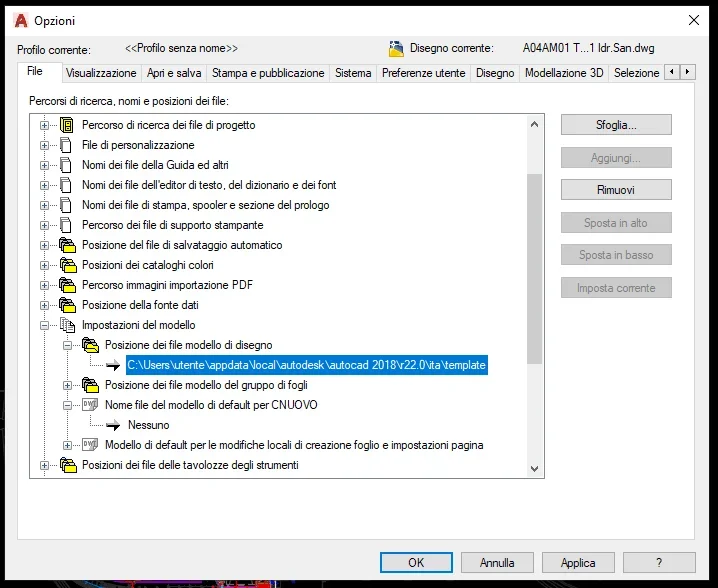
to every good account in the image that follows you find the path of defoult that as you well know is editable therefore if you all need to fish the same base file ( containing common customizations type quota styles, directors, blocks or other ) the dwt can be saved on the server and all pcs have to point to that position to open the base model.
 

Attachments

  • capture-20190822-223812.webp
    capture-20190822-223812.webp
    54.4 KB · Views: 14
Hello, what version of acad do you use?
see the link that follows, maybe find what you couldn't search, some fleas escaped, jump and are distrustful. . .https://www.cad3d.it/forum1/threads...-scheda-con-modello-dwt-personalizzato.54504/
I use 2018, thanks but in the link you suggested I did not find the solution....among other things the command that refers to "newtabmode" in my version is not there.

then, let's say that inside the office I am the only one who had adopted this solution; generally everyone keeps a link on the desktop of the original file saved on the server and launches the new tab from there.
I could do it, for charity... but the fact that I had previously done the other way and not succeed in doing it hurts me deeply...:mad::roflmao:

the thing about the dwt ok, I know, but the fact is that our model is in dwg, not in dwt, as I specified immediately at the beginning... and the passage to the dwt complicates the path, because if it is modified (what happens often), first you have to open the dwg, change the dwg and then save in dwt overwriting it to the old version.

the point is the fact that I had set just the dwg as a model!!! which, moreover, opened not only in read, as is the dwg model we have on the server.
 
hi, since you use 2018 you will not have missed the detail that the newtabmode command was present until 2015 as evidenced by gp....
the image I attached instead refers to 2016 or better from 2016.....
what explained in my second of 22:41 is the procedures you should follow to save goats and cabbages.
another beautiful system could be to set the machines in the same way through the file cuix, very useful method also to transfer in a single stroke all the settings between the various pcs that everyone can use or on pcs not owned but temporarily in use.


the trafil from you described for the dwt/dwg is in my opinion only one of your/our fantasy, from a dwg any copy commands or customizations in the dwt, if you want then there is also the cuix and if you want to keep belt and straps, since from what you understand on the file you use as a model you know how to mess in several, the passionate advice is to make a backup copy of the
as to then the option to open by experts and draw rows a pattern file, for more dwg, not in read-only..... best wishes.
The rest is history.
Bye.
 
hi, since you use 2018 you will not have missed the detail that the newtabmode command was present until 2015 as evidenced by gp....
the image I attached instead refers to 2016 or better from 2016.....
what explained in my second of 22:41 is the procedures you should follow to save goats and cabbages.
Good morning they grace, when I wrote that in my version there is no newtabmode I was referring precisely to what evidenced by gp in the link you put me, and the procedure you explained in your post I already knew it and of course I had already tried it but it was not that solution.

Maybe I didn't explain myself well and you didn't understand what my purpose would be, but the procedure that you signal me flows when I can't choose a dwg file in the path you say.
even if I change the path of the models as you see from image 1, when I go to select the file doesn't display me just the dwg, but I can only choose the dwt as you see in image 2 (other than in the folder I selected in this example there are no dwt files).
1.webp2.webpprobably the fact that I'm not very experienced in this sector makes me difficult, but I can't understand what you mean when you say that the dwg/dwt draw is my fantasy, in the sense that for those that are my knowledge the two files are actually two separate files, each for their own facts, and that modifying and saving the dwg then implies having to go back to dwt (which I had accidentally managed to avoid in the past).
as to then the option to open by experts and draw rows a pattern file, for more dwg, not in read-only..... best wishes.
The rest is history.
Bye.
other clarification: the model I'm telling you, as I said, is a dwg file saved on the office server, to which the read-only check is applied, so all the times it is opened you have the read-only warning and of course it must be "saved by name". It can happen clearly that some changes should be made, so those who have to temporarily delete the only reading, modification, saving, and relay the only reading.
all this to tell you that in this famous way I had set this model, clicking the + opened a new tab with the basic model, but not in read alone.......without however going to touch the file on the server minimally.

Finally allow me a joke......... .
the dispassionate advice is to make a backup copy of the dwt in more than one updated maintain position.
....thank you so much for the advice...we are in 20 in this studio, with people who have been working for more than 20 years but in fact the backups never thought of us.....:unsure:
 
I do not have the version with the cards, but I try to suggest to search in the file cuix (strumenti>personal,izza> interface) if there is a voice that identifies the + command and if this is settable for opening a certain dwg
 
kia, I miss the reason for the procedure you want to adopt and I have not understood so much the speech of the "read only", but keep in mind some things that could help you:

- you can indicate a folder in "model file location" ma in "pattern file name for egg" choosing a file in another position, in the new designs will be opened the latter

- dwts are dwg, just change the extension to the latter to make them model files, without making a save as -> dwt

- to change a dwt, you don't have to do any transformation, open it, change it and fix it

- in "pattern file name for egg" only dwt files are proposed, ma tu poi inserire qualunque dwg typing the path - e.g. d:\pippo\kia.dwg - and will be quietly treated as a template file
 
- in "pattern file name for egg" only dwt files are proposed, ma tu poi inserire qualunque dwg typing the path - e.g. d:\pippo\kia.dwg - and will be quietly treated as a template file
Thank you very much!!! This is what I wanted!!!! It was easier than I imagined....but unfortunately, despite turning around this thing a thousand times, I knew that once the window opened it made me choose between the dwts, and not the dwg....

for everything else ok, but actually it was something I wanted to do personally on my pc, while other things you suggested (such as setting up the dwt and editing directly that) would have meant to make present to all people in the studio that from here on it started from a dwt instead of dwg and set it accordingly on all pcs....while at the end, so many people are accustomed to starting it.

so much for information, the speech of the "read only" is done just to avoid that someone inadvertently saves a job on the original file (of course this risk is precisely because it starts from a dwg and not a dwt) and keeping it in "read only" so you are always forced to save with name, and the original file remains empty but in fact with all the settings of a model.

cmq, thank you so much again!!! the thing was really simple and I had done a bigger problem than it was!!
Thank you very much!! !
 
Good evening, kia, you solved, good. but allow me and forgive me but:

if you select row nobody then browse you can choose the path / location of the file you refer to.
View attachment 54351View attachment 54352at the end of the template file line (*.dwt) if you press on the arrow pointing at the bottom you have the opportunity to choose the quini extension the desired file, if it is there.

As for the read-only option of a dwg rather than a dwt that automatically proposes you to save in dwg or if you decide to overwrite it after customization and have selected the extension more with the possibility to keep track of who intervened doing what... is a convenience to which I could not give up as in the situation of the office in which you work it the only way to operate with a minimum security. backups, however, essential to be done with a simple bat file to be automatically launched via planning.
Good job, bye.
 

Forum statistics

Threads
44,997
Messages
339,767
Members
4
Latest member
ibt

Members online

No members online now.
ciao
Back
Top