
• This forum is the machine-generated translation of www.cad3d.it/forum1 - the Italian design community. Several terms are not translated correctly.

dxf export

  • Thread starter Thread starter Marcross91
  • Start date Start date

Marcross91

Guest
Good morning to all,

I'm not a mechanical designer, but a programming fan.

I wrote a c# program that receives as input a mechanical dxf file with quotation, detects only the quotas and tolerances and for each of these entities:
- adds a leader next to the quota so as to identify it
- inserts the quota in an excel file
In this way it generates a dimensional report for the methylological room in which I work.

the program works well with autocad, but the problem is that where I work I have catch v6, which does not insert quotations as dimensions, but breaks them in polylinee.

the question is: is there a way to export a file created with catia v6 in dxf format, which, once opened in autocad, recognizes the quotations as dimensions and not as polylines?

thanks to all of your patience
 
Hi.
try to go into the cat's settings for dxf and declare out lines as entities and not as polylinees
 
Good morning to all,

I'm not a mechanical designer, but a programming fan.

I wrote a c# program that receives as input a mechanical dxf file with quotation, detects only the quotas and tolerances and for each of these entities:
- adds a leader next to the quota so as to identify it
- inserts the quota in an excel file
In this way it generates a dimensional report for the methylological room in which I work.

the program works well with autocad, but the problem is that where I work I have catch v6, which does not insert quotations as dimensions, but breaks them in polylinee.

the question is: is there a way to export a file created with catia v6 in dxf format, which, once opened in autocad, recognizes the quotations as dimensions and not as polylines?

thanks to all of your patience
little time ago I opened these two posts:https://www.cad3d.it/forum1/threads/sostituzione-del-software-qa-report.55152/https://www.cad3d.it/forum1/threads/ballooning-tool.55163/#post-433024I'd like to see your show.
Could you kindly make me available pictures and a report file as an example?
 
thanks falonef for your answer,

I'm at work tonight. I should be able to send you pictures.
but of course the excel report is customizable according to needs and preferences.
for now the program only works with autocad-made dxf 2ds where a layout is added called "baloons" where leaders are placed with reference numbers.
Of course, it's in development, so there'll be some gaps.

I don't know how to use it, but it uses the r&d where I work, version 6.
So I'll do some evidence...

Thank you.
Mar
 
Hi.

Sorry I'm late. .

allego file:

- "trial" is the file from which I leave
- "balooned drawing" is the file with leaders
- "file measures" is the customizable report to please

tips are well accepted =)

but I have not yet found solution with catia ='(
 

Attachments

  • Trial.webp
    Trial.webp
    20.7 KB · Views: 17
  • Balooned drawing.webp
    Balooned drawing.webp
    23.8 KB · Views: 18
  • File Misure.webp
    File Misure.webp
    62.5 KB · Views: 17
options in catia v5, in 3dexperience should be the same:
 

Attachments

  • dxf.webp
    dxf.webp
    77.3 KB · Views: 19
Hello, thank you.

but it only works for size...

not for tolerances (which are gd&t geometric tolerances), these are exported as blocks

Do you know anything about that?
 
Nothing... it doesn't work. I tried both full and none and one level.
tolerances continue to be blocks.

If I don't find a solution I have to work on the blocks but it will take me a long time I think.. .
 
Hi.

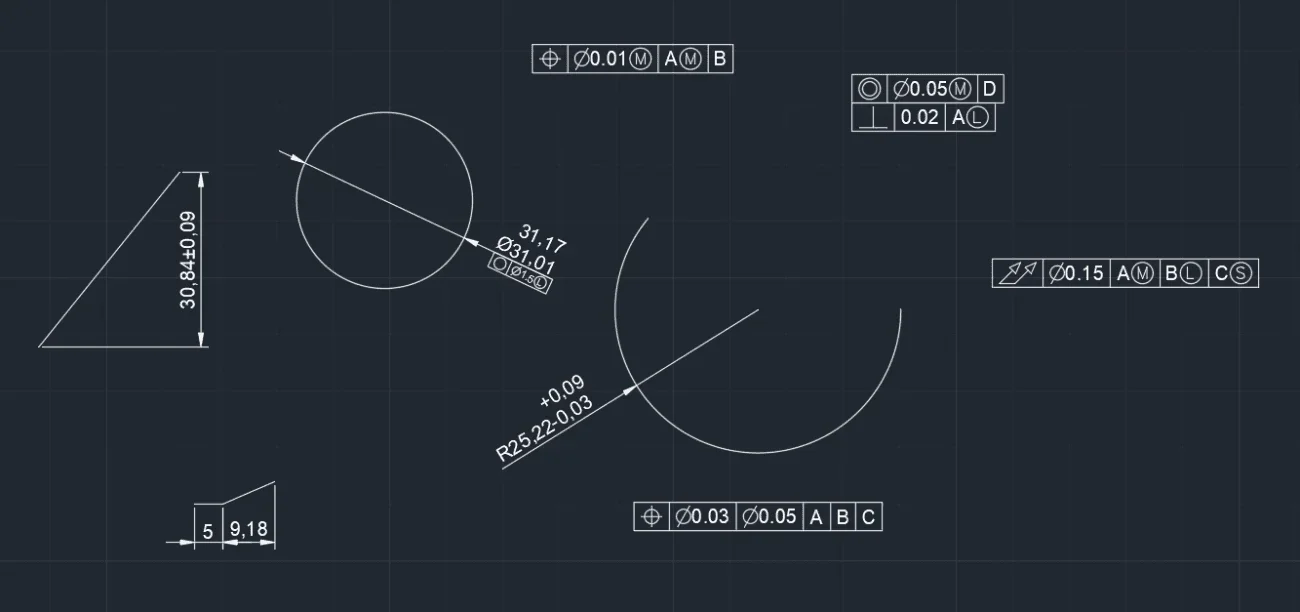
I can't do anything, but maybe I found a way to do it by exploding the block. I noticed that the symbols of general gdt tolerances, using the semantic checkbox and then full, are exported not as polylines but as text with fontstyle "gdt". intercepting in the dxf file the gdt writing should be able to intercept all the tolerances present in the drawing.
I've already done fast tests and it seems to work... I keep you updated
 
Thank you for your concern,

references also work with catia (see image) I just need to change the code for the report.
 

Attachments

  • Prova.webp
    Prova.webp
    89.1 KB · Views: 23
Hi.

allego file:

- "trial" is the file from which I leave
- "balooned drawing" is the file with leaders
- "file measures" is the customizable report to please
I'll give you my compliments.
a program like this I dream of,
I step from proewf4 to dwg / dxf and then by hand all the rest
 
I'll give you my compliments.
a program like this I dream of,
I step from proewf4 to dwg / dxf and then by hand all the rest
Thank you mamobono,
I'm just a programming fan, I did a c# course and to join the profit to the literal I tried to create a program that was good with my job =)
For now, until I finish it, we do everything by hand anyway.
 
can you kindly post an image of the report for that example?
Hello, falonef,
Unfortunately time is a resource that scarcely, I think and hope to implement the writing of the catia compatible report this week
 

Forum statistics

Threads
44,997
Messages
339,767
Members
4
Latest member
ibt

Members online

No members online now.
Back
Top