
• This forum is the machine-generated translation of www.cad3d.it/forum1 - the Italian design community. Several terms are not translated correctly.

quota center holes

  • Thread starter Thread starter POllO2183
  • Start date Start date

POllO2183

Guest
Good morning to all
I create a centring hole through the "creation wizard holes" function, inserting tolerance in the hole specifications. when quoting the table, whether you use "smart quotation", or use "hole caption", the quota never shows tolerance.
This happens even if I insert the tolerance on a simple quota, forcing me to insert it manually.

Can someone tell me if and where am I wrong?
thanks in advance to anyone who wants to help me
Andrea
solidworks2018 sp4
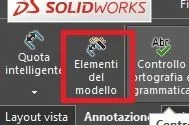
 
Hi.
If you want to care for tolerances you have to use the iconcina elements from the model and select quotations (or the various things you want to import from 3d to the table), you can do it both for single function and for whole model
 

Attachments

  • Immagine.webp
    Immagine.webp
    6.9 KB · Views: 4
I should do some tests, but to read the quotas inserted in the model it is necessary to import them by entering >elements model >quote
the shares inserted exnovo in the drawing are new quotas and does not have to do with those of the model
 
a thousand thanks for the answers:
eros1992: I had already tried. but when they select "quota with tolerance" within the elements of the model, I click on the desired hole tells me: "No stake included." if I extend the destination to the whole model inserts the quota without tolerance.
Moreover the sense of my message is: while I design something and make a hole for plug I insert it as such. If I put it on the table after a few months or, worse yet, someone else does it, I would like the tolerance to appear immediately on the drawing, so as to avoid forgetfulness. to do this I would need a "automatic" method.
Massivonweizen:
the shares inserted exnovo in the drawing are new quotas and does not have to do with those of the model
I understand, but in your opinion it is also applicable to my case, considering that I had not entered any quota in the model?

Thanks again for the help you are giving me
 
I just tried.
by inserting a guided hole, identified as a centering hole to which I gave a tolerance when in the drawing I insert the dadascalia hole annotation the tolerance is included, the same goes for the insertion of the model quotas both that selects the dadascalia holes both that selects quota with tolerance
 
I did a test, too, and what of boulders works great.....
But there is one, at least as far as I am concerned... .
if I change the tolerance from the model to the design the tolerance is changed but if from the model I remove the tolerance attention that on the table is not removed the last of the model is maintained. you have to enter the drawing and remove it from there....... I leave to you the comments... .
Hi.
 
massivonweizen do you think I have to enable something in options? because what you say would be exactly what I would like to do, but in fact I find myself with the quota without indication of tolerance both that we are talking about dascalia hole (that I always use on all holes) and that we are talking about insertion quotas from model (dascalia holes/quota with tolerance)
 
What is the solid version? (in profile)
2019 has another management of tolerances and perhaps depends on this.
attention you have sensitive data, you left the cartiglio with a lot of logo
 
Okay, so unfortunately there's nothing you can do to solve the problem if you don't update the software.

Thank you very much for your concern and help
 
You can still force the situation by inserting tolerance into the sketch that creates the hole.
then double-click the sketch that contains the revolution profile (schizzo3 in your attachment), select the quota and impose tolerance.
This way it works
 

Forum statistics

Threads
44,997
Messages
339,767
Members
4
Latest member
ibt

Members online

No members online now.
Back
Top