• This forum is the machine-generated translation of www.cad3d.it/forum1 - the Italian design community. Several terms are not translated correctly.

mappatura uv solidworks

  • Thread starter Thread starter Mau37
  • Start date Start date

Mau37

Guest
Hello everyone,
I would like to ask, what is the procedure to correctly map 3d parametric models in solidworks?

thanks in advance
 
Hi.
by mapping I mean, correctly prepare the uvs of the 3d model surfaces, then be later textured or rendered. as happens for example with programs of cg such as 3ds max, maya, etc....
in solidworks, I assigned different colors (or materials) to each surface or surface groups. then sum the model in keyshot for the next rendering. so doing I have the surfaces divided by materials, to which check textures and/or materials from keyshot.
but I do not know if this is the correct procedure, with parametric models.
 
I understand nothing about what you wrote nopn because I don't render and I don't know keyshot in the word uv,
but basically you have to assign colors to entities and then export colors. .
by parametric you mean model with configurations?
 
Yes, in the parametric modeling the model is created with a “building history” that remains accessible at all times, and in which you can make changes by changing one or more parameters, and get in real time the new updated model.
Solidworks is a parametric software, it is not specific to computer graphics, so I don't know how you can map the 3d model correctly.
 
in the parametric modeling the model is created with a “building history” that remains accessible at all times, and in which you can make changes by changing one or more parameters, and get in real time the new updated model.
I don't know about graphics, but I've been using it for almost 20 years and I know what it means.
You didn't answer the question, are you making configurations?
because if you're not doing it just change colors and the part updates so I don't understand your question about the best procedure to do
if you are making configurations the situation is quite different
 
Sorry, I didn't understand. by parametric I mean both models (axioms and/or parts) without configurations, and axial models with configurations
 
if there are no configurations, it does not seem to me that there should be particular attention; assigned the colors you are fine.

if there are configurations only at the level of together and the colors are assigned only at the level of the parts and not at the level of the axieme there should be no problem because changed the configuration of the axieme is loaded the model with the colors set and the axieme is updated.
all this because a color management at model level with configurations involves managing them individually for each configuration; I know that you can manage the color of the function or part either directly or through the data table, but I don't know if you can do it on the surfaces.
I'm trying to get an idea of a topic, color management, for almost absolutely new.
 
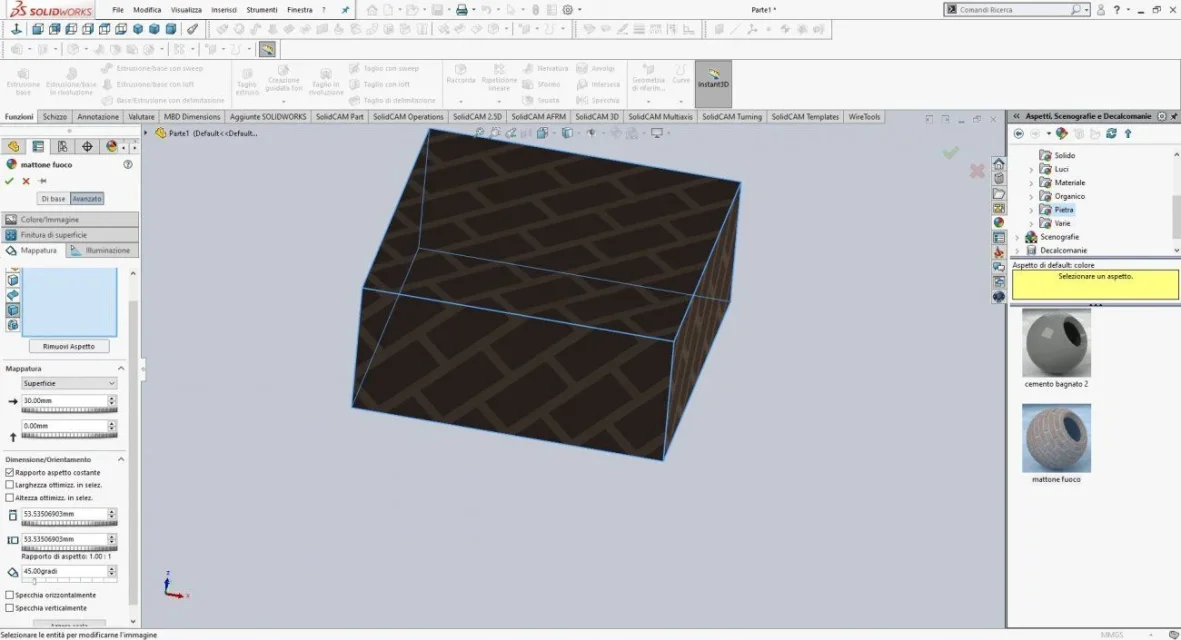
I do not think that solidworks in the creation of surfaces give the possibility to map the isoparametrics at will. However, in the application of the textures you can change position and orientation to pleasure.Annotazione 2020-04-08 094458.webp
 
therefore the process that aduced goes well.
from solidworks imposed the color to every function, face or body, according to the needs and are in place I think. then for textures and materials I do it with keyshot
 
therefore the process that aduced goes well.
from solidworks imposed the color to every function, face or body, according to the needs and are in place I think. then for textures and materials I do it with keyshot
I don't know if keyshot can import solidworks materials. look at the left panel in the posted image, there you see how you can manage the texture orientations.
in visualize is then kept correctlyMattone1.webp
 
for materials, even if they are not imported into keyshot, I use those that already have of its own, or I create new ones. the important thing is that the imported model already has the surfaces divided by color, and then can assign its material. keyshot recognizes the division and grouping of the different surfaces made in solidworks giving it a different color to eachone.

thanks to both for the help!
 
for materials, even if they are not imported into keyshot, I use those that already have of its own, or I create new ones. the important thing is that the imported model already has the surfaces divided by color, and then can assign its material. keyshot recognizes the division and grouping of the different surfaces made in solidworks giving it a different color to eachone.

thanks to both for the help!
I'm sorry, but you've explained yourself to me, not in the correct forum. . .
when I carry a model or a set (in step or parasolid) then make renderings with keyshot, those faces or entirely solids with a random color but, for example, all those of green aluminum, those of blue steel etc. etc.
so doing when the amount in keyshot is enough to assign to one of these a material and if they take it all those of that color.
Was that what you asked?
Hi.
c.
 
That's what I understand.
and also the area of relevance seems correct as it asks if there is a suitable method to manage colors in solidworks.
I have no experience in this context because rarely those faces or functions, I describe whole parts for practical assembly.
you can think of assigning specific colors to materials, but this does not allow you to manage the faces that must always be selected by hand.
configurations manage colors, but I have not deepened the thing is I fear faces are excluded
 
I'm sorry, but you've explained yourself to me, not in the correct forum. . .
when I carry a model or a set (in step or parasolid) then make renderings with keyshot, those faces or entirely solids with a random color but, for example, all those of green aluminum, those of blue steel etc. etc.
so doing when the amount in keyshot is enough to assign to one of these a material and if they take it all those of that color.
Was that what you asked?
Hi.
c.
That's what I do. That was my doubt. I wanted to know if that was the correct procedure.
I'm sorry if I didn't explain.
 
I have done some tests and from my verifications through the data table you can only manage the color of the compressed part and not of the functions or faces.
Instead, I had just forgotten, you can manage multiple color settings through the display states; therefore the same part can have in the display state 1 10 red faces and 4 yellow while in the display state 2 7 green and 7 pervinca.

to optimize coloring it is more practical to launch the menu aspect change> appearance), set the type of entity to color and then select all the same entities
 
it is actually practical to use the "look" command to color the various entities.
I didn't even remember the viewing states, thank you for telling me!
 

Forum statistics

Threads
44,997
Messages
339,767
Members
4
Latest member
ibt

Members online

No members online now.
Back
Top