
• This forum is the machine-generated translation of www.cad3d.it/forum1 - the Italian design community. Several terms are not translated correctly.

manage project on usb key

  • Thread starter Thread starter giorossi
  • Start date Start date

giorossi

Guest
Bye to all,
I pose my problem using inventor professional 2019.
I need to work on portable external drives (hdd, usb key) so I create a resident project on the memory drive and start working on the file.
while saving and closing files, inventor and pc correctly when I try to reopen the file (which is part, together does not make a difference) in the home pc opens a window that is impossible to open the file related database.
Annotazione 2020-09-03 142851.webpI also set the pc so that the same drive letter is assigned but it doesn't make any difference.
I certainly mistake something in the assignment of paths but to today my little experience does not allow me to understand what and correct it.
Someone can help me

thanks for the attention
 
Hello, if you have no problem opening the file on your computer in the office but give it this error at home, try to see if between the two installations of inventor there is a difference at build level. or despite both versions 2019 it is possible that on the one in the office are installed service packs that at home did not install.
 
Hello, if you have no problem opening the file on your computer in the office but give it this error at home, try to see if between the two installations of inventor there is a difference at build level. or despite both versions 2019 it is possible that on the one in the office are installed service packs that at home did not install.
to try again you can try to copy the file from the stick on the home pc and see if it opens locally.
 
thanks to both for the prompt response.
So: the project was created in the office pc with inventor 2019 with the updated 2019.4
on the notebook at home (the one from which I couldn't open the files) I had already installed the updated 2019.4.5 (last available for the 2019 version, then I deduct stable).
some perplexity for the fact that with a later update I couldn't open a project realized with a previous update, however it's fine. this morning I upgrade to version 2019.4.5 also to pc of the office (the one on which the project was created)...to daaaa... not even in the office opens more!!
Well, it's not too messed up and dwg drawings I'm going to do what I lost. now that I have the pcs aligned with the same update on the weekend I will test the nine to see if now I have the total interchangeability of the projects between home and office
 
we are at 2019.4.8
before the 4.8 came out, they made you uninstall the 4.7, which created more problems than it solved.
stability is never guaranteed.
 
Last edited:
Still failed. on both pcs installed version 2019.4.5 but a file created in the office is not opened in the pc at home and vice versa.
other thing that comes to mind: Could it depend on the structure of nested folders of inventor libraries having in office windows 7 and at home windows 10?
 
at this point I would uninstall from both the latest update leaving on both version 2019.4. I think it could work out.
 
thank you go, I will try this way too. Last update: the project saved directly on the usb key in the office, once expelled by the safe removal of the hardware and reinserted into the office pc after trying to open the project at home, is no longer open anywhere (the preview image does not even appear)
 
thank you go, I will try this way too. Last update: the project saved directly on the usb key in the office, once expelled by the safe removal of the hardware and reinserted into the office pc after trying to open the project at home, is no longer open anywhere (the preview image does not even appear)
ok, so it could also be the key that needs a formatting or is faulty.. Well, at this point, I'd try to use another device. First we exclude the problem from a key defect, and then if the behavior is the same try to uninstall the latest update of inventor.
 
Bye to all,
I pose my problem using inventor professional 2019.
I need to work on portable external drives (hdd, usb key) so I create a resident project on the memory drive and start working on the file.
while saving and closing files, inventor and pc correctly when I try to reopen the file (which is part, together does not make a difference) in the home pc opens a window that is impossible to open the file related database.
View attachment 59203I also set the pc so that the same drive letter is assigned but it doesn't make any difference.
I certainly mistake something in the assignment of paths but to today my little experience does not allow me to understand what and correct it.
Someone can help me

thanks for the attention
Just for information, have you done some sort of synchronization files and folders between your usb key and a hd? I wonder why years ago I tried to experiment and precisely using synchronicity folders gave several errors and was unusable the whole project.
other thing if you try to open a direct file, having a "neutro" project file or not pointing in your key but for example "default" from errors?
 
thanks to the suggestions we received. I didn't activate any kind of synchronization, among other things the usb key was newly formatted. in both pcs the projects created on the same local are always working. I have to try to create a project on the local disk and then create a copy of the project folder on usb key. or I was looking to follow the road "pack and go"
 
Of course, if you don't p&go, it's a little hard that you can open it all right.
 
Thank you. @ Stefanobruno , but I imagined that creating a project with the same build installed on different pcs could be managed more immediately. nothing particularly exaggerated. tonight I'll try the pack and go
 
sometimes requires the presence of the goldversion and if not found it will be stacked.
with the p&go you have no opening problems, except then be careful between the steps goes and come not to overwrite things that you do not have to and that you would lose irreparably. (various backups aside )
 
today I have proceeded in this way:
1 - created local project in office pc;
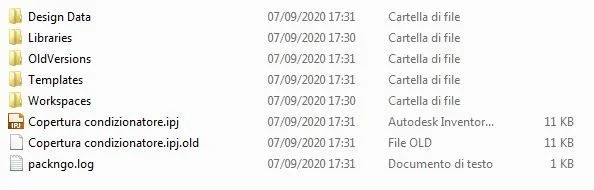
2 - created "pack and go" with usb key destination.

I noticed that this procedure created me a more complex file structure and folders: probably inserted all folders of the libraries to which the project file points.
2020-09-07 17_34_03-CONDIZIONATORE.webpthis evening I will try to open everything on the notebook at home
 
even with the "pack and go" on the usb key I can open the side file in the home notebook. start thinking that it can also depend on the usb key
 
even with the "pack and go" on the usb key I can open the side file in the home notebook. start thinking that it can also depend on the usb key
Sorry but if you cover a single ipt file on the key, then can you open it?
 
and if you don't go through a key? create a new file and send it by mail: let's see what happens.
 

Forum statistics

Threads
44,997
Messages
339,767
Members
4
Latest member
ibt

Members online

No members online now.
Back
Top