
• This forum is the machine-generated translation of www.cad3d.it/forum1 - the Italian design community. Several terms are not translated correctly.

automatically rename parts of a product

MorganPa

Guest
Good morning to all,
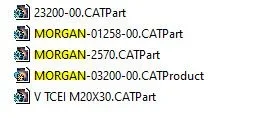
I have a product consisting of numerous under products and parts, all renamed according to the criterion "common code" (referred to the product) + "part code" (referred to the part, also present in the properties of the part). I have to duplicate this product by changing to all the "common code" but keeping the "part code" of each.
Is there a macro for this? or am I forced to change the name of all hundreds of parts one by one?

Thank you very much.
morgan
 
test with save management function.

you will find below an option to define for example a prefix.

I'm not sure if you do.

Let us know
 
Hello, falonef,
Thanks for the advice! I tried and actually a prefix adds it, but it does not replace the previous one.
I explain better with some images created for an example:
I have in the product some files that have the prefix "morgan"2.webpinstead of "morgan" (evidenced), I would like the files were initially called as "proof" as in the following image:1.webpbut using the following matrix, as from advice (if it was the one you recommended me)4.webpthe result I get is the following, highlighted in red:3.webpis there not a system, macro or command that goes to replace "morgan" with "try" whenever the word "morgan" is present, or at least the files I tell him?

Thank you very much for your help.
morgan
 
Hi.
that's the function. However, it does not replace the existing code.

In this regard I know the save as function that allows you to manually save the files to your liking. But it's hard work.

if you are looking on the web surely some macros already exist. maybe even in the forum.
Take time and do a search.

Let us know, okay?
 
save as allows you to change the name, but one at a time (in a product from hundreds of pieces it becomes long, not to think that with save as risk of losing links, no?).
Instead I admit I never used it, but I tried it now and it seems to me that you duplichi in block the product in another directory that you give it to him, but it does not concern the change of name, or is it not the function you talk about?
 
you the functions are exactly what you described.

Unfortunately, what you ask is you do it with a pdm or a macro.
 
Hello morganpa
the question maybe is not very intelligent... but
Could you have a step with changed names?
I don't think so.
because in this case it would be
 
excuse the question but would you pass for a macro that saves in step with names to your liking?
 
You may also use an external program that changes the file name
If you want bulk rename files trovi metodi x win 10 e freeware vari
 
excuse the question but would you pass for a macro that saves in step with names to your liking?
be yes.. is not a macro but a trick with a text editor
1) from cat carry your product in step.
2) open the step file with a text editor
3) Find and replace the texts you want to change (in the case of morganpa .. find "morgan" and replace with "proof"
4) with cat open the step file, which you modified, and you will find the catparts with the desired name
 
ingenious but probably:
You lose all ties in the catproduct.
then if you have drawings you lose links

Maybe I'm wrong...
 
ingenious but probably:
You lose all ties in the catproduct.
then if you have drawings you lose links

Maybe I'm wrong...
You're not wrong, catparts are no longer parametric, you lose all ties and connections with catdrawing.
It is a method that I use to pass step to suppliers without giving other information attributable to third parties. In my case, catpart names can be sources of information.
 
with catia you can't rename files with win
true
Good morning to all,
I have a product consisting of numerous under products and parts, all renamed according to the criterion "common code" (referred to the product) + "part code" (referred to the part, also present in the properties of the part). I have to duplicate this product by changing to all the "common code" but keeping the "part code" of each.
Is there a macro for this? or am I forced to change the name of all hundreds of parts one by one?

Thank you very much.
morgan
you have seen these
 
Hello morganpa
the question maybe is not very intelligent... but
Could you have a step with changed names?
I don't think so.
because in this case it would be
Hi.
Unfortunately I need to keep the catia file with lots of constraints, parameters, links to 2d etc.
for that I was looking for a macro or command inside the catia. but thank you for the suggestion, in case you need to send step with other names I will gladly exploit this method
 

Forum statistics

Threads
44,997
Messages
339,767
Members
4
Latest member
ibt

Members online

No members online now.
Back
Top