
You are using an out of date browser. It may not display this or other websites correctly.
You should upgrade or use an alternative browser.
You should upgrade or use an alternative browser.

falonef
Guest
Can you start from the drawing open the links and load the 3d?
emanuele grasso
Guest
starting from project 3d you mean?
falonef
Guest
no the contrary
see the drawing links and if they still point to 3d.
it could be that the 3d catpart is no longer findable and for that reason the lines are gray.
even clear blue quota lines were set in your options?
see the drawing links and if they still point to 3d.
it could be that the 3d catpart is no longer findable and for that reason the lines are gray.
even clear blue quota lines were set in your options?
emanuele grasso
Guest
It is not that because I tried to do a stupid part (a cube) and put on drawing also has the same problem. There is some particular approach to me, but I have not touched anything.. that is the problem
Vittorio
Guest
on the drawing you have definitely activated this icon.. turn it off and you'll see everything back as before

emanuele grasso
Guest
That I'm not. Thank you very much
emanuele grasso
Guest
I can even know another stuff. .
for the holes of a component use the boolean operation remove. the problem is that it does not show me the thread on the drawing and the properties of the view the tick on thread is active.
how can I see it without having to manually put the thread? thanks in advance
for the holes of a component use the boolean operation remove. the problem is that it does not show me the thread on the drawing and the properties of the view the tick on thread is active.
how can I see it without having to manually put the thread? thanks in advance
Vittorio
Guest
on the body .. button dx and creates theological results
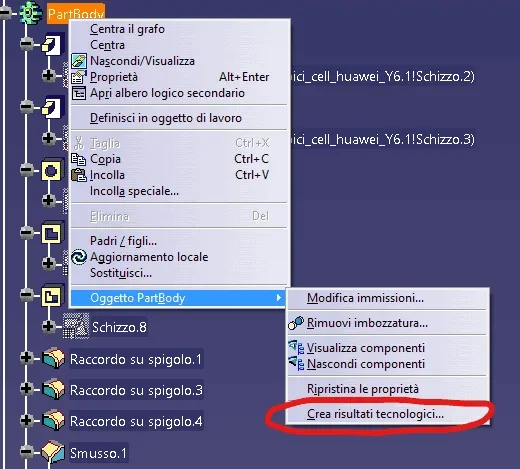
emanuele grasso
Guest
Thank you. How do you connect the properties of the part to the cart?
i.e. make sure that it automatically collects number part definition and material in the respective cartiglio boxes
i.e. make sure that it automatically collects number part definition and material in the respective cartiglio boxes
Vittorio
Guest
double click on the writing, "xxxx" button dx and attachment link
after that .. you move into the catpart and click on the variable you put

after that .. you move into the catpart and click on the variable you put
emanuele grasso
Guest
Is there a way to attach the number part to the sheet number for all carts? i.e. if I have a project that requires 80 sets on the table I would like that name to be seen in "number part" and in sheet number (sheet 1 to understand us) for each design
thanks in advance
thanks in advance
Attachments

Vittorio
Guest
Yes, you can make an excel sheet and put all the variables you want
and colleagues to the cartilage with attribute connection.
I use this method, in catpart I don't put any variable
I prefer to make me a excel sheet and insert everything .. treatment material.bla blah blah. and at this point you can also insert the sheet and total number of sheets
In a catdrawing, I never make sheets again. I'm sorry.
If you damage that file, or you lose it. ,. you need to remake 80table
I prefer. a table for catpart
and colleagues to the cartilage with attribute connection.
I use this method, in catpart I don't put any variable
I prefer to make me a excel sheet and insert everything .. treatment material.bla blah blah. and at this point you can also insert the sheet and total number of sheets
In a catdrawing, I never make sheets again. I'm sorry.
If you damage that file, or you lose it. ,. you need to remake 80table
I prefer. a table for catpart
emanuele grasso
Guest
Have patience but I don't understand. .
Vittorio
Guest
I figured.Have patience but I don't understand. .
from your first questions, did I understand that you're at first with catechism?
Now .. you have to understand that to explain some functions, you have to know others.
It would be like teaching you to drive without first teaching you the road signs.
I can't talk to you about my system because it seems to me that you're not aware of the use of excel sheets inside the catia.
Excuse me. But I don't want to confuse your ideas any more.
falonef
Guest
however, it could happen that the excel sheet is damaged or even deleted or moved to folder.yes, you can make an excel sheet and put all the variables you want
and colleagues to the cartilage with attribute connection.
i use this method, in catpart i don't put any variable
i prefer to make me a excel sheet and insert everything .. treatment material.bla blah blah. and at this point you can also insert the sheet and total number of sheets
in a catdrawing, i never make sheets again. i'm sorry.
if you damage that file, or you lose it. ,. you need to remake 80table
i prefer. a table for catpart
how do you do this?
it would take a pdm...
Vittorio
Guest
Yes, the risk is still
But an excel sheet did it in less time than 80 times.
pdm would be ideal, but in a small reality like mine and like so many others where there is only one cat license you arrange with somewhat rudimentary but working tools.
I have a backup system.. Anyway, I'm kind of hurting
But an excel sheet did it in less time than 80 times.
pdm would be ideal, but in a small reality like mine and like so many others where there is only one cat license you arrange with somewhat rudimentary but working tools.
I have a backup system.. Anyway, I'm kind of hurting
falonef
Guest
small chicca for those who do not have a pdm:
If you create a parameter in the 2d and then select it to create one from the 3d you will have a connection between 3d and 2d.
Could you come back very comfortable in having to open the drawings from 3d?
If you create a parameter in the 2d and then select it to create one from the 3d you will have a connection between 3d and 2d.
Could you come back very comfortable in having to open the drawings from 3d?
Vittorio
Guest
Falonef.. This info is awesome

I couldn't resist, I connected with teamviewer to the office computer.
Thank you very much.. a precious advice
I couldn't resist, I connected with teamviewer to the office computer.
Thank you very much.. a precious advice
emanuele grasso
Guest
Guys. .
First question: what is a pdm
second question : I have been using catia for 2 years and I know quite well the form part, surfaces and drawing and product (which is obligatory). But there are those "closes" that make the program really smoother and less slender and one of them is the link with excel that I am studying at this time. I would like to learn how to put the basics on excel by putting in the first part only the commercial components and in the second part only the working components with the bulk quotas
Thank you.
First question: what is a pdm
second question : I have been using catia for 2 years and I know quite well the form part, surfaces and drawing and product (which is obligatory). But there are those "closes" that make the program really smoother and less slender and one of them is the link with excel that I am studying at this time. I would like to learn how to put the basics on excel by putting in the first part only the commercial components and in the second part only the working components with the bulk quotas
Thank you.