
You are using an out of date browser. It may not display this or other websites correctly.
You should upgrade or use an alternative browser.
You should upgrade or use an alternative browser.
MassiVonWeizen
Guest
First of all, say hello and maybe we introduce ourselves... and finally thank you
What version of solid do you have?
if you've already sketched something, let's see how to fix it without having to start from scratch
What version of solid do you have?
if you've already sketched something, let's see how to fix it without having to start from scratch
Esperaxw
Guest
I apologize ....claudio from thermoli, version 2021, I wanted to post it the file but it does not charge me. I put it in dwg if it can be useful. I practically did the cames sketch, then I used the wind command and the sweep command....but it comes abnormally.First of all, say hello and maybe we introduce ourselves... and finally thank you
What version of solid do you have?
if you've already sketched something, let's see how to fix it without having to start from scratch
thanks in advance.
Attachments
MassiVonWeizen
Guest
in the dwg there is only a view and it is not necessary to understand what you have to do.
you have to explain well what you mean by anomaly
when you press "allega" in the window that appears on the bottom right you can see the types of files that are attachable, if there is no extension of your file (in your case sldprt) it compresses in a zip file that is supported.
maybe even attach a step file for those who have versions prior to 2021
you have to explain well what you mean by anomaly
when you press "allega" in the window that appears on the bottom right you can see the types of files that are attachable, if there is no extension of your file (in your case sldprt) it compresses in a zip file that is supported.
maybe even attach a step file for those who have versions prior to 2021
Esperaxw
Guest
allego i de compressed files in solid and step. practically after making the command wraps, using the sweep, the cut is not regular but leaves a tooth....it is difficult to explain. . ..however should be like the starboard that is naturally following the sketch wraps.
Attachments
MassiVonWeizen
Guest
You can also help with pictures.using the sweep, the cut is not regular but leaves a tooth
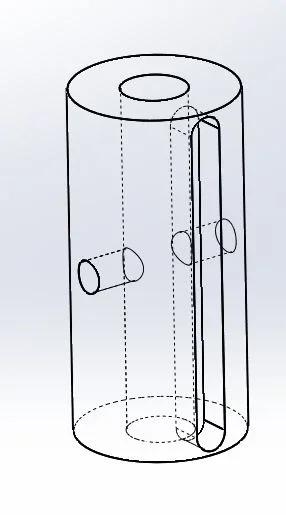
for example this is the image of the step file, a cylinder with a socket and a perpendicular hole passing
Attachments
Esperaxw
Guest
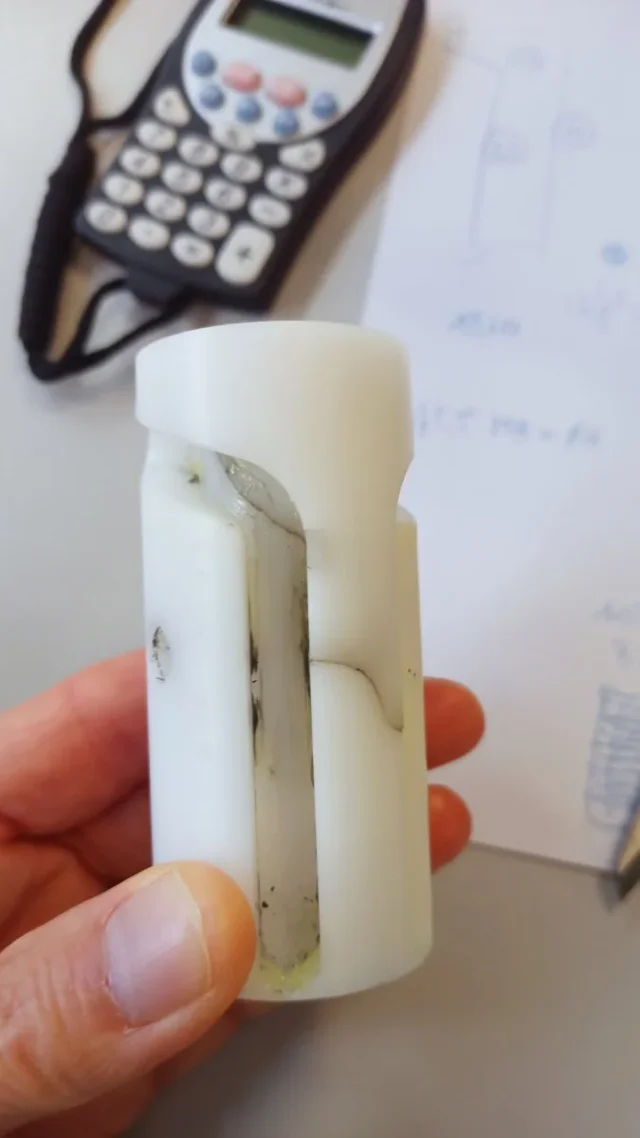
sending section of the detail where you can see the difference between the starboard and the other two. It is immediately known that using the engraving command, the excavated part is conical and not straight as the asola. I need it to be as straight as the star.
Attachments
MassiVonWeizen
Guest
what settings did you put to the sweep cut?
try to make the sweep cut using the body option; in practical models the body that represents the cut and uses it to make the cut
try to make the sweep cut using the body option; in practical models the body that represents the cut and uses it to make the cut
Esperaxw
Guest
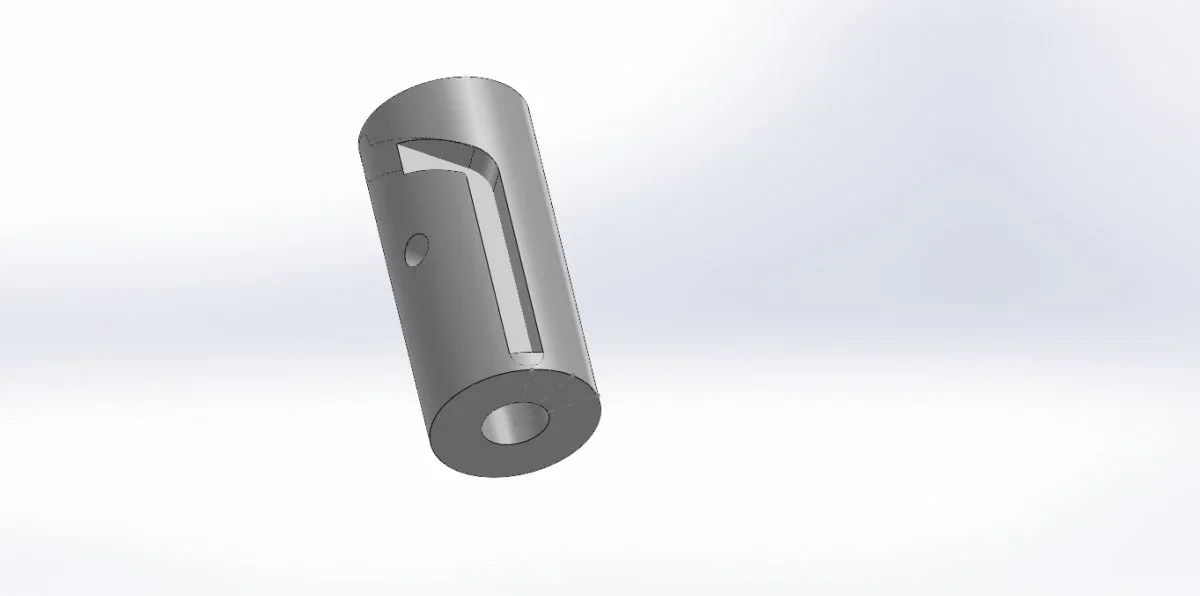
yesterday's section I did it with the winding and engraving command. that of the attached photo with the sweep command of the solid and selected bodies, the first part came well but not having me select winds as a path but only the sketch comes in this way. I don't understand why you don't pick me up as a path.... is there an alternative to use?
Attachments
MassiVonWeizen
Guest
because it is a function, as written in the guide:rules of sweepI don't understand why you don't pick me up as a path
- the path can consist of a series of curves contained in a sketch, curve or a set of edges of the model.
SimoneCRV
Guest
Sorry if I come in, but with that sketch you can possibly create a solid that goes to dig with merge bodies
MassiVonWeizen
Guest
I didn't understand, explain better pleaseSorry if I come in, but with that sketch you can possibly create a solid that goes to dig with merge bodies
SimoneCRV
Guest
with the sketch path creates a solid and then matches it, with the option to remove intersection.I didn't understand, explain better please
Attachments

Esperaxw
Guest
What are these commands? Maybe I do.
SimoneCRV
Guest
for the method I proposed:What are these commands? Maybe I do.
- create the sketch on the cylinder and wrap it as you have already done
- instead of cutting, make it solid and put the check not to join the bodies
- use the matching function
Esperaxw
Guest
I did but I always have the same problem, i.e. I can't select winds to do the sweep. I attach the file saved in solid 2013 if someone wants to try and then repost would make me a pleasure.for the method I proposed:
- create the sketch on the cylinder and wrap it as you have already done
- instead of cutting, make it solid and put the check not to join the bodies
- use the matching function
Attachments
MassiVonWeizen
Guest
That file is a brothel.. .
However, you do not have to use the winding function to make the cut, but to create the path. remove from the sketches the shape you want to get and keep only the axis (which you have to turn into normal line) and then try both with rashes, but also with curve> projected.
at this point, as a curve cannot be used to sweep, through the schzzo 3d transform it into a selectable path.
allego files in 2019
However, you do not have to use the winding function to make the cut, but to create the path. remove from the sketches the shape you want to get and keep only the axis (which you have to turn into normal line) and then try both with rashes, but also with curve> projected.
at this point, as a curve cannot be used to sweep, through the schzzo 3d transform it into a selectable path.
allego files in 2019
Attachments
re_solidworks
Guest
I add a comment: sweeps on curves can be doneThat file is a brothel.. .
However, you do not have to use the winding function to make the cut, but to create the path. remove from the sketches the shape you want to get and keep only the axis (which you have to turn into normal line) and then try both with rashes, but also with curve> projected.
at this point, as a curve cannot be used to sweep, through the schzzo 3d transform it into a selectable path.
allego files in 2019
Attachments
Esperaxw
Guest
I try to see if I can. Thanks for the help.
Forum statistics
ciao