
• This forum is the machine-generated translation of www.cad3d.it/forum1 - the Italian design community. Several terms are not translated correctly.

replace original default coordinated system

  • Thread starter Thread starter RC82
  • Start date Start date

RC82

Guest
Hi.

I have to assemble a complex project and I would like to import a subaxieme that would default in the correct point. However, the subaxieme was created with a reference system other than that of the parent group in which to insert it.
so I wondered if someone could tell me, if possible, how to replace in I create the original default reference system with a second poaizion to my liking?
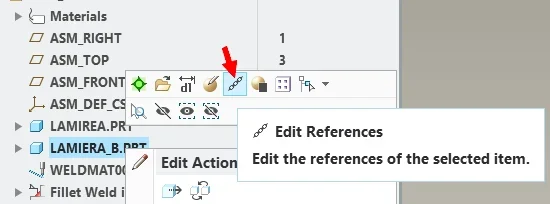
 
you can create a coordinate system to suit and when you import create it allows you to choose whether to use in default sysco or a sysco to please, choose what you have prepared.
 
Thank you for the answer.
I had seen this solution, but I was looking, if it exists, a way to be able to specify the original reference system with a second created later.
I saw that doing a "save as" it is possible to do it, but only with step files. I wanted to find a similar solution for part files or assemblies.
 
Thank you for the answer.
I had seen this solution, but I was looking, if it exists, a way to be able to specify the original reference system with a second created later.
I saw that doing a "save as" it is possible to do it, but only with step files. I wanted to find a similar solution for part files or assemblies.
if it is a set you just need to redefine the position of the components compared to the basic reference plans, since the "default" assembly option does nothing but align the plans of the component to those of the assemblies.
I better explain, if your component has to be, compared to an absolute coordinate system, to x = 100, y = 150, z = 200, you just have to place the elements this position and then assemble the sub together in "default" position. If instead it is a part, the only one is to create a new coordinate system and place it where you need it (differently you should shape by predisposing the whole conceptually already in the correct position, but I think it is an absurd complication).
 
if it is a set you just need to redefine the position of the components compared to the basic reference plans, since the "default" assembly option does nothing but align the plans of the component to those of the assemblies.
I better explain, if your component has to be, compared to an absolute coordinate system, to x = 100, y = 150, z = 200, you just have to place the elements this position and then assemble the sub together in "default" position. If instead it is a part, the only one is to create a new coordinate system and place it where you need it (differently you should shape by predisposing the whole conceptually already in the correct position, but I think it is an absurd complication).
I believe that this is a discounted solution rc82 sought an automatic solution so as not to give back the constraints... let us say that if the evil of giving 3 constraints the problem does not arise.. Otherwise there is to understand well why of the question. .
 

Forum statistics

Threads
44,997
Messages
339,767
Members
4
Latest member
ibt

Members online

No members online now.
Back
Top