
• This forum is the machine-generated translation of www.cad3d.it/forum1 - the Italian design community. Several terms are not translated correctly.

use of revisions

  • Thread starter Thread starter Davimont
  • Start date Start date

Davimont

Guest
Hello, everyone.
I realize that without a course it is difficult to learn some features of the software and if everything you have to discover and study alone becomes ten times heavier.
It's been half an hour since I read a pdf of siemens dealing with the revisions but I'm not in charge.
usually how do you handle revisions?
when I was making production, I saw the progress of revision on the design and I changed the old with the new. my knowledge about revisions ends here:confused:
What are you reviewing? only the draft or even the various par psm and asm?
when I generate pdf for the workshop I renounce it to rev1 but for solid edge files how do I operate?
If you give me a few tips on how you do, I'd be very grateful.
Thanks to who will help me.
 
Hello, everyone.
I realize that without a course it is difficult to learn some features of the software and if everything you have to discover and study alone becomes ten times heavier.
It's been half an hour since I read a pdf of siemens dealing with the revisions but I'm not in charge.
usually how do you handle revisions?
when I was making production, I saw the progress of revision on the design and I changed the old with the new. my knowledge about revisions ends here:confused:
What are you reviewing? only the draft or even the various par psm and asm?
when I generate pdf for the workshop I renounce it to rev1 but for solid edge files how do I operate?
If you give me a few tips on how you do, I'd be very grateful.
Thanks to who will help me.
you must use the "revision manager", a program that automatically updates (more or less) the various assembly in which the part to be revised is contained.

For the revision, I do the revisions of 3d and 2d, but maybe there is also someone who works differently.
 
thanks hunter
The problem is that I really miss the concept of revision.
if I have to change a carter of a car what are the schematic steps to do the right things?

apro file to edit ---- Modify ----- save by name putting r1 to file name ---- create new table with new carter.
In this way I would have the two versions in archive.

apro in rm the file the carter ----- there is a special function that makes me advance the revision ---- I open the file and edit --- I open the table already made, the living room and I find the advance of revision already made.
In this way I would have only one side file and one table but updated revision.

Sorry if I try to explain myself using almost invented procedures but I have never handled revisions.

I'd just need a schematic path, I'll study it and do some tests and if I need clarifications I need!:finger:

Meanwhile, thank you for your concern.
 
revisions are a pretty "personal" concept, I don't know if there are guidelines so you don't have to invent everything every time. we for example use 3 levels of revision, depending on what goes to impact the change (design review, design revision and code, new design and code), but it is not said that it is the way you aggradiate. for simplicity from the point of view of the drawings, every time a revision is made with revision managers we first make a copy of both the design and the 3d, then we go to change it.
 
thanks zeigs
I was wondering. but if I review three times a particular, then can I return to two previous revisions?
solid edge keeps the various versions of the part when reviewing? or it is only a number in the properties of the fine file to itself.
 
Hi.
I have not understood well if your is a doubt only on the practical use of the internal audit management of solid edge, or more general on the management of changes.
I never used it, so I can't tell you anything.
Instead, in general, in the companies in which I worked, I can tell you that we have always adjusted more or less as follows.

the first thing is to distinguish changes in 2 categories:
  1. those for which the new/modified piece is interchangeable with the previous one and there are no other reasons that need traceability in the future
  2. those for which the new/modified piece is not interchangeable with the previous one, or there are other reasons that make traceability necessary in the future
once set to which category the change in question belongs, in the first case the par/psm/asm overwrites it and duplicates the dft by updating the last copy (maybe indicating what has changed in a specific table, with a revision index...) and leaving not updated (or unrolled) the old one; the code of the piece does not change.
In the second case, a new code is made, the par/psm/asm is duplicated and so is the dft, but there are no indications about the design that relate it to the previous one.

even where I had a pdm the logic was more or less this.

If you want, in the first case you may also keep a copy of the 3d files of the overhauled revisions, but with the kindness of changing the file name of the exceeded copy, not of the one that turns out to be current, in this way avoid having to update all the totals that contain it.

I hope I've been helpful.
 
If you want, in the first case you may also keep a copy of the 3d files of the overhauled revisions, but with the kindness of changing the file name of the exceeded copy, not of the one that turns out to be current, in this way avoid having to update all the totals that contain it.

I hope I've been helpful.
I usually do so on the decision whether to make a revision or a new code.

for the issue of updating of assemblies, revision manager has the function "where used" that allows to update all the assemblies in which the piece interested in the modification is used.
 
for the issue of updating of assemblies, revision manager has the function "where used" that allows to update all the assemblies in which the piece interested in the modification is used.
Yes, it is true, but the function where used, in the hypothesis of a database of bodily drawings (I understand thousands), is improposable for daily use. another is if one has a pdm that indexes all links and knows "independently" where a piece is mounted.
 
thanks to both for the advice!
My doubts apegana stem from the fact that in all these years the drawings I generated I put them in production and so I knew well what had changed and what was not.
Now instead I have changed my job and I am in an office where no one has direct experience in managing the various designs and I find everything in my hand.
If before I never cared about any codifices and revisions, now I have to think that when the exterior carpentry will take the drawings, it will have to be clear whether changes have been made or not.
have patience with me but I have to think and a thousand things that maybe for people with more experience are normal.
I think I only keep the pdf of the boards as a historian. having too many files spinning doesn't hold me very much.
thanks again for the advice.
 
have patience with me but I have to think and a thousand things that maybe for people with more experience are normal.
We'd miss anything else, don't worry! However, take into account that the correct and complete management of technical changes, in a medium sized company and working on a medium complex product, is always long, complicated and boring; Unfortunately it is indispensable. so do not break down, are common problems to many :wink:
I think I only keep the pdf of the boards as a historian. having too many files spinning doesn't hold me very much.
as you wish. I have always kept aside (also) the unupdated dfts to have files with (a bit of) the original mathematics; so that if I had to go back or do some verification I would have had some extra data, that is the possibility to take measures that were not on the table.
that clearly because instead the 3d of the overhauled revisions did not have them, for the reasons I explained before.

Good job! !
 
Hello everyone,

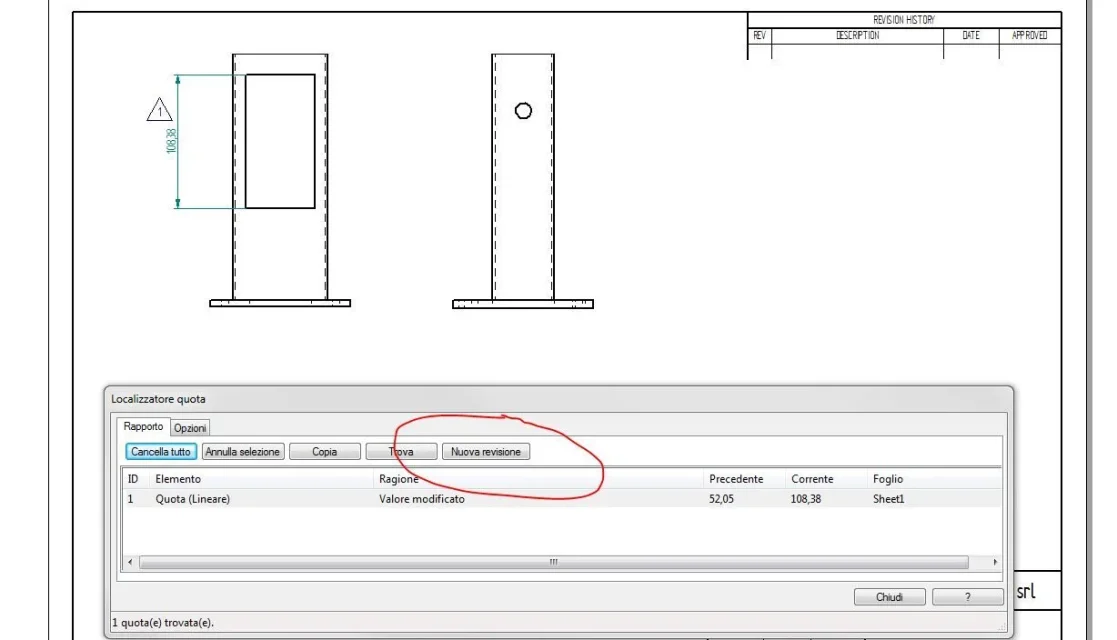
I need to insert a revision table for a simple change of 1 quota.
with swx there was the command insert revision (modalita draft) I inserted the editing area he boiled it and I manually inserted the wording.
Is there anything practical on solidedge?
Thank you.
 
I almost never stamp the individual modifications on the drawing, I limit myself to writing in the revision table that have been changed the quotas.
when you update the draft and if you notice that there are variations, you can select the rows you want to mark and click on "new revision" in the text box that appears you can then write the revision index you want. I don't know if you can automate the compilation of a table.01.webp
 
I almost never stamp the individual modifications on the drawing, I limit myself to writing in the revision table that have been changed the quotas.
when you update the draft and if you notice that there are variations, you can select the rows you want to mark and click on "new revision" in the text box that appears you can then write the revision index you want. I don't know if you can automate the compilation of a table.View attachment 52972
thanks to the info. where can I find the revision table that I see at the top right?
 
the table you see is the default solid edge table. However the table draws you in the background of the template as you need.
 
Good day to all,
I appeal to this discussion because I am trying to learn how to use "data management" in solid edge.
In particular, I would like to manage the revisions.
Currently, in case you create a revised eggs, the .par .asm and .dft files of the old revisions are disconnected from the revised axieme and saved in a folder with the name of the corresponding revision. for example within the folder containing .par files and .dft files of pipes, there will be a named folder rev 02 where inside there will be all codes (with the same name as the codes present in the main folder) related to revision 02.
in the main folder will always present the file with the highest revision number.
the revision number is not reported in the file name but is a custom property.
this management is done by hand and not managed.

in the "data management" section of solid edge when I create a new revision, the new file is renamed, while the old one keeps the name unchanged.

Do you think there's a way to do the opposite?
I would like to have old revisions with a different code (it goes well _revn°) but the revised file must always report the initial code without reference to the revision, the revision number will be a custom property.
Gestione dati 1.webp ciao!
 
Good day to all,
I appeal to this discussion because I am trying to learn how to use "data management" in solid edge.
In particular, I would like to manage the revisions.
Currently, in case you create a revised eggs, the .par .asm and .dft files of the old revisions are disconnected from the revised axieme and saved in a folder with the name of the corresponding revision. for example within the folder containing .par files and .dft files of pipes, there will be a named folder rev 02 where inside there will be all codes (with the same name as the codes present in the main folder) related to revision 02.
in the main folder will always present the file with the highest revision number.
the revision number is not reported in the file name but is a custom property.
this management is done by hand and not managed.

in the "data management" section of solid edge when I create a new revision, the new file is renamed, while the old one keeps the name unchanged.

Do you think there's a way to do the opposite?
I would like to have old revisions with a different code (it goes well _revn°) but the revised file must always report the initial code without reference to the revision, the revision number will be a custom property.
View attachment 67018ciao!
no; with solid edge data management the file name is always code + revision, so you can quickly rediscover an old revision. keep in mind that with this management it is kept track of all links between files through fastsearch service; When you do a review, you know where other files are going to impact.

said this, what is the reason to keep the file with last revision without revision number?
 
Good day to all,
I appeal to this discussion because I am trying to learn how to use "data management" in solid edge.
In particular, I would like to manage the revisions.
Currently, in case you create a revised eggs, the .par .asm and .dft files of the old revisions are disconnected from the revised axieme and saved in a folder with the name of the corresponding revision. for example within the folder containing .par files and .dft files of pipes, there will be a named folder rev 02 where inside there will be all codes (with the same name as the codes present in the main folder) related to revision 02.
in the main folder will always present the file with the highest revision number.
the revision number is not reported in the file name but is a custom property.
this management is done by hand and not managed.

in the "data management" section of solid edge when I create a new revision, the new file is renamed, while the old one keeps the name unchanged.

Do you think there's a way to do the opposite?
I would like to have old revisions with a different code (it goes well _revn°) but the revised file must always report the initial code without reference to the revision, the revision number will be a custom property.
View attachment 67018ciao!
Mah, the simplest thing that comes to mind is to "save copy by name" from cad instead of data management. in that case save a copy of the code_old_01.par type, which remains there in the file system forgotten and unused, but instead the updated part continues to be properly linked to all the axis in which it is used.
 

Forum statistics

Threads
44,997
Messages
339,767
Members
4
Latest member
ibt

Members online

No members online now.
Back
Top