
• This forum is the machine-generated translation of www.cad3d.it/forum1 - the Italian design community. Several terms are not translated correctly.

coloring part of feature to divide feature in skin 'bodies

  • Thread starter Thread starter Cashflow_
  • Start date Start date

Cashflow_

Guest
therefore,
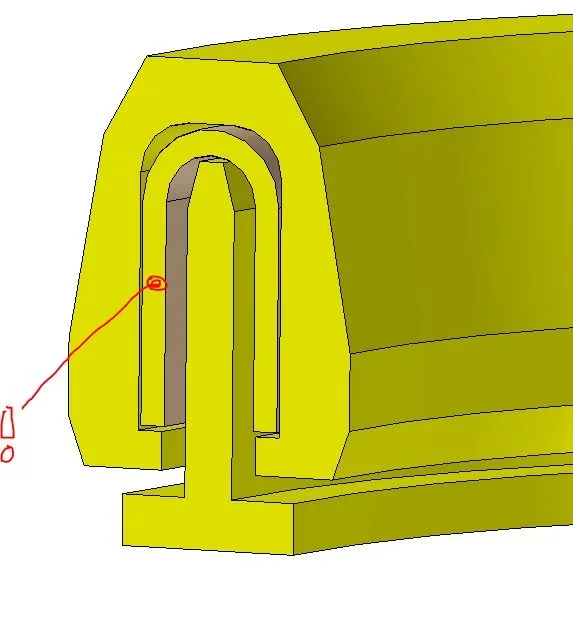
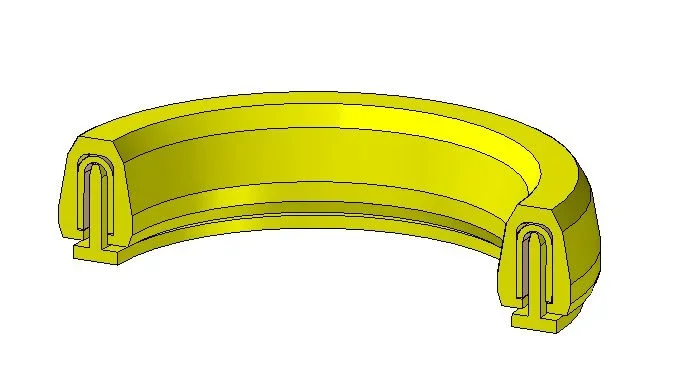
I received this model, which basically has three separate bodies and designed in one feature (prot. of revolution). modeling for me can be okay, but I need to color the three parts differently for a presentation.
using the "part painting" command I can only assign different colors to the faces (see u in the image I colored in marroncino), but I did not find the way to assign the same color even to the inner mass of the u (the image is in section). I was looking for the way to split up the different parts of the extra feature bodies to get around the problem, but I didn't find the way to do this.

Is there a way to do what I look for without remodeling everything?
Thank you!
 

Attachments

  • Sample.webp
    Sample.webp
    21.5 KB · Views: 8
  • Sample 1.webp
    Sample 1.webp
    18.8 KB · Views: 8
therefore,
I received this model, which basically has three separate bodies and designed in one feature (prot. of revolution). modeling for me can be okay, but I need to color the three parts differently for a presentation.
using the "part painting" command I can only assign different colors to the faces (see u in the image I colored in marroncino), but I did not find the way to assign the same color even to the inner mass of the u (the image is in section). I was looking for the way to split up the different parts of the extra feature bodies to get around the problem, but I didn't find the way to do this.

Is there a way to do what I look for without remodeling everything?
Thank you!
you can use the copy command surfaces to recreate the bodies and then use eliminates face to erase the old one.

another method is to use the command "divid" but you have to create the superfice of division.

I think the quickest thing is to recreate the features. save the profile as a sketch (if you use the 2023 right-click on the feature and use the appropriate command, otherwise you change the sketch and then copy it to new sketch) and then repeat the revolution 3 times by selecting the corresponding profile
 
you can use the copy command surfaces to recreate the bodies and then use eliminates face to erase the old one.

another method is to use the command "divid" but you have to create the superfice of division.

I think the quickest thing is to recreate the features. save the profile as a sketch (if you use the 2023 right-click on the feature and use the appropriate command, otherwise you change the sketch and then copy it to new sketch) and then repeat the revolution 3 times by selecting the corresponding profile
ok grazie!
 
or after doing the color section also the portion of the dissected face. If you have to do something fast.
 
or after doing the color section also the portion of the dissected face. If you have to do something fast.
excuse but by section in this case you intend to cut the model with a cut or there's the way (which I can't find) also to color the section made with the pmi command?
 

Forum statistics

Threads
44,997
Messages
339,767
Members
4
Latest member
ibt

Members online

No members online now.
Back
Top