
You are using an out of date browser. It may not display this or other websites correctly.
You should upgrade or use an alternative browser.
You should upgrade or use an alternative browser.

MARCOC
Guest
Sorry forgotten file is made with solid 2022
Esselle
Guest
pose63
Guest
hello to all...you place a file
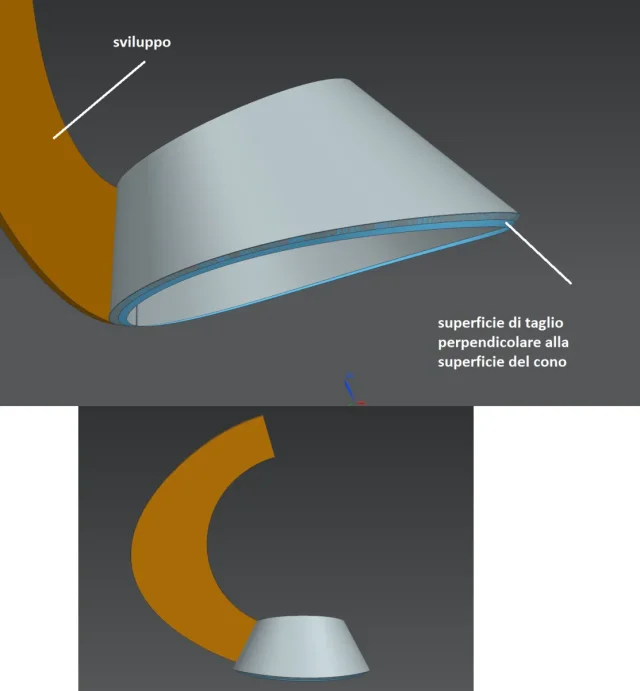
solidworks does not and wants to know how to develop this object (due to the indicated processing that I need to have the right cut)
Does anyone have solutions? Have you been there yet?View attachment 68034
Attachments
MARCOC
Guest
hello to everyone... today afternoon I place the correct file. ..what I have put and has already been mistakenly modified ..practically the loft is not concentric, but the census below is decentralized compared to the above, and the problem on development presents only when I create the conical cut...which instead not from problems when the two circles are concentric
MARCOC
Guest
MARCOC
Guest
this is done with inventor
 and how he could see the thickening and correct and develops it
with solid I can not get that result
and how he could see the thickening and correct and develops itwith solid I can not get that result
MassiVonWeizen
Guest
but wouldn't it be better to work directly with the sheet functions since you want to achieve a straight development?
MARCOC
Guest
look at the difference in development
between solid and inventor
between solid and inventor
MARCOC
Guest
hi massive...if you are how to get it correctly with solid...try to propose a solutionbut wouldn't it be better to work directly with the sheet functions since you want to achieve a straight development?
are all made with both solid and inv sheet commands
Esselle
Guest
I noticed that using the command "folding with loft" with the option "formed" development is not correct. for correcting it you have to use "piegato".
MassiVonWeizen
Guest
if you use the "superficie-loft" commands, "inspect" and then convert to sheet metal you are not using the sheet functions.hi massive...if you are how to get it correctly with solid...try to propose a solution
are all made with both solid and inv sheet commands
I've already done that kind of cone in the past when I used pipes or plate development using the correct commands.
of proposals I have already given in the past, but you are of those who obtained the solution not from feedback and disappears in nothing until the next need, so why should I lose more time than necessary? I've written how it's done. You're good.
MARCOC
Guest
Did you look at the second file I posted?
and did you read well?
If the conical cut I do it after the sheet loft...the cut is not correct..for the same reason I wrote where I posted the second file...so the cad model is not correct...and I don't know if the development as a result is
and did you read well?
If the conical cut I do it after the sheet loft...the cut is not correct..for the same reason I wrote where I posted the second file...so the cad model is not correct...and I don't know if the development as a result is
re_solidworks
Guest
I use 2021 and can't open the file. Can you give me directions on cone geometry? so I can try to do it with 2021.
MARCOC
Guest
hi resolid te la giro made con la 2017 ok
MARCOC
Guest
re_solidworks
Guest
must be so disapproved? because if so is not a cone, but a different geometric figure that must be managed with sheet loft or with surfaces. for development and bend directions, if you want to do something realistic, you have to switch to a multi-fold geometry "spigolosa" and not continuous. Basically, you don't make it of calandra, but multiply or printed.here is the cone disassato solid2017
re_solidworks
Guest
MARCOC
Guest
hi king....I saw the file....it would also be good done using the loft sheet...but with the folds...the problem and that it does not accept the 3d sketches and therefore having to make then the conical cut after...I would not have the correct background...and then return to have the same doubt...the developments that kicks solid on those maths are correct?
try to remake the loft sheet by choosing flattened and unformatted...and you will see that it does not accept the 3d sketch below
try to remake the loft sheet by choosing flattened and unformatted...and you will see that it does not accept the 3d sketch below