• This forum is the machine-generated translation of www.cad3d.it/forum1 - the Italian design community. Several terms are not translated correctly.

wrap sheet around a hole

  • Thread starter Thread starter nickobellick995
  • Start date Start date

nickobellick995

Guest
hello to all and compliments for the quality of discussions and advice I read through which I learned and am learning so much. I write this post because I couldn't find a discussion that could fit into my problem. I describe my problem with the hope of being exhaustive and understandable for all: I have a rectangular plate size (in mm) 5212*580 and 11.7mm thick. This sheet is 'extended' and I need to 'wrap it' around a hole of 1500mm diameter. the sheet length of 5212mm when wrapping around the hole, will have a part of the length (a part of those 5212mm) that will overlap the remaining sheet by defining a length of overlap that I would like to make visible and measurable. I tried to use the winding command, but when the sheet goes in 'overlapping' it tends to show me only the overlapping part and to cancel the display of everything else. I would like to make the result more realistic and conform to reality, so the result I get with the wind command is not enough. I therefore ask you a suggestion, thanking in advance all those who will answer me.
 
Here you have problems with the functions always attach images of the property manger, model or design and how useful it can be to define the problem.
try using the spiral command to create the sheet and then extend it
 
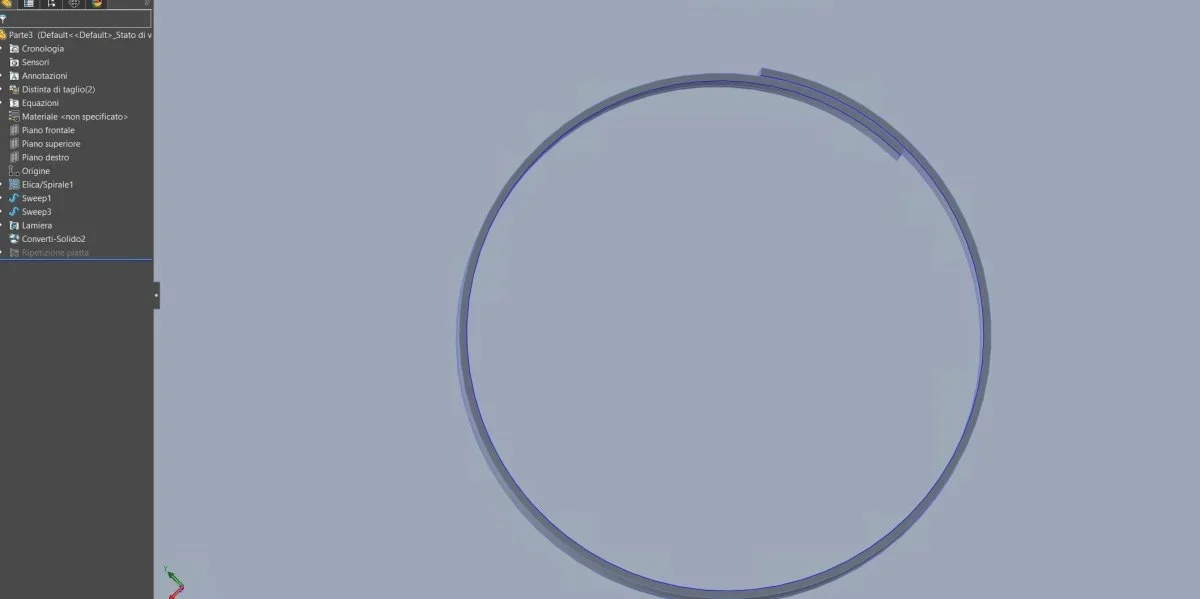
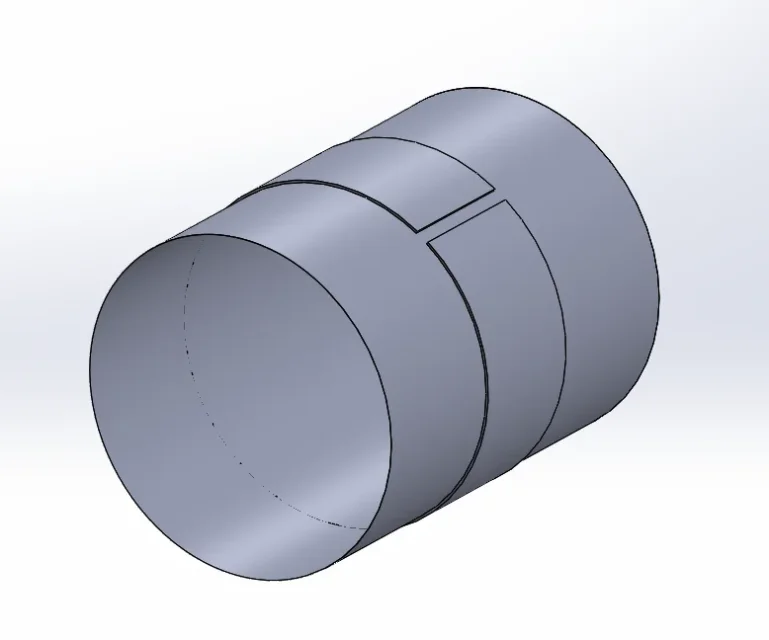
Meanwhile thank you for the answer. I'll attach you photos of my sheet that I wrapped around the photo. as you can see from the first photo the sheet can not completely wrap the hole, but if increase the length of the sheet, the overlap length visible in the second photo, will result the only part of visible sheet, instead I would like to overlap the sheet and make visible all the sheet included the overlapping part.
 

Attachments

  • Foto1.webp
    Foto1.webp
    14.1 KB · Views: 18
  • Foto2.webp
    Foto2.webp
    11.9 KB · Views: 18
I already call hole a pipe is not good, I don't understand what you want to get.
In the first picture I see a tube with an open ring, in the second I see a tube with a "weet".... what should be deducted?
 
I'm sorry for the bad description of the problem, but I'm in the industry recently. I try to relay myself using the two photos of before: the ring you see in the first photo is born from a horizontal sheet that I go to wrap around the tube. I would like to make that ring, when it wraps around the tube, can have such a length to overlap on itself (compared to the initial section where it starts to wrap around the tube), then measure and make visible all the ring, including the overlapping part.
 
I would like to make that ring, when it wraps around the tube, can have such a length to overlap on itself (compared to the initial section where it starts to wrap around the tube), then measure and make visible all the ring, including the overlapping part.
do a sketch of what you want to get because overlay has a clear meaning and I'm not sure you're using it properly, considering the previous one.
overlapping means that the sheet once exceeded the 360° winding will increase in diameter so that the inner face of the ring is coincident with the external face of the overhead part.
 
do a sketch of what you want to get because overlay has a clear meaning and I'm not sure you're using it properly, considering the previous one.
overlapping means that the sheet once exceeded the 360° winding will increase in diameter so that the inner face of the ring is coincident with the external face of the overhead part.
In fact, it is as you said, surpassed 360° the sheet will literally have to overlap.
I have to get this exact result. visually it is correct, but practically I would like to get it from a flat sheet that rolls it on itself, producing an overlap of its portion
 
I don't have much time now. I got it, very quickly, with the functions you see in the image and got a sheet, but it does not give me development.
doing so starting from a flat sheet now I don't know.... Maybe starting from the surfaces?
 
visually it is correct, but practically I would like to get it from a flat sheet that rolls it on itself
the winding function is not good because it uses only one surface so it cannot change the diameter, unless you try creating a surface with the final shape that must have the sheet.. .
the most obvious function is that used by xxfast even if it is to understand why it does not develop; Alternatively you can try to make the sheet loft using the spiral as guide curves.

is this of the flat sheet an indispensable bond?
 
the winding function is not good because it uses only one surface so it cannot change the diameter, unless you try creating a surface with the final shape that must have the sheet.. .
the most obvious function is that used by xxfast even if it is to understand why it does not develop; Alternatively you can try to make the sheet loft using the spiral as guide curves.

is this of the flat sheet an indispensable bond?
I could also think of developing it directly curved rather than flat, but I would then need to understand if later I can change the length of the sheet.
 
But I would then need to understand if I can change the length of the sheet.
the spiral can be quoted with the distance, this allows you to control its length. Moreover the length of a spiral is obtained through formulas, therefore by deduction you can obtain the data to be inserted in the creation of the spiral using an equation that has as defined value the length that must have
 
I'm trying through the spiral command and then sweep, if I can, I'm loading the file for those who have problems. Thank you very much
 
it starts by checking that it works normally, then steps to manage the size of the spiral. otherwise you risk losing time uselessly.
 
Hi, after several tests I managed to solve the ark, in case it can serve someone I list the functions used: I defined through the 'spirale' function the curve I needed with relative overlap. I created a sketch using the spiral created as polished and through the 'converted entity' command I designed the spiral as a sketch. I copied this sketch on a new floor away from me decided and through the function 'folding with loft) I defined the sheet that had to bend on itself. made this automatically creates the sheet and there is the possibility to spread it. holes can also be made on the overlapping part which will be kept in the extended version of the sheet.
 
wouldn't it be better to attach the file without having to interpret the description?
 

Forum statistics

Threads
44,997
Messages
339,767
Members
4
Latest member
ibt

Members online

No members online now.
Back
Top