
• This forum is the machine-generated translation of www.cad3d.it/forum1 - the Italian design community. Several terms are not translated correctly.

share the position of a hexagonal hole

  • Thread starter Thread starter alberto64
  • Start date Start date

alberto64

Guest
Good morning, I have a very trivial problem that I can't solve: I have to quote the position of the hexagonal holes inside a sheet, of course I need the center, on the one hand I can use the edge or the middle line of the key, but on the other??? ? ?
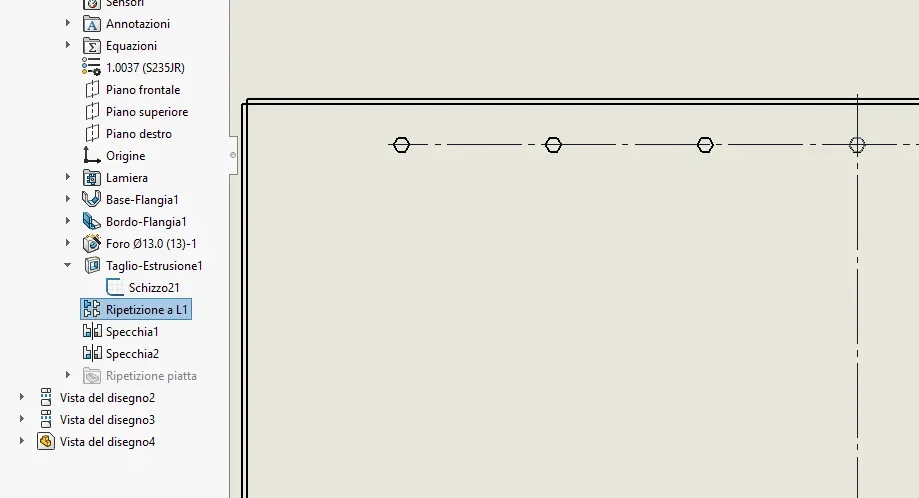
 
always nice to imagine how the real situation is. . .
Hexagonal hole that I imagine you did with a sketch, then if you used the polygon sketch element you would have also had the inscribed or circumscribed circle.
However it is enough to trace a construction line and put a point in the center
 
always nice to imagine how the real situation is. . .
Hexagonal hole that I imagine you did with a sketch, then if you used the polygon sketch element you would have also had the inscribed or circumscribed circle.
However it is enough to trace a construction line and put a point in the center
I used the polygon sketch element, but in the table I do not see the central point and not even the inscribed circle
 
If I had immediately written that you meant the quotation in the design environment I would have calibrated the answer better.
Unfortunately I do not remember the peculiarities of the quotation of solidworks, but maybe you can use the medium point snap.
an alternative is, if the arrangement is not important, rotate the hexagon by 90° so as to have the edge upwards.
 
If I had immediately written that you meant the quotation in the design environment I would have calibrated the answer better.
Unfortunately I do not remember the peculiarities of the quotation of solidworks, but maybe you can use the medium point snap.
an alternative is, if the arrangement is not important, rotate the hexagon by 90° so as to have the edge upwards.
the funny thing is that I do not select the mdeio point of the hexagon segment in quotation, I have to quote both in x and in y the position of the hole
 
in y all holes are at the same height, in x if the quota does not take the average point you can put a sketch point that the snap takes it for sure; then you can put these points on an unprintable level
 
in y all holes are at the same height, in x if the quota does not take the average point you can put a sketch point that the snap takes it for sure; then you can put these points on an unprintable level
Yes, found the piece, but it's really weird that they don't have a tool that makes the centering notch.
 
on solidworks 2022 pressing on the right button until you are with the intelligent quota tool allows you to select the average point of the hexagon line, actually on the 2019 version that I used before there was... and I really felt like a flaw
 
on solidworks 2022 pressing on the right button until you are with the intelligent quota tool allows you to select the average point of the hexagon line, actually on the 2019 version that I used before there was... and I really felt like a flaw
Grazie!!!
 

Forum statistics

Threads
44,997
Messages
339,767
Members
4
Latest member
ibt

Members online

No members online now.
Back
Top