• This forum is the machine-generated translation of www.cad3d.it/forum1 - the Italian design community. Several terms are not translated correctly.

cut and folded pipe

  • Thread starter Thread starter Shotfree
  • Start date Start date

Shotfree

Guest
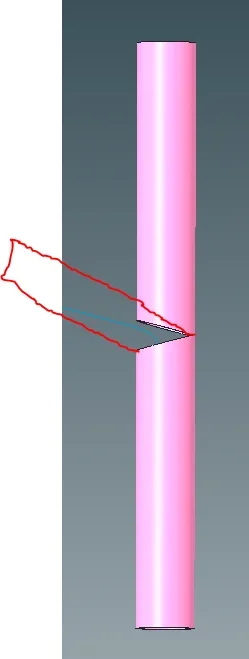
good morning to all of you, I should make a folded pipe with a cut that allows, for the precisely bending (a little like a sheet), I thought of the svergola and the deformation according to trajectory, but I can not find the square, someone has right about it?
to understand us as from image (in red the final result I would like to get).
1686581855692.webpThank you for your help!
 
good morning to all of you, I should make a folded pipe with a cut that allows, for the precisely bending (a little like a sheet), I thought of the svergola and the deformation according to trajectory, but I can not find the square, someone has right about it?
to understand us as from image (in red the final result I would like to get).
View attachment 68487Thank you for your help!
Hi, I don't understand what you mean by the square, but I think you want to know the value of the v-cut angle to do, to get the desired total angle.
by principle, know that to get a finished total angle of 90 °, you need to make two cuts equal to 45°.
to measure the angle you want to get, you have to put the goniometer on the outside, considering the zero as the pipe without bending.
from the drawing you might think you want to get an external angle of 60° so you have to make a cut with total opening of 60°, but divided into two equal parts, then two cuts to 30°.
 
Hi, I don't understand what you mean by the square, but I think you want to know the value of the v-cut angle to do, to get the desired total angle.
by principle, know that to get a finished total angle of 90 °, you need to make two cuts equal to 45°.
to measure the angle you want to get, you have to put the goniometer on the outside, considering the zero as the pipe without bending.
from the drawing you might think you want to get an external angle of 60° so you have to make a cut with total opening of 60°, but divided into two equal parts, then two cuts to 30°.
It's all nice, but he's asking how to shape him in a creo...
sometimes the context has its own because
 
It's all nice, but he's asking how to shape him in a creo...
sometimes the context has its own because
in these few weeks of my presence at the forum, I realized that certain programs, do not accept certain physical data (see factor k in bending), modeling in a program is always tangled with difficulties and answers out of every logic, instead of helping create even more confusion.
who asks for help, does it precisely because it is often devoid of the physical and technical bases of design, trigonometric calculation, etc.
I know perfectly that we must reason and never give a solution to the problem immediately, but when it is necessary, we must first know where the problem is physically placed and what references we need to see and consider, also the answers have their own because.
 
in these few weeks of my presence at the forum, I realized that certain programs, do not accept certain physical data (see factor k in bending), modeling in a program is always tangled with difficulties and answers out of every logic, instead of helping create even more confusion.
who asks for help, does it precisely because it is often devoid of the physical and technical bases of design, trigonometric calculation, etc.
I know perfectly that we must reason and never give a solution to the problem immediately, but when it is necessary, we must first know where the problem is physically placed and what references we need to see and consider, also the answers have their own because.
but not!!
 
I thank all for the interventions and for the help you have given me, in particular @arni1 For the solution, I escaped exactly the use of deformation tools, I will try to replicate your model, because in my attempts I create deformed the tube (sirly my cognitive deficiency :) )
 
Hi.
hinges
ciao @arni1 , I can't replicate your result, can I kindly ask you the correct procedure? I select trajectory and body to deform but I create it doesn't allow me to finalize the operation, what is wrong? Thanks a lot again for availability and time.
1686643742699.webp
 
the sketch must start from below and then the two linies must be turned into a spline,
because for this deformation you need a sketch with tangential elements,
but with a spline it works.
 

Attachments

  • sketch.webp
    sketch.webp
    7 KB · Views: 6
the sketch must start from below and then the two linies must be turned into a spline,
because for this deformation you need a sketch with tangential elements,
but with a spline it works.
to do so it is necessary to manually recalcate the line or there is a "more clever" method?
 
I also noticed that your spline does not require the insertion of quota, would you explain this aspect to me, please?
1686645888185.webp
 
if the request concerns creo you posted right, if it concerns another software you had to post in that section. any software can handle the same request differently so using a generic section would make little sense
 
if the request concerns creo you posted right, if it concerns another software you had to post in that section. any software can handle the same request differently so using a generic section would make little sense
It's about creo, absolutely! :
 
hi to all, I introduce myself in the discussion to ask what kind of feature could be used to represent the beginning or end of a pipe (type those in copper) crushed in clamp.
Thank you.
 

Forum statistics

Threads
44,997
Messages
339,767
Members
4
Latest member
ibt

Members online

No members online now.
Back
Top