• This forum is the machine-generated translation of www.cad3d.it/forum1 - the Italian design community. Several terms are not translated correctly.

"configuration" in if to be able to put on the table only part of the model tree

  • Thread starter Thread starter Cashflow_
  • Start date Start date

Cashflow_

Guest
I still ask for help, I can't find the command... 🄓

I have a composite part model that has the structured model tree with a sequence:
1. modeling of a piece for preparation for a carryover
2. carryover, managed with an independent body
3. final processing that removes a little mass from both bodies

now I would like to make the table only of 1. to produce the first phase. But how do I do it?
to understand what you do in sw with configurations. Is there a similar function or should I use another methodology?

Thank you very much...
 
I still ask for help, I can't find the command... 🄓

I have a composite part model that has the structured model tree with a sequence:
1. modeling of a piece for preparation for a carryover
2. carryover, managed with an independent body
3. final processing that removes a little mass from both bodies

now I would like to make the table only of 1. to produce the first phase. But how do I do it?
to understand what you do in sw with configurations. Is there a similar function or should I use another methodology?

Thank you very much...
Are we talking about an assembly or part?

If it's a part there's no quick way like solidwrks configurations, unfortunately.

Do you have to manage everything as one part and as one code or the various stages of processing can take different codes? in the second case you can use the "copy part" command:
1) create the part with preparation
2) insert it as a copy part inside a new par and models the carry
3a) insert this as copy part into another part and do the jobs
3b) do the work with the "simplify" option on part 2, but it's an eye because the simplifications are not born for that.

If it's an assembly:
1) models the assembly and declares it "saving"
2) create the cords
3) do the jobs as a feature together.

then make two sets in the table (even possibly in the same sheet), one without and one with the work together. eye that work together make the file very heavy and a little unstable.

you can also make a hybrid approach:
do the assembly, insert it as a copy part into a new par and do the work on the latter. It's the approach I prefer because it's the lightest and most robust methodology.

depends a lot on the file management system you have.
 
for those who want to do everything in one file there is the possibility to create the parts inside the axieme (internal parts)

I personally prefer the approach in which each part is a file, and the axieme is the result of the processing. which is then what you do in the real world.
 
Are we talking about an assembly or part?

If it's a part there's no quick way like solidwrks configurations, unfortunately.

Do you have to manage everything as one part and as one code or the various stages of processing can take different codes? in the second case you can use the "copy part" command:
1) create the part with preparation
2) insert it as a copy part inside a new par and models the carry
3a) insert this as copy part into another part and do the jobs
3b) do the work with the "simplify" option on part 2, but it's an eye because the simplifications are not born for that.

If it's an assembly:
1) models the assembly and declares it "saving"
2) create the cords
3) do the jobs as a feature together.

then make two sets in the table (even possibly in the same sheet), one without and one with the work together. eye that work together make the file very heavy and a little unstable.

you can also make a hybrid approach:
do the assembly, insert it as a copy part into a new par and do the work on the latter. It's the approach I prefer because it's the lightest and most robust methodology.

depends a lot on the file management system you have.
Hello and thank you.
I have to manage it as part of it, I get the creeps only to think of having a set to manage a piece ..

but then do I have to have a file for each correct phase? Is there no way to hide at least the body of the carryover to avoid a file I don't share?
 
for those who want to do everything in one file there is the possibility to create the parts inside the axieme (internal parts)

I personally prefer the approach in which each part is a file, and the axieme is the result of the processing. which is then what you do in the real world.
Hi.

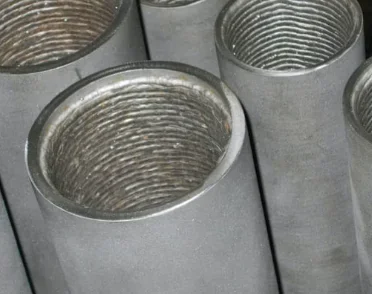
but then you a tube with variable thickness and clad would handle it as together with if?
1694159563020.webp
 
Hello and thank you.
I have to manage it as part of it, I get the creeps only to think of having a set to manage a piece ..
probably with sw you got used to working in a way I don't judge, it will definitely be what leads you to do the software.

you have 2 pieces (which I imagine have a code, a supplier and all the rest of the data) that you go to join (then they will be placed) making it a new piece (which will have its code, description etc.) on which you go to do further processing.

in solid edge we proceed in this way:
- create the 2 parts to join
- they fit into a set, positioning them with the commands together
- work with the features together

if you want to have only one file (so save disk space? or does the management not make it?) you can create the 2 initial parts directly inside the axieme
 
depends, do you have to create it or buy it already?
I create it, for me from a technical point of view, it's only a piece, never seen to make assemblies of stash even because the clad is never codified. all the companies I know run at stages is what:
1. drawing prework of the piece
2. welding (the clading is shaped, no welding module because at certain points it must be thicker for example)
3. drawing finish that resumes both the cladding and the basic material

the bom is flat enough, finished taking the tube or the rough forged, all in short cycle.
I have to raise the drawing of 1./3. , and I have no problem doing two drawings (different drawing numbers) or having a drawing on two sheets.
But I would like to minimize the part files obviously, because I don't need anything operationally, to me one is enough and advances and everything else is just unnecessary management for me.
What do you recommend? ? ?
Thank you! ! !
 
probably with sw you got used to working in a way I don't judge, it will definitely be what leads you to do the software.

you have 2 pieces (which I imagine have a code, a supplier and all the rest of the data) that you go to join (then they will be placed) making it a new piece (which will have its code, description etc.) on which you go to do further processing.

in solid edge we proceed in this way:
- create the 2 parts to join
- they fit into a set, positioning them with the commands together
- work with the features together

if you want to have only one file (so save disk space? or does the management not make it?) you can create the 2 initial parts directly inside the axieme
I answered you in your other reply šŸ˜‰
 
I create it, for me from a technical point of view, it's only a piece, never seen to make assemblies of stash even because the clad is never codified. all the companies I know run at stages is what:
1. drawing prework of the piece
2. welding (the clading is shaped, no welding module because at certain points it must be thicker for example)
3. drawing finish that resumes both the cladding and the basic material

the bom is flat enough, finished taking the tube or the rough forged, all in short cycle.
I have to raise the drawing of 1./3. , and I have no problem doing two drawings (different drawing numbers) or having a drawing on two sheets.
But I would like to minimize the part files obviously, because I don't need anything operationally, to me one is enough and advances and everything else is just unnecessary management for me.
What do you recommend? ? ?
Thank you! ! !
I believe at this point that the best thing for you is to use the aid by creating the inner parts; in fact you have all the environments available to be able to use them at the best in a single file

other roads that have possible contraindications:
to have a unique part file; you could use the "simplified" to create the body you want to put on the table. there are several limitations, and you can have only one simplified model

you could use the family of parts, to create the various files that represent the steps, but in this case it is less the requirement to have a single file

you could use the part copy, even in this you have more than one file


fear of managing files is common to sw users, in itself everything is oriented in this direction with the necessary tools; operationally you need to get and detail what you produce.

in every way; as a general speech not only for this case, I suggest you use solid edge as solid edge and do not try to emulate the sw streets when they are different.
 
I believe at this point that the best thing for you is to use the aid by creating the inner parts; in fact you have all the environments available to be able to use them at the best in a single file

other roads that have possible contraindications:
to have a unique part file; you could use the "simplified" to create the body you want to put on the table. there are several limitations, and you can have only one simplified model

you could use the family of parts, to create the various files that represent the steps, but in this case it is less the requirement to have a single file

you could use the part copy, even in this you have more than one file


fear of managing files is common to sw users, in itself everything is oriented in this direction with the necessary tools; operationally you need to get and detail what you produce.

in every way; as a general speech not only for this case, I suggest you use solid edge as solid edge and do not try to emulate the sw streets when they are different.
ciao,
but then do you advise to completely dissociate bom in the erp system and pdm tree?
it is possible to do it obviously, perhaps it is also better side cad but then not only move the problem downstream?
It is not to use sw instead of solidedge, it is more the concept, I come from the old school ptc/pro-e/intralink these things were really dresses "accrocchi" to overcome limits of the cad (which also had pro-e at the times we mean....). boh perhaps I don't understand philosophy but so the dateteam must always put hand at the distinct mistake?

Let's understand it's not my polemic, I want to use swx, indeed now I am with it and I want to exploit its potential to the best
 
I'll get you a possible solution, based on multibody+simplification.
Wait! ! !
but this is what I need!! ! !

but how did you do the "simplification" (command I don't know) and say what level do you want in the table? ? ? ?

Thank you!
 
ciao,
but then do you advise to completely dissociate bom in the erp system and pdm tree?
it is possible to do it obviously, perhaps it is also better side cad but then not only move the problem downstream?
It is not to use sw instead of solidedge, it is more the concept, I come from the old school ptc/pro-e/intralink these things were really dresses "accrocchi" to overcome limits of the cad (which also had pro-e at the times we mean....). boh perhaps I don't understand philosophy but so the dateteam must always put hand at the distinct mistake?

Let's understand it's not my polemic, I want to use swx, indeed now I am with it and I want to exploit its potential to the best
not all the opposite, I say that for every physical object you need to have a part and for each assembled you must have a set, in this way you have a true correspondence with the bom

choose what to display the tree is the real eye you need to manually manage
 
Wait! ! !
but this is what I need!! ! !

but how did you do the "simplification" (command I don't know) and say what level do you want in the table? ? ? ?

Thank you!
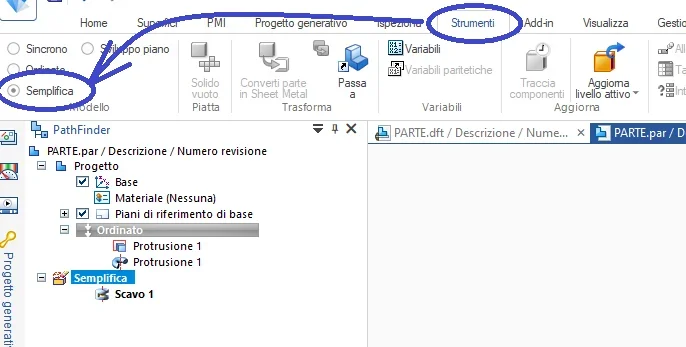
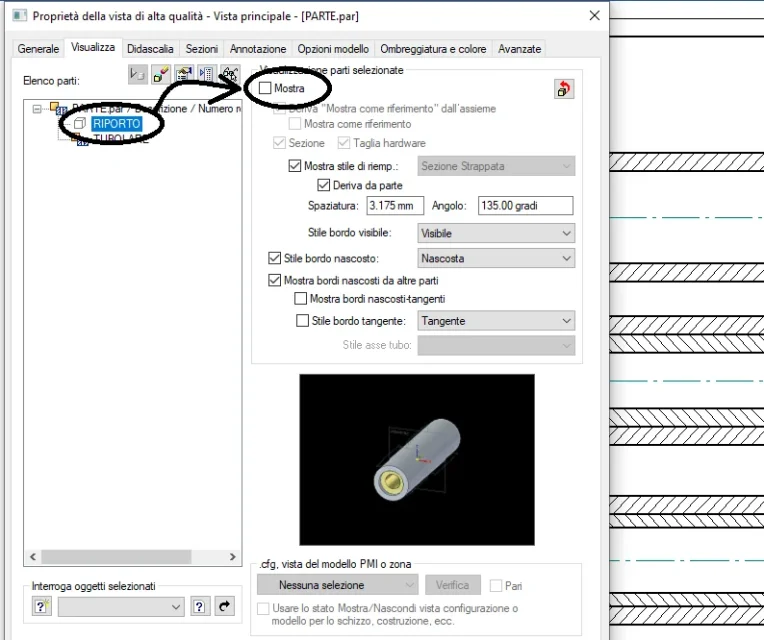
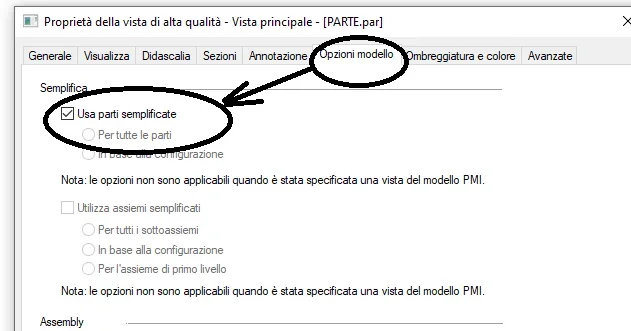
Look, these are things you find on the guide, though:
 

Attachments

  • SEMPLIFICA.webp
    SEMPLIFICA.webp
    29.2 KB · Views: 11
  • VISUALIZZA_CORPO.webp
    VISUALIZZA_CORPO.webp
    52.4 KB · Views: 11
  • VISUALIZZA_SEMPLIFICATO.webp
    VISUALIZZA_SEMPLIFICATO.webp
    21.9 KB · Views: 11
not all the opposite, I say that for every physical object you need to have a part and for each assembled you must have a set, in this way you have a true correspondence with the bom

choose what to display the tree is the real eye you need to manually manage
But I'm putting the bom in the erp, you know what I mean.
for this component is flat, only a code to understand us.
I mean this, you propose instead of disconnecting the two things or not?
 
But I'm putting the bom in the erp, you know what I mean.
for this component is flat, only a code to understand us.
I mean this, you propose instead of disconnecting the two things or not?
I understand, that carryover for you is like a soldering cord, and no company is coding a welding cord. something different if they were a tubular and a plate welded together, and then you could have two side codes and one together or only one finite code if your company, as it happens almost always, the parts if it does it as a tertist.
 
I understand, that carryover for you is like a soldering cord, and no company is coding a welding cord. something different if they were a tubular and a plate welded together, and then you could have two side codes and one together or only one finite code if your company, as it happens almost always, the parts if it does it as a tertist.
Obviously, if I have two welded tubes together I make the two codes for tubes and no welding code to understand. But in this case I also have a set because in know I have to have two levels otherwise I can't manage the cycle as I have to have both tubes in stock to be able to pick them up for welding.
with internal cycle of course (balance inside), otherwise I don't care and make a code only, I completely agree
 
Look, these are things you find on the guide, though:
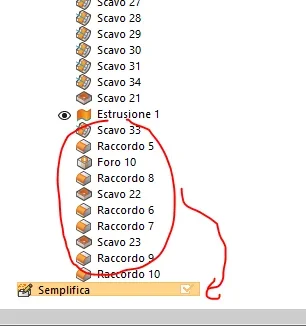
It's very interesting, it's what, last question, then I'm not gonna give you any more: but how do I move the features into the "simplify" tree. I now have all the features made in the model tree, can I move them in the simplifies or do I have to do it again?

Thank you.
1694186174916.webp
 
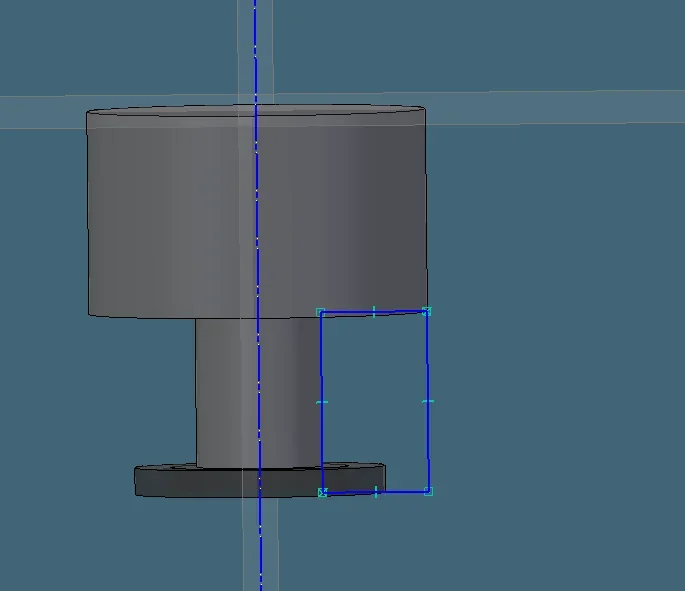
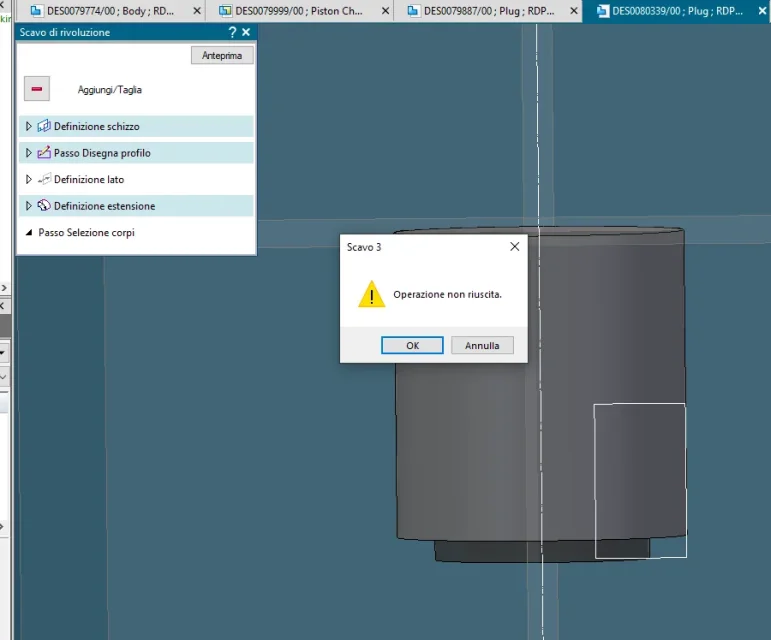
for completeness in the dear substance to this thread, the simplifies command seems really limited to manage these cases: It seems that I can only work a body: if selection in the cut "all bodies" tells me "unsuccessful operation and does not remove me mass in the second body".

is not the right tool to manage claddature efficiently. I will continue to look for, for the moment I manage by hand the boms otherwise I do not come out.

every help is welcome

1695210858887.png
1695210959774.png
 

Forum statistics

Threads
44,997
Messages
339,767
Members
4
Latest member
ibt

Members online

No members online now.
Back
Top