
• This forum is the machine-generated translation of www.cad3d.it/forum1 - the Italian design community. Several terms are not translated correctly.

macro to export dwg,pdf,step with folder selection

  • Thread starter Thread starter FIGOR71
  • Start date Start date

FIGOR71

Guest
Good morning to all, I hope you are well seen the situation in Italy. .
I find myself with the need to create dwg,pdf files and step files of each table of solidworks, and turning on the internet I found the macro attached. .
I kindly ask if someone is able to change it, so that I can choose the folder where to extract the generated files..(At this moment I type them in the native file folder)
Thank you in advance and wish you a good day
 

Attachments

Good morning to all
I created a macro (thanks to the code found by one of the deepak macros combined with one of mine) that should do as follows;


-open a folder selection box (where the user selects a folder)

-open all drawing files in the selected folder (one by one, one after the other)

-check if there is a folder called "pdf", otherwise create a directory

-Save the open design file as pdf, creating the name saved as from custom properties in the reference model

-close the design

-pass to next


now in my code below (and I attached the macro file because the folder tab is attached) the macro will complete a drawing, close the drawing and show the msgbox if the folder "pdf" exists, if the folder does not exist will create the folder, save the open design, close the drawing and fail on "sfilename = dir"


if comment "if dir(pdfpath, vbdirectory) = "" then mkdir pdfpath" and create "pdfpath=currpath" works perfectly and saves all designs in the selected directory.


Can someone help me solve it, so that you create the pdf folder and save pdf? ?


explicit option


dim swapp as sldworks.sldworks

dim swmodel as sldworks.modeldoc

dim sfilename as string

dim vfilename as string

attenuated path as string

dim npath as string

dim nerrors as long

dim navverte until

dim swdraw as sldworks.drawingdoc

dim swcustprop as custompropertymanager

dim swview as sldworks.view

dim configname as string

I am so long

dim valout1 as string

dim valout2 as string

dim solvedvalout1 as string

dim solvedvalout2 as string

dim leaving as string

dim nfilename as string

dim swdocs as variant

dim pdfpath as string

weak currpath as string

dim partnodes as string


subprinciple()


tax swapp = application.sldworks


path = folder("select a path/folder")


path = path + "\"


sfilename = dir(path & "*.slddrw")


run until sfilename = ""


set swmodel = swapp.opendoc6(path + sfilename, swdocdrawing, swopendocoptions_silent, "", nerrors, nwarnings)


swmodel tax = swapp.activedoc

Swadraw tax = swapp.activedoc

set swview = swdraw.getfirstview

set swview = swview.getnextview

set swmodel = swview.referenceddocument


pathcurr = left(swdraw.getpathname, instrrev(swdraw.getpathname, "\"))

pdf route = current route & "pdf"


if dir(pdfpath, vbdirectory) = " then mkdir pdfpath


if swmodel.gettype = swdocpart then

partnodes = mid(swdraw.getpathname, instrrev(swdraw.getpathname, "\") + 1)

partnodes = right(partnodes, len(partnodes) - 14)

partnodes = left(partnodes, len(partnodes) - 7)

partno = mid(swmodel.getpathname, instrrev(swmodel.getpathname, "\") + 1)

partno = left(partno, len(partno) - 7)

set swcustprop = swmodel.extension.custompropertymanager(swview.referencedconfiguration)

Configuration name = swview.referencedconfiguration

swcustprop.get2 "description", valout1, solvedvalout1

swcustprop.get2 "revision", valout2, solvedvalout2

nfilename = pdfpath & "\" & partno & "-" & configname & "-" & solvevalout2 & " & partnodes

swdraw.saveas3 nfilename & ".pdf", 0, 0


elseif swmodel.gettype = swdocassembly therefore

partnodes = mid(swdraw.getpathname, instrrev(swdraw.getpathname, "\") + 1)

partnodes = right(partnodes, len(partnodes) - 11)

partnodes = left(partnodes, len(partnodes) - 7)

partno = mid(swmodel.getpathname, instrrev(swmodel.getpathname, "\") + 1)

partno = left(partno, len(partno) - 7)

set swcustprop = swmodel.extension.custompropertymanager("")

swcustprop.get2 "description", valout1, solvedvalout1

swcustprop.get2 "revision", valout2, solvedvalout2

nfilename = pdfpath & "\" & partno & "-" & solvedvalout2 & " & partnodes

swdraw.saveas3 nfilename & ".pdf", 0, 0


You're gonna end up


swapp.quitdoc swdraw.getpathname


set swdraw = nothing


set swmodel = nothing


snomefile = dir


continuous cycle


msgbox "all done"


end
 
Good morning to all
I created a macro (thanks to the code found by one of the deepak macros combined with one of mine) that should do as follows;


-open a folder selection box (where the user selects a folder)

-open all drawing files in the selected folder (one by one, one after the other)

-check if there is a folder called "pdf", otherwise create a directory

-Save the open design file as pdf, creating the name saved as from custom properties in the reference model

-close the design

-pass to next


now in my code below (and I attached the macro file because the folder tab is attached) the macro will complete a drawing, close the drawing and show the msgbox if the folder "pdf" exists, if the folder does not exist will create the folder, save the open design, close the drawing and fail on "sfilename = dir"


if comment "if dir(pdfpath, vbdirectory) = "" then mkdir pdfpath" and create "pdfpath=currpath" works perfectly and saves all designs in the selected directory.


Can someone help me solve it, so that you create the pdf folder and save pdf? ?


explicit option


dim swapp as sldworks.sldworks

dim swmodel as sldworks.modeldoc

dim sfilename as string

dim vfilename as string

attenuated path as string

dim npath as string

dim nerrors as long

dim navverte until

dim swdraw as sldworks.drawingdoc

dim swcustprop as custompropertymanager

dim swview as sldworks.view

dim configname as string

I am so long

dim valout1 as string

dim valout2 as string

dim solvedvalout1 as string

dim solvedvalout2 as string

dim leaving as string

dim nfilename as string

dim swdocs as variant

dim pdfpath as string

weak currpath as string

dim partnodes as string


subprinciple()


tax swapp = application.sldworks


path = folder("select a path/folder")


path = path + "\"


sfilename = dir(path & "*.slddrw")


run until sfilename = ""


set swmodel = swapp.opendoc6(path + sfilename, swdocdrawing, swopendocoptions_silent, "", nerrors, nwarnings)


swmodel tax = swapp.activedoc

Swadraw tax = swapp.activedoc

set swview = swdraw.getfirstview

set swview = swview.getnextview

set swmodel = swview.referenceddocument


pathcurr = left(swdraw.getpathname, instrrev(swdraw.getpathname, "\"))

pdf route = current route & "pdf"


if dir(pdfpath, vbdirectory) = " then mkdir pdfpath


if swmodel.gettype = swdocpart then

partnodes = mid(swdraw.getpathname, instrrev(swdraw.getpathname, "\") + 1)

partnodes = right(partnodes, len(partnodes) - 14)

partnodes = left(partnodes, len(partnodes) - 7)

partno = mid(swmodel.getpathname, instrrev(swmodel.getpathname, "\") + 1)

partno = left(partno, len(partno) - 7)

set swcustprop = swmodel.extension.custompropertymanager(swview.referencedconfiguration)

Configuration name = swview.referencedconfiguration

swcustprop.get2 "description", valout1, solvedvalout1

swcustprop.get2 "revision", valout2, solvedvalout2

nfilename = pdfpath & "\" & partno & "-" & configname & "-" & solvevalout2 & " & partnodes

swdraw.saveas3 nfilename & ".pdf", 0, 0


elseif swmodel.gettype = swdocassembly therefore

partnodes = mid(swdraw.getpathname, instrrev(swdraw.getpathname, "\") + 1)

partnodes = right(partnodes, len(partnodes) - 11)

partnodes = left(partnodes, len(partnodes) - 7)

partno = mid(swmodel.getpathname, instrrev(swmodel.getpathname, "\") + 1)

partno = left(partno, len(partno) - 7)

set swcustprop = swmodel.extension.custompropertymanager("")

swcustprop.get2 "description", valout1, solvedvalout1

swcustprop.get2 "revision", valout2, solvedvalout2

nfilename = pdfpath & "\" & partno & "-" & solvedvalout2 & " & partnodes

swdraw.saveas3 nfilename & ".pdf", 0, 0


You're gonna end up


swapp.quitdoc swdraw.getpathname


set swdraw = nothing


set swmodel = nothing


snomefile = dir


continuous cycle


msgbox "all done"


end
Hi.
Can you attach the complete macro?
with the code so copied and translated it is difficult to help you.
 
Hi.
Can you attach the complete macro?
with the code so copied and translated it is difficult to help you.
i have created a macro (thanks to finding code from one of deepak's macros combined with one of mine) that is supposed to do the following;


-open a folder selection box (where the user selects a folder)

-open all the drawing files in the selected folder (one by one, one after the other)

-check to see if there is a folder called "pdf" in the directory, if not then create one

-save the open drawing file as a pdf, building the save as name from custom properties in the referenced model

-close the drawing

-move on to next one


now in my code below (and i have attached the macro file because there is the browse folder module attached) the macro will complete one drawing, close the drawing and show the msgbox if that "pdf" folder exists, if the folder does not exist it will create the folder, save the open drawing, close the drawing and fail on "sfilename = dir"


if i comment out the "if dir(pdfpath, vbdirectory) = "" then mkdir pdfpath" and make "pdfpath=currpath" it runs perfectly and saves the drawings all in the selected directory.


can anyone please help me solve this, so it creates that pdf folder and saves the pdfs in to it??


option explicit


dim swapp as sldworks.sldworks

dim swmodel as sldworks.modeldoc

dim sfilename as string

dim vfilename as string

dim path as string

dim npath as string

dim nerrors as long

dim nwarnings as long

dim swdraw as sldworks.drawingdoc

dim swcustprop as custompropertymanager

dim swview as sldworks.view

dim configname as string

dim i as long

dim valout1 as string

dim valout2 as string

dim resolvedvalout1 as string

dim resolvedvalout2 as string

dim partno as string

dim nfilename as string

dim swdocs as variant

dim pdfpath as string

dim currpath as string

dim partnodes as string


sub main()


set swapp = application.sldworks


path = browsefolder("select a path/folder")


path = path + "\"


sfilename = dir(path & "*.slddrw")


do until sfilename = ""


set swmodel = swapp.opendoc6(path + sfilename, swdocdrawing, swopendocoptions_silent, "", nerrors, nwarnings)


set swmodel = swapp.activedoc

set swdraw = swapp.activedoc

set swview = swdraw.getfirstview

set swview = swview.getnextview

set swmodel = swview.referenceddocument


currpath = left(swdraw.getpathname, instrrev(swdraw.getpathname, "\"))

pdfpath = currpath & "pdf"


if dir(pdfpath, vbdirectory) = "" then mkdir pdfpath


if swmodel.gettype = swdocpart then

partnodes = mid(swdraw.getpathname, instrrev(swdraw.getpathname, "\") + 1)

partnodes = right(partnodes, len(partnodes) - 14)

partnodes = left(partnodes, len(partnodes) - 7)

partno = mid(swmodel.getpathname, instrrev(swmodel.getpathname, "\") + 1)

partno = left(partno, len(partno) - 7)

set swcustprop = swmodel.extension.custompropertymanager(swview.referencedconfiguration)

configname = swview.referencedconfiguration

swcustprop.get2 "description", valout1, resolvedvalout1

swcustprop.get2 "revision", valout2, resolvedvalout2

nfilename = pdfpath & "\" & partno & "-" & configname & "-" & resolvedvalout2 & " " & partnodes

swdraw.saveas3 nfilename & ".pdf", 0, 0


elseif swmodel.gettype = swdocassembly then

partnodes = mid(swdraw.getpathname, instrrev(swdraw.getpathname, "\") + 1)

partnodes = right(partnodes, len(partnodes) - 11)

partnodes = left(partnodes, len(partnodes) - 7)

partno = mid(swmodel.getpathname, instrrev(swmodel.getpathname, "\") + 1)

partno = left(partno, len(partno) - 7)

set swcustprop = swmodel.extension.custompropertymanager("")

swcustprop.get2 "description", valout1, resolvedvalout1

swcustprop.get2 "revision", valout2, resolvedvalout2

nfilename = pdfpath & "\" & partno & "-" & resolvedvalout2 & " " & partnodes

swdraw.saveas3 nfilename & ".pdf", 0, 0


end if


swapp.quitdoc swdraw.getpathname


set swdraw = nothing


set swmodel = nothing


sfilename = dir


loop


msgbox "all done"


end sub
 
i have created a macro (thanks to finding code from one of deepak's macros combined with one of mine) that is supposed to do the following;


-open a folder selection box (where the user selects a folder)

-open all the drawing files in the selected folder (one by one, one after the other)

-check to see if there is a folder called "pdf" in the directory, if not then create one

-save the open drawing file as a pdf, building the save as name from custom properties in the referenced model

-close the drawing

-move on to next one


now in my code below (and i have attached the macro file because there is the browse folder module attached) the macro will complete one drawing, close the drawing and show the msgbox if that "pdf" folder exists, if the folder does not exist it will create the folder, save the open drawing, close the drawing and fail on "sfilename = dir"


if i comment out the "if dir(pdfpath, vbdirectory) = "" then mkdir pdfpath" and make "pdfpath=currpath" it runs perfectly and saves the drawings all in the selected directory.


can anyone please help me solve this, so it creates that pdf folder and saves the pdfs in to it??


option explicit


dim swapp as sldworks.sldworks

dim swmodel as sldworks.modeldoc

dim sfilename as string

dim vfilename as string

dim path as string

dim npath as string

dim nerrors as long

dim nwarnings as long

dim swdraw as sldworks.drawingdoc

dim swcustprop as custompropertymanager

dim swview as sldworks.view

dim configname as string

dim i as long

dim valout1 as string

dim valout2 as string

dim resolvedvalout1 as string

dim resolvedvalout2 as string

dim partno as string

dim nfilename as string

dim swdocs as variant

dim pdfpath as string

dim currpath as string

dim partnodes as string


sub main()


set swapp = application.sldworks


path = browsefolder("select a path/folder")


path = path + "\"


sfilename = dir(path & "*.slddrw")


do until sfilename = ""


set swmodel = swapp.opendoc6(path + sfilename, swdocdrawing, swopendocoptions_silent, "", nerrors, nwarnings)


set swmodel = swapp.activedoc

set swdraw = swapp.activedoc

set swview = swdraw.getfirstview

set swview = swview.getnextview

set swmodel = swview.referenceddocument


currpath = left(swdraw.getpathname, instrrev(swdraw.getpathname, "\"))

pdfpath = currpath & "pdf"


if dir(pdfpath, vbdirectory) = "" then mkdir pdfpath


if swmodel.gettype = swdocpart then

partnodes = mid(swdraw.getpathname, instrrev(swdraw.getpathname, "\") + 1)

partnodes = right(partnodes, len(partnodes) - 14)

partnodes = left(partnodes, len(partnodes) - 7)

partno = mid(swmodel.getpathname, instrrev(swmodel.getpathname, "\") + 1)

partno = left(partno, len(partno) - 7)

set swcustprop = swmodel.extension.custompropertymanager(swview.referencedconfiguration)

configname = swview.referencedconfiguration

swcustprop.get2 "description", valout1, resolvedvalout1

swcustprop.get2 "revision", valout2, resolvedvalout2

nfilename = pdfpath & "\" & partno & "-" & configname & "-" & resolvedvalout2 & " " & partnodes

swdraw.saveas3 nfilename & ".pdf", 0, 0


elseif swmodel.gettype = swdocassembly then

partnodes = mid(swdraw.getpathname, instrrev(swdraw.getpathname, "\") + 1)

partnodes = right(partnodes, len(partnodes) - 11)

partnodes = left(partnodes, len(partnodes) - 7)

partno = mid(swmodel.getpathname, instrrev(swmodel.getpathname, "\") + 1)

partno = left(partno, len(partno) - 7)

set swcustprop = swmodel.extension.custompropertymanager("")

swcustprop.get2 "description", valout1, resolvedvalout1

swcustprop.get2 "revision", valout2, resolvedvalout2

nfilename = pdfpath & "\" & partno & "-" & resolvedvalout2 & " " & partnodes

swdraw.saveas3 nfilename & ".pdf", 0, 0


end if


swapp.quitdoc swdraw.getpathname


set swdraw = nothing


set swmodel = nothing


sfilename = dir


loop


msgbox "all done"


end sub
Hi.
I made some small changes, and added the browsefolder function you didn't post. to try the macro I had to exclude code lines that formed the file name to be saved, but you can reactivate them.
 

Attachments

Hi.
I made some small changes, and added the browsefolder function you didn't post. to try the macro I had to exclude code lines that formed the file name to be saved, but you can reactivate them.
Thank you so much I try and I give you
 
Hi.
I made some small changes, and added the browsefolder function you didn't post. to try the macro I had to exclude code lines that formed the file name to be saved, but you can reactivate them.
Good morning I tried the macro but no works unfortunately I am not experienced.
I tried this macro that does to my case, this macro exports the active sheet to pdf in a folder called pdf, what I would like to have taken all the solidworks drawing files and exported them to pdf in a folder called pdf .
Thank you in advance
 

Attachments

Good morning I tried the macro but no works unfortunately I am not experienced.
I tried this macro that does to my case, this macro exports the active sheet to pdf in a folder called pdf, what I would like to have taken all the solidworks drawing files and exported them to pdf in a folder called pdf .
Thank you in advance
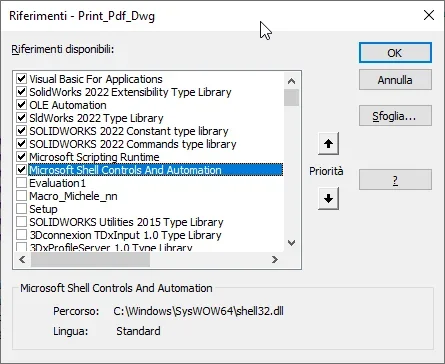
this is your second macro you posted, modified to read all drawings of a directory and save them with the same name of the drawing file with adding the value of the design "rev." property in a subfolder called pdf. you have to add references to libraries as from image.1699619541258.png
 

Attachments

Last edited by a moderator:

Forum statistics

Threads
44,997
Messages
339,767
Members
4
Latest member
ibt

Members online

No members online now.
Back
Top