• This forum is the machine-generated translation of www.cad3d.it/forum1 - the Italian design community. Several terms are not translated correctly.

group of parts handle thread

  • Thread starter Thread starter Shotfree
  • Start date Start date

Shotfree

Guest
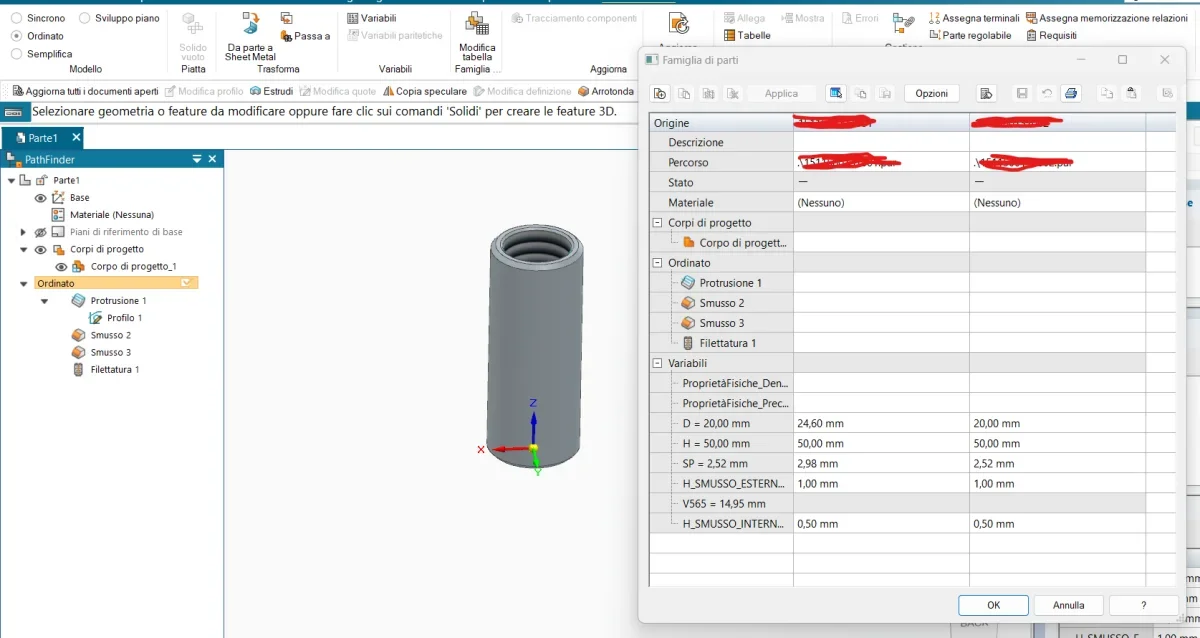
good afternoon to all, here I am again to break the boxes, but this time with something a little more challenging. I have the need to manage a family of parts in which I will vary some parameters, among them I would like to vary the inner diameter of the component, but it is thread diameter.
the particular has a straight gas thread that of course recognizing the diameter to be threaded is chosen from the sw. all right here, but when I go to vary the inner diameter of the children this processing is not recalculated and fails. premetto that I come from create of the ptc. and the threads are not manageable in familytable (the equivalent of the families of parts), therefore generally I create a manual cosmetic of which I manage the diameter and a variable with which I manage the indication (3/8", 1/2" etc.). do you know if in solid adge you can do something better?
Thank you.
1723467846453.webp
 
other question about the same topic, are custom variables manageable for each child?
Thank you again!
 
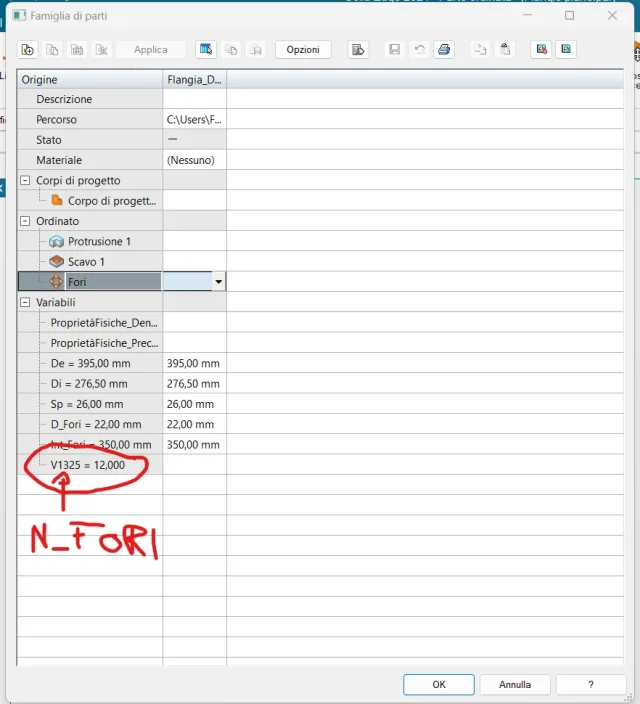
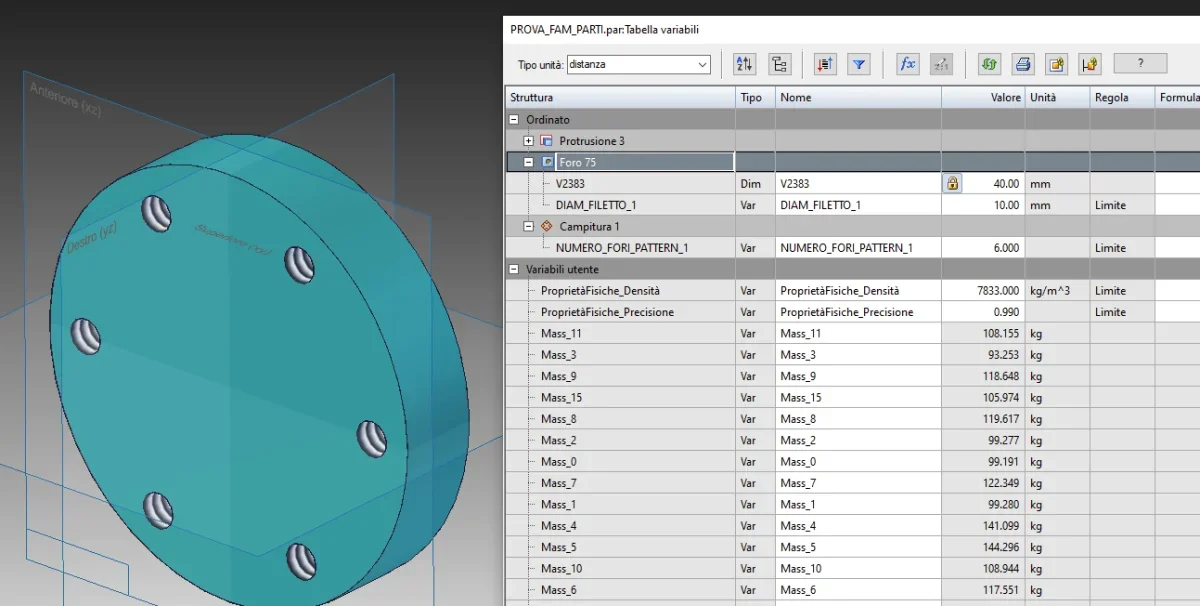
good morning to all and good August done, update on the use of the families of part, is it possible to assign a name to the internal "quotes" to feature as series? e.g. n° of repeats of the series. I would then like to be run in the family, moreover, I have an option that allows me to save all instances (family parts) as physical files dependent on the family itself without doing so for every single instance? I know I'm stressing you, so thank you very much for the answers!1723809981972.webp1723810034933.webp
 
hi, I tried to do both things (filet diameter and number of repetitions) and they worked on the first attempt, after having renamed the variables to be able to easily recognize them. I'll get you the file par. to save all variants as separate files I didn't find the way (I didn't waste much time, maybe it's possible).

Actually, the guide says he's working like this:

create the master with all variants
open a vacuum file
insert as a copy part of the variant that interests
save this part connected and use it in the real project both in assembly and table.

Basically, the master will never be used in any set, but it will only be saved on the server's hard drive as a reference.
1723810856287.png
 

Attachments

hi, I tried to do both things (filet diameter and number of repetitions) and they worked on the first attempt, after having renamed the variables to be able to easily recognize them. I'll get you the file par. to save all variants as separate files I didn't find the way (I didn't waste much time, maybe it's possible).

Actually, the guide says he's working like this:

create the master with all variants
open a vacuum file
insert as a copy part of the variant that interests
save this part connected and use it in the real project both in assembly and table.

Basically, the master will never be used in any set, but it will only be saved on the server's hard drive as a reference.
View attachment 71861
Okay, as soon as I can try, the file you attached to me with what version was made?I use the free version can I open it? Thank you so much!
 
Okay, as soon as I can try, the file you attached to me with what version was made?I use the free version can I open it? Thank you so much!
I don't think so. It's done with commercial st10. If you have the student or hobbyist version maybe you can't, still do a test.
 
I don't think so. It's done with commercial st10. If you have the student or hobbyist version maybe you can't, still do a test.
Okay, your file opens, but it's not clear how you renamed the two variables and how you selected them to run them in the family, would you explain it to me? then another thing, I did the pre-forum first, then the thread, to manage both flanges with passing hole and with threaded hole, is it incorrect? Thanks again.
 
Okay, your file opens, but it's not clear how you renamed the two variables and how you selected them to run them in the family, would you explain it to me? then another thing, I did the pre-forum first, then the thread, to manage both flanges with passing hole and with threaded hole, is it incorrect? Thanks again.
I answer for points:

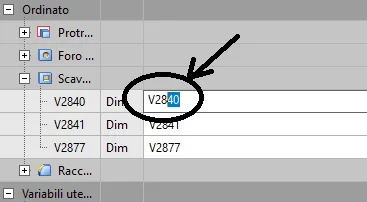
1) to rename the variable: open the variable table and then doubleclick on the variable name "v32456" and write to us instead what you want
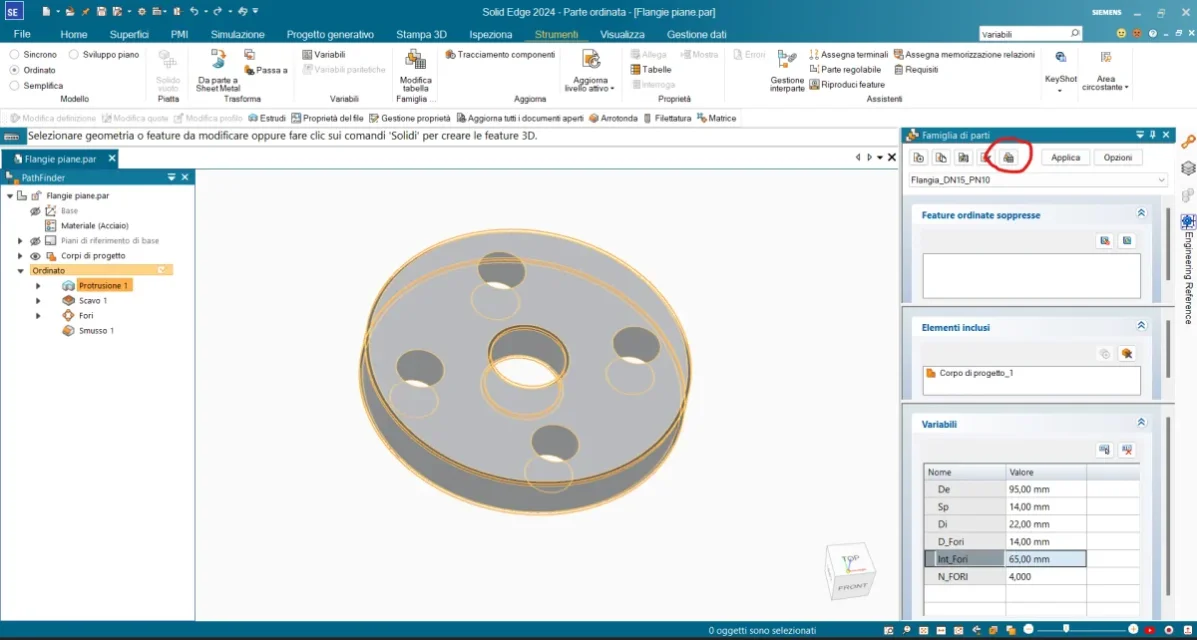
1723884329391.webp2) to select the variables to manage in the family of parts:
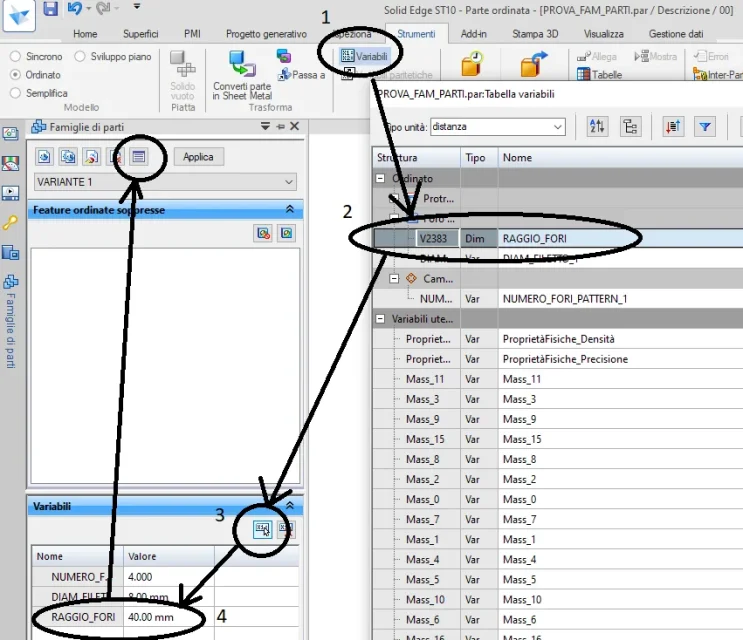
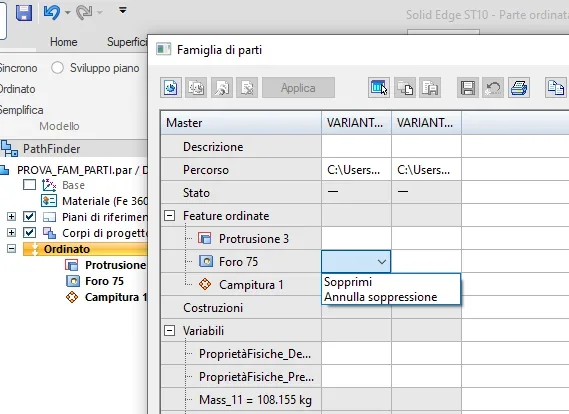
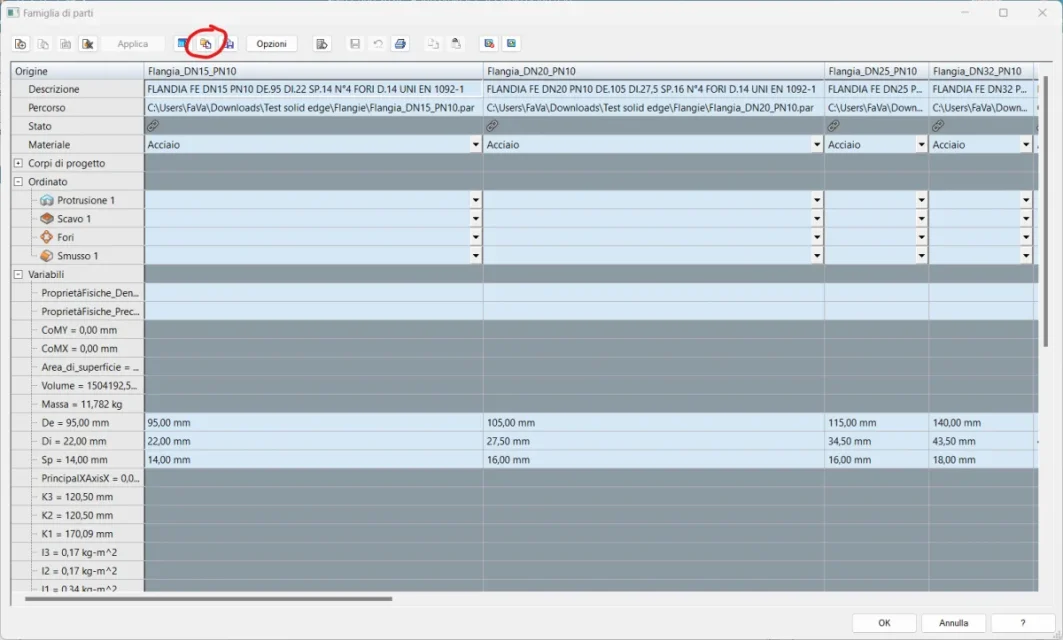
1723884568395.webp3) I have directly used the threaded hole, if you have the need to differentiate between passers holes and threaded holes in my opinion you should use the feature suppression. you will make on your master flange both threaded and passing holes, and then on your children you will suppress those that you will not need. Maybe you can do it as you thought, but now I don't have much time to get into it.
1723884766761.webp
 
I answer for points:

1) to rename the variable: open the variable table and then doubleclick on the variable name "v32456" and write to us instead what you want
View attachment 718692) to select the variables to manage in the family of parts:
View attachment 718713) I have directly used the threaded hole, if you have the need to differentiate between passers holes and threaded holes in my opinion you should use the feature suppression. you will make on your master flange both threaded and passing holes, and then on your children you will suppress those that you will not need. Maybe you can do it as you thought, but now I don't have much time to get into it.
View attachment 71872
you are the top! thank you so much, while I found how to export all children keeping them connected to the father without making it one by one, after place the procedure to benefit everyone!
 
once compiled the table with all variants, save the father, then:

1) select the “table display” icon
1723885706675.png2) click "select all components"
1723885881808.png3) select "path tax"
1723885947921.png4) set the path where, subsequently, we will save the separate files.
1723886094407.png5) select "compiling components"
1723886144331.png6) close with ok and save the generic again (father)

the process will take more or less time depending on the number of instances of the family and will produce a single file for each component, this file will remain connected to the father and will undergo the changes that will subsequently be made in the family table.

I hope it will be useful to someone else!
 
as for threaded holes the best thing is to create multiple versions of the hole with the various threads needed, then on children go to suppress those not to use.
 
as for threaded holes the best thing is to create multiple versions of the hole with the various threads needed, then on children go to suppress those not to use.
ciao @be_on_edge , the road that you propose is complicated to use, I make an example, go a family of sleeves with inch thread, I represent 200 sleeves, each with its thread, depth and diameter (1/8", 1/4", 1/2", 1", 1"1/2, etc.), would touch me to manage 200 features (it would no longer make sense the use of the family). Anyway, thank you for the answer.
 
ciao @be_on_edge , the road that you propose is complicated to use, I make an example, go a family of sleeves with inch thread, I represent 200 sleeves, each with its thread, depth and diameter (1/8", 1/4", 1/2", 1", 1"1/2, etc.), would touch me to manage 200 features (it would no longer make sense the use of the family). Anyway, thank you for the answer.
but as 200 ? are 12 threads to manage, considering also 1/8" (which I want to see the sleeve of that size :d)

the features you do once and then de-soppress what you need, that from the family table of parts you put a moment to set.

if you have to give up the family for this instead you have to recreate\modify the hole feature for each part you create, in addition to everything else.

p.s.: there would also be an alternative road (which I disagree for various reasons), and it is to create a hole with a nominal diameter and then go to apply the thread (as if it were a male); changing the nominal diameter the thread will be updated to that corresponding to that nominal diameter. Did I say I'm upset with you? [Bleep]
 
but as 200 ? are 12 threads to manage, considering also 1/8" (which I want to see the sleeve of that size :d)

the features you do once and then de-soppress what you need, that from the family table of parts you put a moment to set.

if you have to give up the family for this instead you have to recreate\modify the hole feature for each part you create, in addition to everything else.

p.s.: there would also be an alternative road (which I disagree for various reasons), and it is to create a hole with a nominal diameter and then go to apply the thread (as if it were a male); changing the nominal diameter the thread will be updated to that corresponding to that nominal diameter. Did I say I'm upset with you? [Bleep]
That's exactly what I wanted to do and I couldn't do, however as soon as I can try again, in the cado I had a few tips to give me on how I would appreciate it! Thank you very much.
 

Forum statistics

Threads
44,997
Messages
339,767
Members
4
Latest member
ibt

Members online

No members online now.
Back
Top