
• This forum is the machine-generated translation of www.cad3d.it/forum1 - the Italian design community. Several terms are not translated correctly.

2013 autocad crash for mac when inserting retini

  • Thread starter Thread starter carlorosati
  • Start date Start date

carlorosati

Guest
Hello everyone,
first of all specific to have a macbook pro, and the problem, is on autocad 2013.
when I press the last confirmation click to insert a sample suddenly crashes the program closing abruptly.
I tried to copy all the contents and paste them into a new project, but nothing, same problem.
I would not uninstall and reinstall for fear of losing all the settings I set to the program.

the error report contains the following files:

crashlog.txt
dmpuserinfo.xml
dumped.zip
system_profile.xml

Can you help me? thanks in advance.
 
the report also advised me to install it, it is in download, install it and I will let you know.
 
Unfortunately even after installing the problem remains.
crashes only on this project, because if I repeat the command on any other file, nothing happens.
 
try to copy everything in a new file, sometimes problems magically disappear.
as mentioned above, I already tried, but crashes the same.
crash should be caused by the contents of this file, because in any other dwg, which does not contain the same content, the command works regularly. Maybe a mistake in the layers?
 
as mentioned above.. .
You're right, I didn't notice. :tongue:

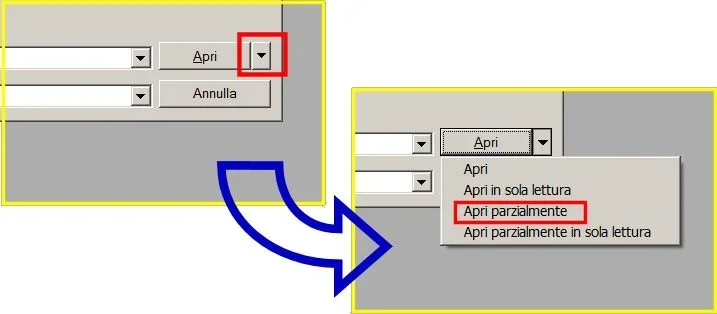
I would try a "open partially" and start with two layers, that of the object to be sampled and that of the sampling.

normally this type of error is related to some entity, you should be able to understand at least what layer is found trying to open one/two at a time.
 
You're right, I didn't notice. :tongue:

I would try a "open partially" and start with two layers, that of the object to be sampled and that of the sampling.

normally this type of error is related to some entity, you should be able to understand at least what layer is found trying to open one/two at a time.
You must excuse me, but it's the first time I've had to solve such a problem, and more like you know, autocad 2013 doesn't have the Italian language, so I'm in trouble enough.
Could you explain the procedure better? Thank you very much for your patience
 
Unfortunately if I go on file-open there is no open partially, however, there is the possibility to open files in read-only.
 
if you select the file to open before, the "open partially" option is also displayed.
419.webpThe list of layers to be loaded is then required.
 
I have no windows, the toolbars are different...if I go on open there is no possibility to open a curtain.
thanks anyway for the answer
 

Forum statistics

Threads
44,997
Messages
339,767
Members
4
Latest member
ibt

Members online

No members online now.
Back
Top