• This forum is the machine-generated translation of www.cad3d.it/forum1 - the Italian design community. Several terms are not translated correctly.

2d drawing projections in perspective with 3d effect

  • Thread starter Thread starter doking
  • Start date Start date

doking

Guest
boys according to you it is possible to project a 2d design on a particular 3d so as to simulate those projections that some artists make on the street that seen to a determined angle they look really real. I would like to project on a step a sketch and position myself to a certain angle with the photo tool, maybe 45° I would like to see the projected sketch but to see it perfectly.
easy image to make better understandpac-man-street-art-4.webp
 
you could use this technique:
- draws your gradient as solid 3d.
- activates an isometric view at 45°
- ucs command, activate view option
- Geompiatta command (or _flatshot) and creates a 2d block of 3d representation
- re-scale the block with the scale command to correct any deformation of the previous command
- draw your 2d geometry on the newly created block

In this way you can detect the distances of key points, of your 2d design, as intersections between the gradient lines and the entities of your 2d design will be available.
 
if you mean something like that

anamorf_d.rar (1.00 mb)

Of course you can.
Then it depends.. .

I can't believe
 

Attachments

you could use this technique:
- draws your gradient as solid 3d.
- activates an isometric view at 45°
- ucs command, activate view option
- Geompiatta command (or _flatshot) and creates a 2d block of 3d representation
- re-scale the block with the scale command to correct any deformation of the previous command
- draw your 2d geometry on the newly created block

In this way you can detect the distances of key points, of your 2d design, as intersections between the gradient lines and the entities of your 2d design will be available.
I had thought of placing myself in isometrics, positioning my figure, extruding the sketch as a surface and then drawing the solid using the surfaces
 
I had thought of placing myself in isometrics, positioning my figure, extruding the sketch as a surface and then drawing the solid using the surfaces
It seems to me that you don't care to have some points known to rebuild your sketch on the royal step. I'll attach the design I imagined to describe your problem. In fact, as the gp says, it is better to attach the sketch.
 

Attachments

Well, no, I'm interested in transporting the sketch, which is visible not deformed by a well identified point of observation,
I found the point that interests me, the point of observation, I traced a line that passes through the center "of my eye" to the center of the figure that will result on the gradinata, I extruded the sketch in surfaces and I used them to cut the stairway so to know precisely the quotas that then will serve me on the staircase to paint the sketch
allego file
I created a custom view so that I can identify the observation point immediatelyView attachment prova.rar
 
if you can attach the "try" file to an older dwg format I can open it and better understand the problem.
from your description it seems to me to understand that you carried out with the extrusion, basically, a parallel projection.

I can't believe
 
See, thank you. in fact you have carried out a parallel projection whose result is appreciable, in theory, only from a point of view to the infinite; in practice even from a very far point of view you can get, with approximation, a result more or less acceptable. to satisfy your initial request from a glance, if you have not already done so, here: http://www.didatticarte.it/blog/?p=1107jar
 
to represent worthy the scene test this procedure:

- place a room at the observation point;
- target point position at the centre of the step at the projection;
- z position chamber = 1.50÷1.60 (the one of the eyes);
- z target point position = half step height
- focal length = 50 mm

you can manage these settings when entering the room, acting on the grips or the property window.
assigning a name to the room you can recall the scene with the view command.
 
to represent worthy the scene test this procedure:

- place a room at the observation point;
- target point position at the centre of the step at the projection;
- z position chamber = 1.50÷1.60 (the one of the eyes);
- z target point position = half step height
- focal length = 50 mm

you can manage these settings when entering the room, acting on the grips or the property window.
assigning a name to the room you can recall the scene with the view command.
I will try as soon as possible:)
 
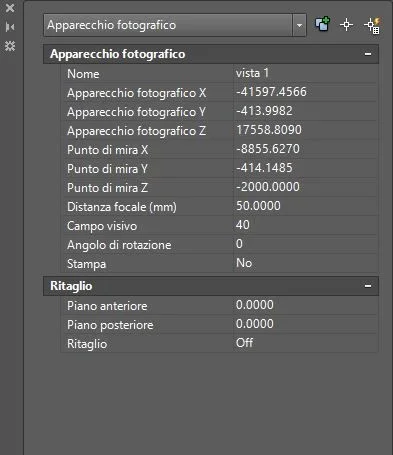
it is not so clear to me - z room position = 1.50÷1.60 (that of eyes);
- z target point position = half step height, I only have these settings as in photo.
I'm sorry, but I'm at the first render...:redface:
 

Attachments

  • Cattura.webp
    Cattura.webp
    17.8 KB · Views: 34
insert a typographical device with the chamber command in the position from which to look, pull the elastic line up to the step to orientate on the latter, sending.
from the property window you will notice that the zeta of "photo fixture" and "point of aim" are set to zero, that is, placed on the ground, assigns the values that I told you in order to have a view set "on the eyes" of those who look and oriented to the center of the figure.
clearly if in the scene you represented the plot at altitude 150,00 sets the mint of the room accordingly.
 
gp. I put a 1.75 high omino and placed the camera directly in an eye....... .
Unfortunately in this perspective only the player in red and the balleria in purple is well seen because the perspectives are different for the other images
ease the final result
 

Attachments

  • 10414413_10204184267797124_3086917816970783336_n.webp
    10414413_10204184267797124_3086917816970783336_n.webp
    98.1 KB · Views: 11
  • 10388117_10203684186282387_3685949989443094579_n.webp
    10388117_10203684186282387_3685949989443094579_n.webp
    91 KB · Views: 8
then, it seems to me to have understood what you want to get; therefore, in the meantime, we present for the moment the reference, implicit in your initial request, to the anamorfosi that avails of the reverse method of the perspective, in your case better avoid.
if the procedure you have adopted is the same as the first rows, i.e. parallel projection, it is natural that from a unique point of view, the chamber, the figures appear prospectically “uncomposed”.
as I do not use autocad, but the question prescinds from the cad used, I will use generic terms, to you the task of finding the matches.
if I have understood you have placed in front of the rank your figurines projecting them then with a specific command on the same.
if it is so proof the procedure that follows, initially with only one figurine:
- keep the room as it is already positioned,
- place the figurine behind the ranked and orthogonal to the axis of the room,
- with a favorable orientation, draw a straight from the point of view of your room at the center of the figurine,
- always from the same point of view, center of the projection, draws, perhaps placing you profile, two straights (races) for two extreme points of the figurine,
- make a copy of the figurine and slide it on the straight "camera»centre of the figurine" position it in front of the staircase appropriately and with great precision.
at this point you have the sequence aligned in the visual cone: centre of the room > small figurine (from the grade) > whole figurine (behind the grade).
with the command that in autocad seems to me called sweep join the two figurines and you will get a surface "pyramid tape" with mixed base (the figurine) that will intersect the rank: obtains the polylinea of intersection and with Boolean operation "cut" (not subtraction) the graded; to the autonomous piece so obtained by the color you want.
so now in the vector you can detect the points to be reported on the real can and the rendering will return the image sought.
repeat the procedure for other figurines always from the same projection center.
the final rendering from the room initially placed should, except for errors and/or omissions, return on the stage the image prospectically consistent of all the figurines.

I can't believe
 

Forum statistics

Threads
44,997
Messages
339,767
Members
4
Latest member
ibt

Members online

No members online now.
ciao
Back
Top