
• This forum is the machine-generated translation of www.cad3d.it/forum1 - the Italian design community. Several terms are not translated correctly.

3d solid creation starting from open mesh

  • Thread starter Thread starter eliabizz8
  • Start date Start date

eliabizz8

Guest
Hello everyone

I am new to the forum, I have seen that the topic has already been dealt with but no one as in my case had open mesh, so I hope it will be okay that I have opened a new discussion. ...

then my situation is this

I find myself with a capital of a classic furniture modeled with 3ds to have it transmuted into a solid 3d of autocad?

I tried with "_meshsmooth" and then " _convtosolid".....poi with your advice I tried with "experience"....nothing to do......has open sides and I don't know how to close them because complex

thank you for those who can help me xke I don't know where to bang my head! :frown::36_1_4:
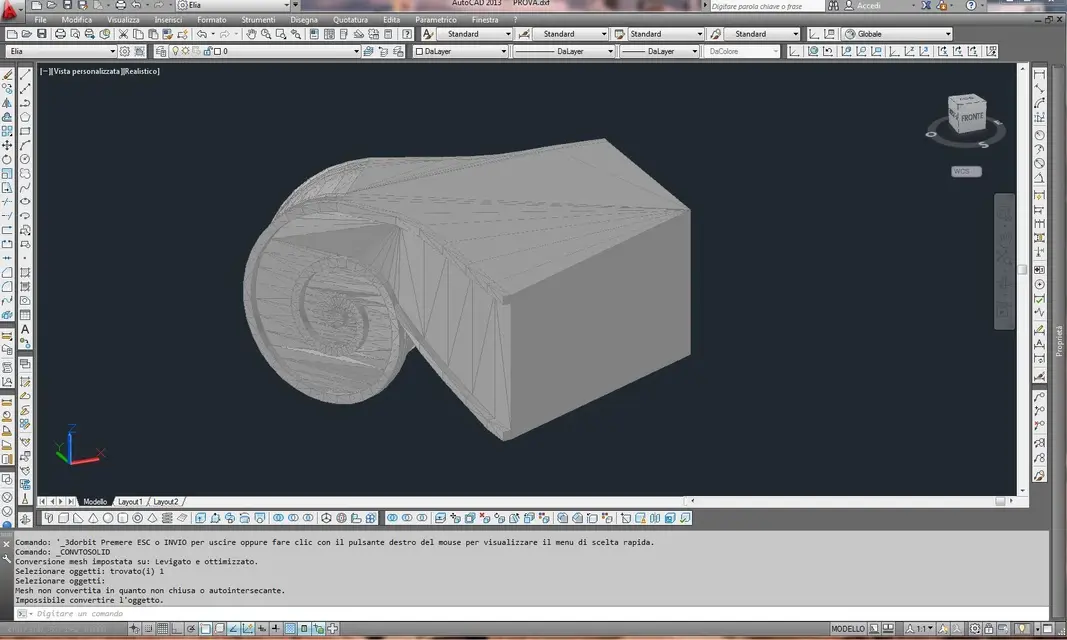
 
Cattura.webpI tried to close it with riho....under you see the message after the command "_convtosolid"
 
The problem may not be closed or not, but it is self-interesting. you probably put less to do it than to find and correct the error
 
after 1000 attempts I managed....:cool:

Then I explain that maybe someone can be useful:

1. opened with riho (by my colleague) and closed creating new mesh where they were missing.
2. exported as a unique polyhedra mesh.
3. installed in cad the plug-in "polyhedral mesh to solid" (proof version)
4. loaded in cad
5. and with the plug-in button convert polyedral mesh to solid 3d
6. at first the program crashed and turned off but in the backup of the file it magically appeared my solid and in description "solid3d"

.....as proof I performed a simple "draw" and everything is smooth yarn!!! !
 
after 1000 attempts I managed....:cool:

Then I explain that maybe someone can be useful:

1. opened with riho (by my colleague) and closed creating new mesh where they were missing.
2. exported as a unique polyhedra mesh.
3. installed in cad the plug-in "polyhedral mesh to solid" (proof version)
4. loaded in cad
5. and with the plug-in button convert polyedral mesh to solid 3d
6. at first the program crashed and turned off but in the backup of the file it magically appeared my solid and in description "solid3d"

.....as proof I performed a simple "draw" and everything is smooth yarn!!! !
Kill... achieve the result by switching from rhino, import into autocad using a test version plugin and repeating the file from a crash into the auto backup folder, all after 1000 attempts you call it smooth spin? :eek: it seems to me a discreet calvary... :smile:
 
Kill... achieve the result by switching from rhino, import into autocad using a test version plugin and repeating the file from a crash into the auto backup folder, all after 1000 attempts you call it smooth spin? :eek: it seems to me a discreet calvary... :smile:


effettivamente non hai torto :wink:
 

Forum statistics

Threads
44,997
Messages
339,767
Members
4
Latest member
ibt

Members online

No members online now.
Back
Top