• This forum is the machine-generated translation of www.cad3d.it/forum1 - the Italian design community. Several terms are not translated correctly.

a help for customizing the caption holes

  • Thread starter Thread starter skia51
  • Start date Start date

skia51

Guest
Bye to all,
I already searched in the forum and on the solidworks guide, but I couldn't find what I was looking for.
In practice, as from the title of the discussion, I would like to customize the caption holes,
in particular I would like to customize the laminated and flared holes, so that does not appear all the description with the diameter of the lamatura and the depth, but I would like it to appear simply the wording " hole lamato per vite t.c.e.i. m...." or " hole flared for screws t.s.p.e.i. m....
These are the demands of the workshop, because it seems that some workers cannot interpret the symbols of caption well.
I took the file colloutformat.txt but I have difficulty changing the strings of my interest.
Can someone please help me?
Thank you very much
 
Meanwhile, put the description that is inserted and how you would like to have it.
is a job that must be done for every type of hole and its variant
For example
♪<mod-diam> <hw-diam> <hole-depth> <hw-depth>;
<hole-spot><mod-diam> <hw-cbdia> <hole-depth> <hw-cbdepth>should be a blind vased hole (conditional of obligation given the English terms and abbreviations) where today variable is connected to the toolbox

When you enter the caption, in the feature manager, you will find this description and so you can connect the hole type to the callout voice.
identified a standard modifies it going even a little for attempts and checking changes. is a workmanship, but identified the method and the parameters will be easier.
But in my opinion it is not the right way to operate. should be the workers to learn the language of drawing (maybe putting a block with the captions of symbols)</hw-cbdepth></hole-depth></hw-cbdia></mod-diam></hole-spot></hw-depth></hole-depth></hw-diam></mod-diam>
 
Meanwhile, put the description that is inserted and how you would like to have it.
is a job that must be done for every type of hole and its variant
For example
♪<mod-diam> <hw-diam> <hole-depth> <hw-depth>;
<hole-spot><mod-diam> <hw-cbdia> <hole-depth> <hw-cbdepth>should be a blind vased hole (conditional of obligation given the English terms and abbreviations) where today variable is connected to the toolbox

When you enter the caption, in the feature manager, you will find this description and so you can connect the hole type to the callout voice.
identified a standard modifies it going even a little for attempts and checking changes. is a workmanship, but identified the method and the parameters will be easier.
But in my opinion it is not the right way to operate. should be the workers to learn the language of drawing (maybe putting a block with the captions of symbols)</hw-cbdepth></hole-depth></hw-cbdia></mod-diam></hole-spot></hw-depth></hole-depth></hw-diam></mod-diam>
Thank you
I thought it was a piece of work that took time.
I was hoping for a tip to do first, like I could export a tabellina to excell as for editing the toolbox.
I'll try to motify the strings until I get something.
Thanks again
 
io ho fatto anni fa quello che diceva massi, in realtà si fa piuttosto presto visto che i fori che devi personalizzare non sono tanti.
in calce al file calloutformat.txt trovi la leggenda delle variabili che riporto qui sotto nel caso non l'avessi vista.

**********************************************************************************
** variables **
**********************************************************************************
*
*each string right of the = above may be customized to suit with plain text entries
*or appropriate hole wizard variables. one variable may be used in place of another.
*hole wizard variables are in lower case letters, and have the form: <hw-type>
*the items in capital letters are solidworks symbol names, and have the form: <mod-dia>
*
*new entries left of the = above will not be used.
*deleting any entries left of the = above, may result in associated holes having blank hole callouts.
*
*valid hole wizard variables are as follows:
*variable description*
*<hw-cbdepth> counterbore depth
*<hw-cbdia> counterbore diameter
*<hw-cdrlang> counterdrill angle
*<hw-cdrldepth> counterdrill depth
*<hw-cdrldia> counterdrill diameter
*<hw-csang> countersink angle
*<hw-csdia> countersink diameter
*<hw-depth> depth
*<hw-descrp> description
*<hw-diam> diameter
*<hw-drlang> drill angle
*<hw-endcond> end condition
*<hw-fscsang> far side countersink angle
*<hw-fscsdia> far side countersink diameter
*<hw-fstsze> fastener size
*<hw-fsttyp> fastener type
*<hw-headclr> head clearance
*<hw-holedepth> hole depth
*<hw-holedia> hole diameter
*<hw-midcsang> middle countersink angle
*<hw-midcsdia> middle countersink diameter
*<hw-minordia> minor diameter
*<hw-mjrdia> major diameter
*<hw-nscsang> near side countersink angle
*<hw-nscsdia> near side countersink diameter
*<hw-slot-length> slot length
*<hw-std> standard
*<hw-tapdrldepth> tap drill depth
*<hw-tapdrldia> tap drill diameter
*<hw-threadang> thread angle
*<hw-threadclass> thread class (1b, 2b or 3b, applies to ansi inch holes only)
*<hw-threaddepth> thread depth
*<hw-threaddesc> thread description
*<hw-threaddia> thread diameter
*<hw-threadseries> thread series
*<hw-threadsize> thread size
*<hw-thruholedepth> thru hole depth
*<hw-thruholedia> thru hole diameter
*<hw-thrutapdrldia> thru tap drill diameter
*<hw-thrutapdrldp> thru tap drill depth
*<hw-type> type
*
* cosmetic thread callout variables
*
*<cthrd-depth> thread depth
*<cthrd-major-dia> major diameter
*<cthrd-minor-dia> minor diameter
*<cthrd-size> size
*<cthrd-std> standard
*<cthrd-type> type</cthrd-type></cthrd-std></cthrd-size></cthrd-minor-dia></cthrd-major-dia></cthrd-depth></hw-type></hw-thrutapdrldp></hw-thrutapdrldia></hw-thruholedia></hw-thruholedepth></hw-threadsize></hw-threadseries></hw-threaddia></hw-threaddesc></hw-threaddepth></hw-threadclass></hw-threadang></hw-tapdrldia></hw-tapdrldepth></hw-std></hw-slot-length></hw-nscsdia></hw-nscsang></hw-mjrdia></hw-minordia></hw-midcsdia></hw-midcsang></hw-holedia></hw-holedepth></hw-headclr></hw-fsttyp></hw-fstsze></hw-fscsdia></hw-fscsang></hw-endcond></hw-drlang></hw-diam></hw-descrp></hw-depth></hw-csdia></hw-csang></hw-cdrldia></hw-cdrldepth></hw-cdrlang></hw-cbdia></hw-cbdepth></mod-dia></hw-type>
 
io ho fatto anni fa quello che diceva massi, in realtà si fa piuttosto presto visto che i fori che devi personalizzare non sono tanti.
in calce al file calloutformat.txt trovi la leggenda delle variabili che riporto qui sotto nel caso non l'avessi vista.

**********************************************************************************
** variables **
**********************************************************************************
*
*each string right of the = above may be customized to suit with plain text entries
*or appropriate hole wizard variables. one variable may be used in place of another.
*hole wizard variables are in lower case letters, and have the form: <hw-type>
*the items in capital letters are solidworks symbol names, and have the form: <mod-dia>
*
*new entries left of the = above will not be used.
*deleting any entries left of the = above, may result in associated holes having blank hole callouts.
*
*valid hole wizard variables are as follows:
*variable description*
*<hw-cbdepth> counterbore depth
*<hw-cbdia> counterbore diameter
*<hw-cdrlang> counterdrill angle
*<hw-cdrldepth> counterdrill depth
*<hw-cdrldia> counterdrill diameter
*<hw-csang> countersink angle
*<hw-csdia> countersink diameter
*<hw-depth> depth
*<hw-descrp> description
*<hw-diam> diameter
*<hw-drlang> drill angle
*<hw-endcond> end condition
*<hw-fscsang> far side countersink angle
*<hw-fscsdia> far side countersink diameter
*<hw-fstsze> fastener size
*<hw-fsttyp> fastener type
*<hw-headclr> head clearance
*<hw-holedepth> hole depth
*<hw-holedia> hole diameter
*<hw-midcsang> middle countersink angle
*<hw-midcsdia> middle countersink diameter
*<hw-minordia> minor diameter
*<hw-mjrdia> major diameter
*<hw-nscsang> near side countersink angle
*<hw-nscsdia> near side countersink diameter
*<hw-slot-length> slot length
*<hw-std> standard
*<hw-tapdrldepth> tap drill depth
*<hw-tapdrldia> tap drill diameter
*<hw-threadang> thread angle
*<hw-threadclass> thread class (1b, 2b or 3b, applies to ansi inch holes only)
*<hw-threaddepth> thread depth
*<hw-threaddesc> thread description
*<hw-threaddia> thread diameter
*<hw-threadseries> thread series
*<hw-threadsize> thread size
*<hw-thruholedepth> thru hole depth
*<hw-thruholedia> thru hole diameter
*<hw-thrutapdrldia> thru tap drill diameter
*<hw-thrutapdrldp> thru tap drill depth
*<hw-type> type
*
* cosmetic thread callout variables
*
*<cthrd-depth> thread depth
*<cthrd-major-dia> major diameter
*<cthrd-minor-dia> minor diameter
*<cthrd-size> size
*<cthrd-std> standard
*<cthrd-type> type</cthrd-type></cthrd-std></cthrd-size></cthrd-minor-dia></cthrd-major-dia></cthrd-depth></hw-type></hw-thrutapdrldp></hw-thrutapdrldia></hw-thruholedia></hw-thruholedepth></hw-threadsize></hw-threadseries></hw-threaddia></hw-threaddesc></hw-threaddepth></hw-threadclass></hw-threadang></hw-tapdrldia></hw-tapdrldepth></hw-std></hw-slot-length></hw-nscsdia></hw-nscsang></hw-mjrdia></hw-minordia></hw-midcsdia></hw-midcsang></hw-holedia></hw-holedepth></hw-headclr></hw-fsttyp></hw-fstsze></hw-fscsdia></hw-fscsang></hw-endcond></hw-drlang></hw-diam></hw-descrp></hw-depth></hw-csdia></hw-csang></hw-cdrldia></hw-cdrldepth></hw-cdrlang></hw-cbdia></hw-cbdepth></mod-dia></hw-type>
Thank you
I'll start doing some tests these days, I hope I can do it in no time.
Thanks again
 
Hello everyone
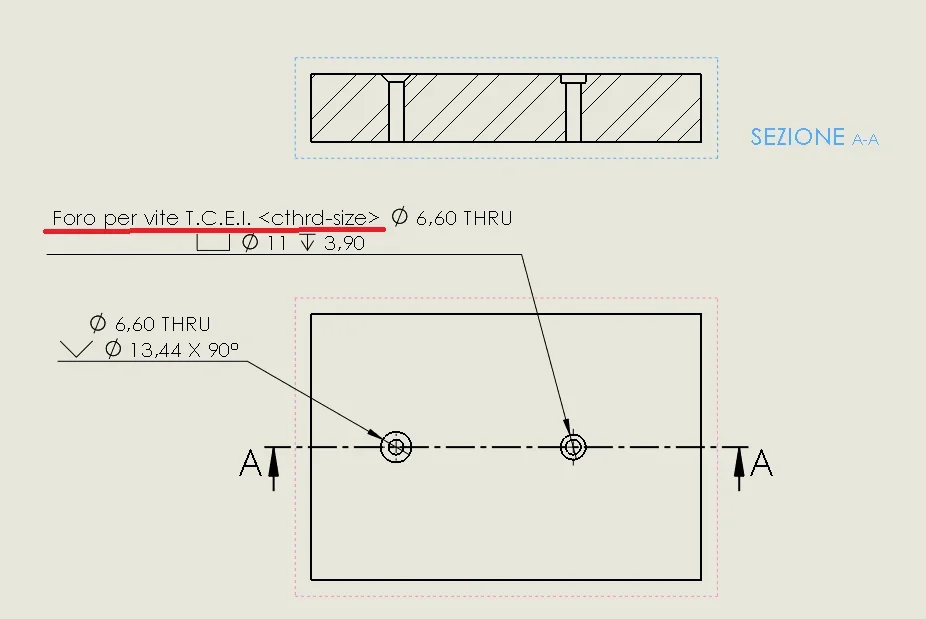
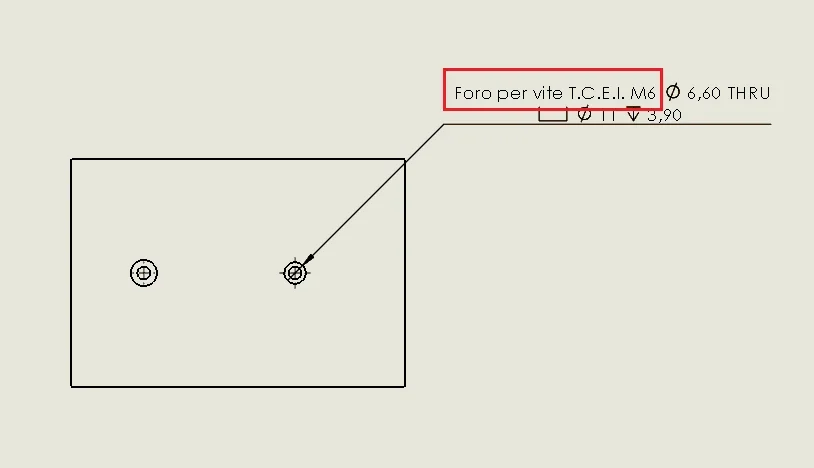
I am struggling with the modification of the colloutformat.txt file, I managed to get something like I show you in the pictures, but now what I can't get out of it is getting the measure of the screw that will go into the hole.
in the pictures you see the modified string and what appears in the table, I used the variable <cthrd-size> hoping that I would return the greatness of the life for which the hole was made, but instead it appears to me as it is, as if it were of the text.
How can I do it for you?</cthrd-size>Cattura.webpCattura2.webp
 
Usually to understand what I need to create the string with all the variables, then I go to remove those I don't need and between one and the other I insert the static text.
 
Thank you.
works
Thanks, jenuary, now the caption is just like I was looking for it, now I just have to delete the text I don't need.
Thanks again Cattura3.webp
 
Put it on
<hw-fstsze>instead of
<cthrd-size></cthrd-size></hw-fstsze>
I repeat this debate if I am mistaken I apologize
jenuary: se non use the caption, but use the smart quota on the hole (made with the hole function of course) if then in the text I go to add manually <hw-threaddepth> this is not recognized, but appears as string.
You know if there's a way to recall those variables even in other places that aren't the hole caption. (even possibly to create macros)
Thank you very much</hw-threaddepth>
 
Hello nicodownbeat
variables are recognized using caption, with intelligent odds are not read, they are two completely different commands.
with macros\addin we can do a little what we want, but if you have to use a macro to make an alternative caption, I don't see the meaning, you probably have some other idea that you haven't written in question yet.
 
I understand, thank you very much. I thought it was possible to recall that variable even within the smart quota.
for the macro we see in the future, if I need maybe I write more clearly.
Thank you! !
 

Forum statistics

Threads
44,997
Messages
339,767
Members
4
Latest member
ibt

Members online

No members online now.
Back
Top