
• This forum is the machine-generated translation of www.cad3d.it/forum1 - the Italian design community. Several terms are not translated correctly.

abnormal thread on given center contents

  • Thread starter Thread starter deep70
  • Start date Start date

deep70

Guest
Hello everyone,
I am having to insert various details from the center contained as dice or screws in general, to insert a nut m20 but this appears to me with a very small thread (see picture), you know how to tell me if by chance you have to configure something or how can I do to see the correct thread?
Thank you all in advance for the answers given and good day to all.
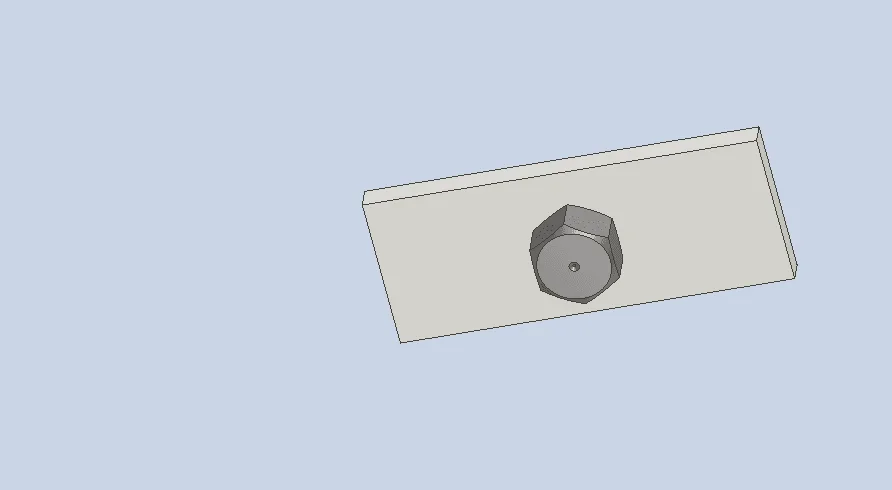
1625961557051.webp
 
strange, I usually insert the various norms both uni and I have never had problems. could put the screen of the content center?
 
Thank you so much for the answer drbarde, I attach the image of the center contained, you know to tell you the truth seemed to have heard a thing like this time ago. then we talk about configurations made in inches instead of metrics, but anyway I don't know where and how to intervene. .

now1625990193247.pngNow I have seen that this error message also gives me:1625990312464.webp
 
I resume this discussion because I had the same problem described in the first message (inserting dice from the content center, they are created with a very small thread), with the error window indicated in the third message ("a problem occurred when setting the thread data").

I explain how I solved it and what was caused: on my pc the problem happened because I changed the thread descriptions in the "thread designation" column of the thread.xls file.
I arrived after reading this: "... there was a problem when setting thread data." when the inventor content center | inventor | inventor | autodesk knowledge network is placedFirst of all then (with closed inventor, for security) I corrected the thread.xls file, taking the "right" data from the original file I had kept in backup; I left my custom descriptions in the column "custom thread designation", that does not affect.

then, following After positioning, the inventor's content center nut comes with small internal thread | inventor | autodesk knowledge network I have identified the cache directory of the content center (file/management/projects/folder options), opened it with scans windows resources, entered the sub directory "it-it" which contains the cache with the various occurrences of symbols, and I have deleted the various instances of the "wrong" dice.

I reopened inventor, trying to insert dice and screws and everything works.

(changes to the thread.xls file do not work hot with open inventor; probably uploads the file only at the beginning, does not read it from time to time)

by curiosity, even those who complained about the same problem had modified the thread.xls file?
 

Forum statistics

Threads
44,997
Messages
339,767
Members
4
Latest member
ibt

Members online

No members online now.
ciao
Back
Top