• This forum is the machine-generated translation of www.cad3d.it/forum1 - the Italian design community. Several terms are not translated correctly.

acquire images from drawing in good/high quality for word document

  • Thread starter Thread starter MadEngineer95
  • Start date Start date

MadEngineer95

Guest
Good evening to all, a question I don't know if it's already been posted but looking for nothing. I wondered how to capture images (also screenshots) of parts of a drawing in good/high quality to insert later into a word file. I have already tried to save/print a pdf (which keeps the carriers) but it is not good because then going to zoom the lines appear too big (even to the second thickness smaller than 0.3 and broken). the ideal would zoom in in the drawing and capture a screenshot, but with the capture/screenshot tool with windows the squared background is captured (or gray activating the other type of view). is there an orthodox way to acquire these images or, also, can you change the background from gray to white and then make the capture?

thanks to all and good evening
 
hi, I don't use the sw that mentions, but in all cad there is the possibility to change, easily, the background. Otherwise, you have the ability to assign zero value to the thickness of the lines, if what you need is to get thin lines.
 
..... I wondered how to capture images (also screenshots) of parts of a drawing in good/high quality to be inserted later in a word file. ....

thanks to all and good evening
If you're talking about catia v5, I tried something like that (on the contrary) when I have to enter pdf documents.

- from catdrawing, saved as pdf
- open the pdf with the reader, select all*, copy
- open paint (or, I imagine, quasiasi editor of images ) , incolli and saved as png, jpg or whatever you need.
- insert your image into your text document.

* I think I understand that when you select, it changes if you do it with a 10% or 100% zoom.

Try if it's useful, otherwise patience.

on the speech "quadretti", seen "grigie" and the rest I leave to others.
 
If you're talking about catia v5, I tried something like that (on the contrary) when I have to enter pdf documents.

- from catdrawing, saved as pdf
- open the pdf with the reader, select all*, copy
- open paint (or, I imagine, quasiasi editor of images ) , incolli and saved as png, jpg or whatever you need.
- insert your image into your text document.

* I think I understand that when you select, it changes if you do it with a 10% or 100% zoom.

Try if it's useful, otherwise patience.

on the speech "quadretti", seen "grigie" and the rest I leave to others.
hello, yes I mean catia v5 (r21). However I tried your suggestion but after I press it selects everything in pdf and copy, then when I take off in paint I paste the last image I had copied earlier (sign that I don't copy anything from pdf...)

for the suggestion of biz: unfortunately instead I can not find the option that should change the color of the background...
 
Last edited:
hello, yes I mean catia v5 (r21). However I tried your suggestion but after I press it selects everything in pdf and copy, then when I take off in paint I paste the last image I had copied earlier (sign that I don't copy anything from pdf...)

for the suggestion of biz: unfortunately instead I can not find the option that should change the color of the background...
I don't remember now if, under the editor of pdf reader, it's the "copy file to clipboard" or "take a snapshot" .
 
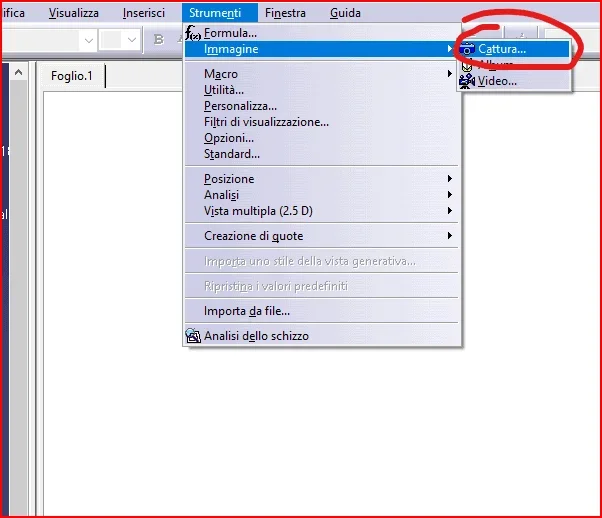
in the catdrawing there is the appropriate function to capture the image
1620109565044.webpIf you don't want to make the notebooks appear.. deactivate them with this icon1620109727666.webpIf you don't want to make the window contour appear
you must turn it off
1620109832702.webp
 
but excuse,can't you insert a zero or close value to zero regarding the line thickness?
 
Have you tried with an a0-screen format? How do they become quotas when you zoom?
bhe.. insert a "a0" format as image, in a word file.. It seems inappropriate.
Usually.. insert drawing rhinestones .. and if zoom and capture the image. It's decent.
if I have to insert an a0 format, I create a pdf and in the word file I insert the icon with the link to it
 
bhe.. insert a "a0" format as image, in a word file.. It seems inappropriate.
Usually.. insert drawing rhinestones .. and if zoom and capture the image. It's decent.
if I have to insert an a0 format, I create a pdf and in the word file I insert the icon with the link to it
If you create the image of the format a0 or a1 whole from "capture images" of v5 , then zooming , the quotas become gross, illegible ( or, at least, "grossolane"/"wild") ?
 
No, I may have been wrong.
capture image ,in catia,I use it only to take drawing rhinestones and with copy and paste insert them into an email or in a word file and graphics is acceptable.
if I have to make an image from an a0 format.. image capture is bad.
but as I said before.. is not the right method
There is the command "save by name" where the catdrawing can save it in jpg or tiff.. after that if you want to insert it in the word file or in an email and it is perfect as graphics. better would be the tiff
 
Last edited by a moderator:
Good morning, thank you all for the answers. I tried the victorious methods and the tif still creates geared images, while I get a good quality by capturing the image (png) by hiding the grid.
 
Good morning, thank you all for the answers. I tried the victorious methods and the tif still creates geared images, while I get a good quality by capturing the image (png) by hiding the grid.
the tif you have to configure it, has various settings from poor to excellent.. increase file size
if "save by name" in jpg is great
 
the tif you have to configure it, has various settings from poor to excellent.. increase file size
if "save by name" in jpg is great
I also tried jpg and it always hurts. the plus tif weighs 6 megabytes so it is already set for high quality but despite this it does not go... However I think it goes well with the capture directly in the drawing, the only thing I would like to get a black "more black", I tried to set monochrome threshold instead of color in the capture and comes more black but then the lines all of the same thickness come. I believe that the solution is to leave color but increase the contract, later, to the image obtained.. .
mmm maybe for black I have to try to print black/white to see what happens
 
bho.. strange jpg to me comes out great
the alternative is to save it as pdf and then to capture image from pdf
 
bho.. strange jpg to me comes out great
the alternative is to save it as pdf and then to capture image from pdf
I initially thought about doing so but the pdf has problems. I begin to think that it is some wrong setting of my catia in exports (pdf/jpg or tif they are). However with the capture in the drawing I tried to make prints and is well (also the question of black I said), so for now I go on so
 

Forum statistics

Threads
44,997
Messages
339,767
Members
4
Latest member
ibt

Members online

No members online now.
Back
Top