
• This forum is the machine-generated translation of www.cad3d.it/forum1 - the Italian design community. Several terms are not translated correctly.

ad arco opening - revit2009

  • Thread starter Thread starter Stefano.bp
  • Start date Start date

Stefano.bp

Guest
are to ask you some clarification about the openings:
- in your opinion what could be the best way to create an arched opening, since revit for openings in the walls provides only the rectangular shape. ..carry out all the elements...or anything?
- Is it possible that there is no temporary dynamic quota representing the width of an opening? When I go to draw one in view of prospectus I only propose the quotas from the upper and lower level...but not a quota that allows me to define the width in a numerical way.
thanks for a possible answer.
 
No. is not correct.
1) in the dynamic modification of the walls, there are various instruments of "editation of the line" including "curves" (circle/ellisse/. ..

2) you create a new family of blanks, on a wall host, with the management parameters of the size. imported into the wall of the project, it is manageable by the properties of the element.
 
on openings: I have to deal with it, but revit's help clearly tells me that the openings in the walls can only have a rectangular shape. ..parlo of the modeling command> aperture>muro.
I thank you very much for the attention, last night I was a bit in a fight for my limits! !
 
Hi, I checked, and in the help it is said that the openings for the walls can only be rectangular.
at this point how can I get my opening with arched architrave?
I tried to generate a mass of the desired shape but I can't remove it from the wall where I have to place it.. . .
Can someone give me a suggestion?
Thank you! !
 
.... I checked, and in the help it is said that the openings for the walls can only be rectangular. . .
I've lost something... eek::biggrin:

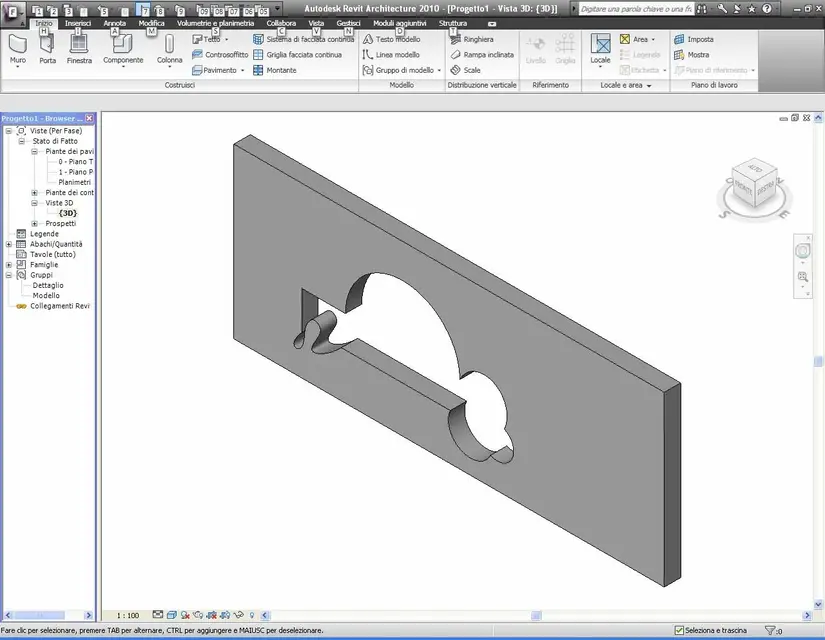
select the wall: edit wall>modifies profile and with tools "drawn" tracks the profile of the vacuum ...

in the ver. 2009 there were the same commands .... (maybe the names were different)
 

Attachments

  • MURO33.webp
    MURO33.webp
    73 KB · Views: 30
Last edited:
Wow, got it! !
However I tried to place on the wall both an opening created with your instructions and an opening created by modeling> aperture>muro.
by changing the wall the opening (so we call the one generated by the command), disappears from the profiles present in the wall and is not editable.
Thank you so much, I never would have come!
 
Hello everyone, I have revit 2013 and there is a group of families dedicated to these things that are called openings. I would like to ask you how to load a family, for example, archways and put it in the project. Thank you all
 

Forum statistics

Threads
44,997
Messages
339,767
Members
4
Latest member
ibt

Members online

No members online now.
Back
Top