• This forum is the machine-generated translation of www.cad3d.it/forum1 - the Italian design community. Several terms are not translated correctly.

add in the paper mill the type of material of the piece and the quantity of the pieces

  • Thread starter Thread starter roby88
  • Start date Start date

roby88

Guest
Good evening, everyone. .
I am using inventor 8 (although it is not very recent as version) to realize a small project at work. .

during the table stage how do you add in the cartilage the type of material of the piece designed and the quantity of the pieces to be realized?

I select the text icon, it opens the dialog box, but then I press ok no writing appears. .

Can anyone help me?

Thank you.

 
Good evening, everyone. .
I am using inventor 8 (although it is not very recent as version) to realize a small project at work. .

during the table stage how do you add in the cartilage the type of material of the piece designed and the quantity of the pieces to be realized?

I select the text icon, it opens the dialog box, but then I press ok no writing appears. .

Can anyone help me?

Thank you.

Bye.

You have to do this:

1 - open drawing file (*.idw)
2 - in the browser tree on the left, click on "foil1" -> click on "iso" (in my case the name of the default cartiglio, in your will be the name you will have assigned to it) -> sx key "modification definition" and you will open the folder in edit mode allowing you to see the name of the properties that make up the cartiglio.

3 - Enter any text box with the appropriate command in the sketch bar.
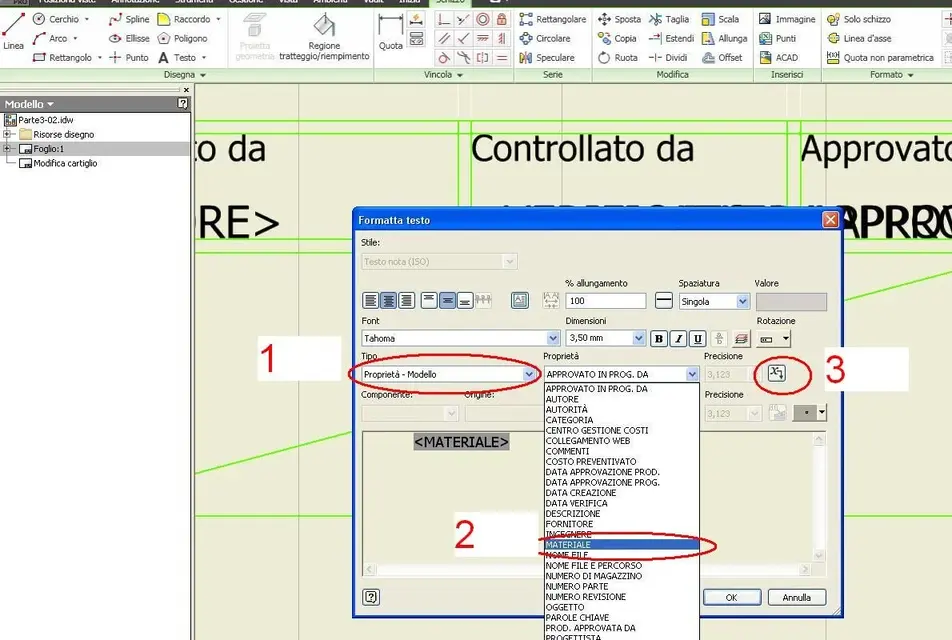
4 - "type" selection in the dialog box, then -> "model property" -> then in the "ownership" box to dx -> "material" -> "save" and the game is done.

try to look into the image I attached to you to see if it is clearer.View attachment 24403As for the quantity, this must take the value from the axieme where your piece appears, so it will be found in the axieme and not in the part.

so you should create a custom property "quantity" within your side file and call it back in the folder with the same procedure I have listed you.
At this point however, the quantity value you have to write it by hand and consequently you have no automatic update as it is a value you write and therefore untied by the side.

I don't know if there's an automatism to make the "quantity" appear automatically in the cartouche, even to me it would have been convenient you don't know how many times, let's see if maybe there's someone who knows, the thing also affects me!:smile:
 
I'm sorry, but the annex can't see it. .
the instructions are perfect in fact in the phase of modification of the cartiglio has come out <materiale>. .
further trouble... :
now how do I insert the type of material?
I tried to open the iso tree menu and click with the dx key on field text then I chose edit text field and in the window opening I find the material voice but I can't write anything. .

How can I do that? :</materiale>
 
I'm sorry, but the annex can't see it. .
the instructions are perfect in fact in the phase of modification of the cartiglio has come out <materiale>. .
further trouble... :
now how do I insert the type of material?
I tried to open the iso tree menu and click with the dx key on field text then I chose edit text field and in the window opening I find the material voice but I can't write anything. .

How can I do that? :</materiale>
Bye.

Now the annex should be seen.

nothing happens because you don't have to click with the dx button on "field text", but on "iso" or any other name you gave him.
then you enter "change" mode and from there you can use the "text" command to insert a text or change the definition of existing properties, such as: <societa>, <numero parte="">, etc.

in practice: dx button on "iso" -> "modification definition" -> "text" command in the sketch bar and insert any text in the desired location -> in the "text form" dialog box, do the operations I described in my last post.
Try to look at the image, you should be of help.

Hi.</numero></societa>
 

Attachments

  • materiale_inventor.webp
    materiale_inventor.webp
    88.7 KB · Views: 75
I'm sorry, but the annex can't see it. .
the instructions are perfect in fact in the phase of modification of the cartiglio has come out <materiale>. .
further trouble... :
now how do I insert the type of material?
I tried to open the iso tree menu and click with the dx key on field text then I chose edit text field and in the window opening I find the material voice but I can't write anything. .

How can I do that? :</materiale>
You shouldn't write it to "mant" the material.
does as he said arzigogogolo:
- Right click on iso cartiglio (or what you use)
-change the definition
opens the maple sketch
If there's no field with material writing.
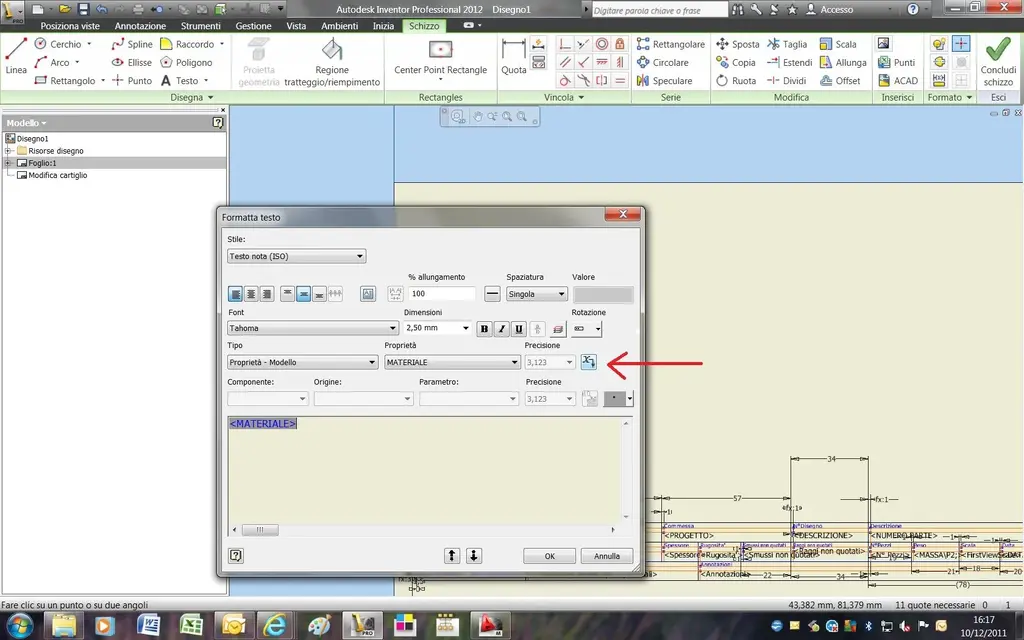
in this field insert another line of text by putting these features from the appropriate boxes:
-type: model properties
-property:material
click on the right dart with x (look at image)
the material property is added to the text line.
close the text window,close and save changes to the cartiglio .
material property remains hidden until you insert a part in the drawing.
at this point the text line will give as material, what you assigned to the part in the ipt file.
This is where the material is normally assigned, not directly in the cartilage... and this is the procedure to make a cartilage that brings you the properties that interest you; weight, sheet size, creation date, revision, custom properties etc. etc.
 

Attachments

  • Assegnazione materiale.webp
    Assegnazione materiale.webp
    121.4 KB · Views: 48
and if it were un welded together where will the material appear in the cartilage?
I can't change the default one.
 
hi guys resume the discussion...is there an "automatism" to insert the quantity in the cartiglio in inventor 2013?? Thank you.
 
I repeat the discussion for a mistake that often happens to me. . .
There's something I don't understand. .

example:
I have a "assieme chassis.iam" composed of:

1) "frame dx.ipt"_____1 pz
2) "frame sx.ipt"_____1 pz
3) "sportello.iam"___1 pz

the axieme "sportello.iam" consists of:

1) "part a.ipt"____2 pz
2) "part b.ipt______1 pz

now I open the overall "assieme chassis.iam", open the distinct with my iproperty "quantity" and cover the default column "qtà" in my "quantity" to have in the tables the correct quantities. And so far it's okay.
if I insert in the total a double "sportello.iam" (equal), imposed in the distinct "assieme chassis.iam" --> "sportello.iam" --> quantity --> 2, in the separate "sportello.iam" are not automatically set the quantities (double)? ?
as I am working now, also inserting 10 doors (equal), in the tables of the details of the door I will always have:

1) "part a.ipt"____2 pz
2) "part b.ipt______1 pz

instead of:

1) "part a.ipt"____20 pz
2) "part b.ipt_____10 pz

Do I have to manually correct the distinct??? ? ? ! ! ?
ass.webp
 
Yeah.
or you should try using the distinct "only parts", but depends on how the ownership of the components is set: For example, if you have "inseparable" or "acquired" assemblies, it sees them as a unique piece without promoting the stuff inside.
 

Forum statistics

Threads
44,997
Messages
339,767
Members
4
Latest member
ibt

Members online

No members online now.
Back
Top