
• This forum is the machine-generated translation of www.cad3d.it/forum1 - the Italian design community. Several terms are not translated correctly.

alias studio 2008 -

  • Thread starter Thread starter Nikipa
  • Start date Start date

Nikipa

Guest
for all friends who want to answer and enlighten me! !

I just signed up to ask for advice

I must import a solid edge file saved in iges format in alias in order to improve the visualization of materials.

I confess that I am neophyte of alias . I follow the import but it does not display anything

What is my mistake?

thanks for the possible answer
 
Hello and welcome.

I don't know alias, so I don't know how to help you.
if it doesn't display, he only sets surfaces, and you set the display of solids (it happens so in itself).
Can it be that it doesn't matter, do you have a import report?
Hi.
 
Thanks for the answer.
I tried both to set solids and even surfaces.
the problem persists.
I have the iges translation report. What am I supposed to check?
Thank you.
 
the problems that come to my mind can be two:

1) if it did not export solids in iges, as gerod says (it often happens). look at the size of the iges, if I am a handful of kb means that it is actually empty.

2) alias has the furba found that when it amounts a file does not create the view and does not zoom everything. So: layout (downset menu) / perspective creates a room, view (palette) / look at makes you zoom everything.

If you don't solve it, put the igs.
 
He really doesn't want to be seen.
He tells me he has nothing to look at! !
if I place the file what happens?
 
if I place the file what happens?
it happens that all subscribers to the site can download it, so if it is reserved material not to do so.
if you can post it, remember to compress it in zip format.

Bye.
 
Well, if you have nothing to look at, the file is empty. what size (in bytes) has?
I meant to publish the file so that we can download it and manipulate it. on the subject, read the last post of hunter
 
I take up the subject of the other day as it is still not resolved.
I try to explain myself better.
my problem is not to explain why a test file saved in iges format, I can't view it in alias (software installed on my computer ) while the same file is opened with different computer of my own
Dude. My friend can't give me a break.
I therefore ask myself whether through your courteous collaboration you can understand why.
Are these particular settings for my installed software?
is it the 2008 alias version that does not provide import iges although it is expected?

thanks for the patience you want to dedicate
a big greeting
 
I would marry the question in the alias forum, I think it is easier to have an answer.


Hi.
 
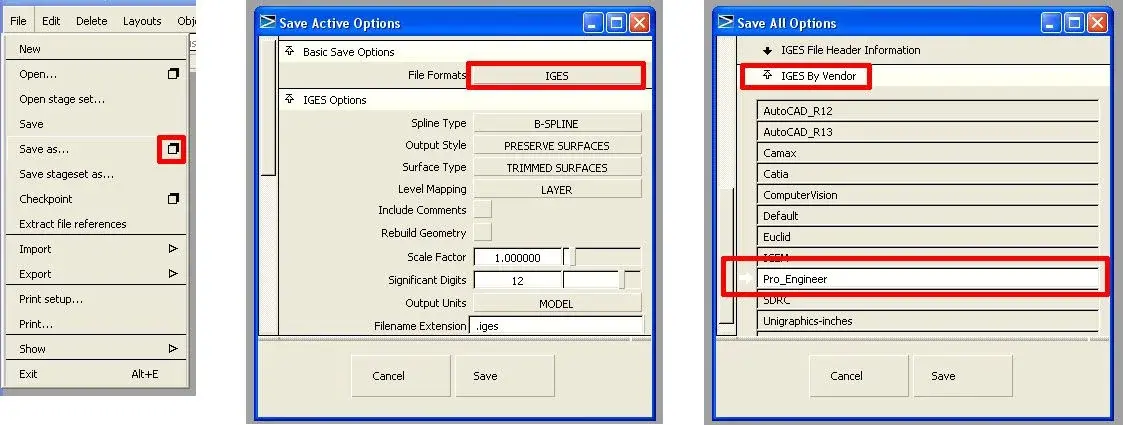
I do not use 2008... try to export the igs from the alias that reads it. uses "profile puzzles", I don't know why but that's what works best.

but on the two pcs are installed different versions of alias?
 
affirmative
My friend uses the 2010 version on mec.
I'm sorry, "Igs per proe " where do I find him?
Thank you very kind to have patience for my questions.
I'll have to look for a way to get rid of myself.
Hi.
 
Here, I selected the steps in red. I recommend, do not click on "save as", but on the square on its right, otherwise you do not open the options
 

Attachments

  • ExpIgs.webp
    ExpIgs.webp
    45.4 KB · Views: 6
thanks fulvio
I followed what was indicated and everything was resolved.
actually was a problem with options.
I still don't know the software well and so only with your valuable indications it was possible to overcome the problem.
Now I dive into studying well how much.


Your maximum is ever clear.
Hello and thank you again.

no matter whether you believe or not you can succeed... you will be right anyway!
 

Forum statistics

Threads
44,997
Messages
339,767
Members
4
Latest member
ibt

Members online

No members online now.
Back
Top