• This forum is the machine-generated translation of www.cad3d.it/forum1 - the Italian design community. Several terms are not translated correctly.

alignment texts with the layout in the blocks

  • Thread starter Thread starter mir
  • Start date Start date

mir

Guest
Hi.
I have blocks that contain texts (already annotative and with the option rotated on the layout) but when I rotate the block in the drawing the text remains oriented with the layout ... but that of the block.

How can I do that?

Thank you.
 
Hi.
I have blocks that contain texts (already annotative and with the option rotated on the layout) but when I rotate the block in the drawing the text remains oriented with the layout ... but that of the block.

How can I do that?

Thank you.
I'm not sure I understand what you need, but maybe if you explode the block and do it again, do it first.
 
Genius trick... but I wish I didn't have to remake the blocks...
to make the lock, it takes two to three seconds. Select everything (i.e. the object you want to block) hold down the tdx move the mouse and select copy as a block.
 
to make the lock, it takes two to three seconds. Select everything (i.e. the object you want to block) hold down the tdx move the mouse and select copy as a block.
but can I not do it without dismantling the blocks?
 
It's two to three seconds. Select everything (i.e. the object you want to block) hold down the tdx move the mouse and select copy as a block.
What does the mouse mean?
However not really practical as a method if you have to rotate a block several times.
Moreover if you want to give a name and a defined insertion point you have to make some extra passage than paste as a block.
I would suggest that you do the text as an attribute without making it fixed, so by turning the block you can edit the attribute and rotate it as desired
 
[QUOTE="...
io suggerirei di fare il testo come attributo senza renderlo fisso, in questo modo ruotando il blocco si può editare l'attributo e ruotarlo a piacimento[/QUOTE]I did... but the orientation does not change (of the text) if I roote the block ... it aligns (the text) if I roote the text editing the block ... I explain?
 
What does the mouse mean?
However not really practical as a method if you have to rotate a block several times.
Moreover if you want to give a name and a defined insertion point you have to make some extra passage than paste as a block.
I would suggest that you do the text as an attribute without making it fixed, so by turning the block you can edit the attribute and rotate it as desired
Selects hold the tdx (destection button) move the mouse and you will find a menu, from the menu you choose to paste it as a block (it seems or similar , try)
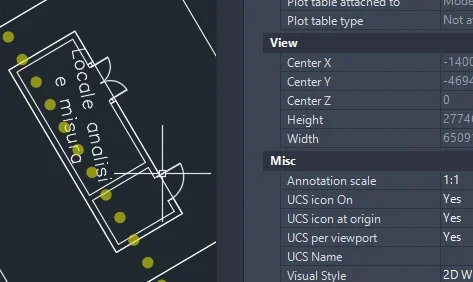
sends an image you do not understand how, is it mirrored?
 
[QUOTE="...
io suggerirei di fare il testo come attributo senza renderlo fisso, in questo modo ruotando il blocco si può editare l'attributo e ruotarlo a piacimento
I did... but the orientation does not change (of the text) if I roote the block ... it aligns (the text) if I roote the text editing the block ... I explain?[/QUOTE]ahhhhh obvious ok does not revolve because if the text includes it in the block remains such.. . attach an image the same
 
I did... but the orientation does not change (of the text) if I roote the block ... it aligns (the text) if I roote the text editing the block ... I explain?
Isn't that what I wrote? that you must edit the block to rotate the text.
Selects hold the tdx (destection button) move the mouse and you will find a menu, from the menu you choose to paste it as a block (it seems or similar , try)
not all use the context menu as a right button.
 
bhé is not a trick, it is the default function of the autocad right button, only that not everyone has set the right button with that function, so in that case apo would move the mouse unnecessarily looking who knows what.
paste as block you also get it with ctrl+maiusc+v or the change menu
 
is by default in acad, you knew him before I told you?
is it natural to select and hold the tdx and then move? to most users not,,, is a trick because it is fast.

Would you send an image of what menu you're getting out of when you said?
 
is by default in acad, you knew him before I told you?
is it natural to select and hold the tdx and then move? to most users not,,, is a trick because it is fast.

Would you send an image of what menu you're getting out of when you said?
I've known him before. about 20 years
do you know the use that make most users? I don't, and I don't like to generalize. Moreover if you do not change the behavior of the right button is because you are accustomed to using the context menu (I strongly doubt that there are those who never press the right button)
I set the right button as a repeat of the last command so I have no menu to show. for some commands I have keyboard shortcuts.
But honestly I don't understand: the right button, by default, shows the context menu (setting in the settings) and does not need to move the mouse.

mir, behavior is strange because if it is a normal text and not an attribute that requires an update the block rescue should keep the text rotated.
 
is by default in acad, you knew him before I told you?
is it natural to select and hold the tdx and then move? to most users not,,, is a trick because it is fast
non
I've known him before. about 20 years
do you know the use that make most users? I don't, and I don't like to generalize. Moreover if you do not change the behavior of the right button is because you are accustomed to using the context menu (I strongly doubt that there are those who never press the right button)
I set the right button as a repeat of the last command so I have no menu to show. for some commands I have keyboard shortcuts.
But honestly I don't understand: the right button, by default, shows the context menu (setting in the settings) and does not need to move the mouse.

mir, behavior is strange because if it is a normal text and not an attribute that requires an update the block rescue should keep the text rotated.
you don't understand....
I didn't talk about the menu that comes out by clicking the right button you've known for 20 years but the menu that comes out holding it and moving the mouse after selecting an object (125 times I wrote it) that you don't know despite me seem to have understood uses acad (or tecnigraph video) for 20 years.
you don't have to change any tdx setup just do as I wrote and you'll see it works

just to understand... send a menu screen that comes out...
 

Forum statistics

Threads
44,997
Messages
339,767
Members
4
Latest member
ibt

Members online

No members online now.
Back
Top